
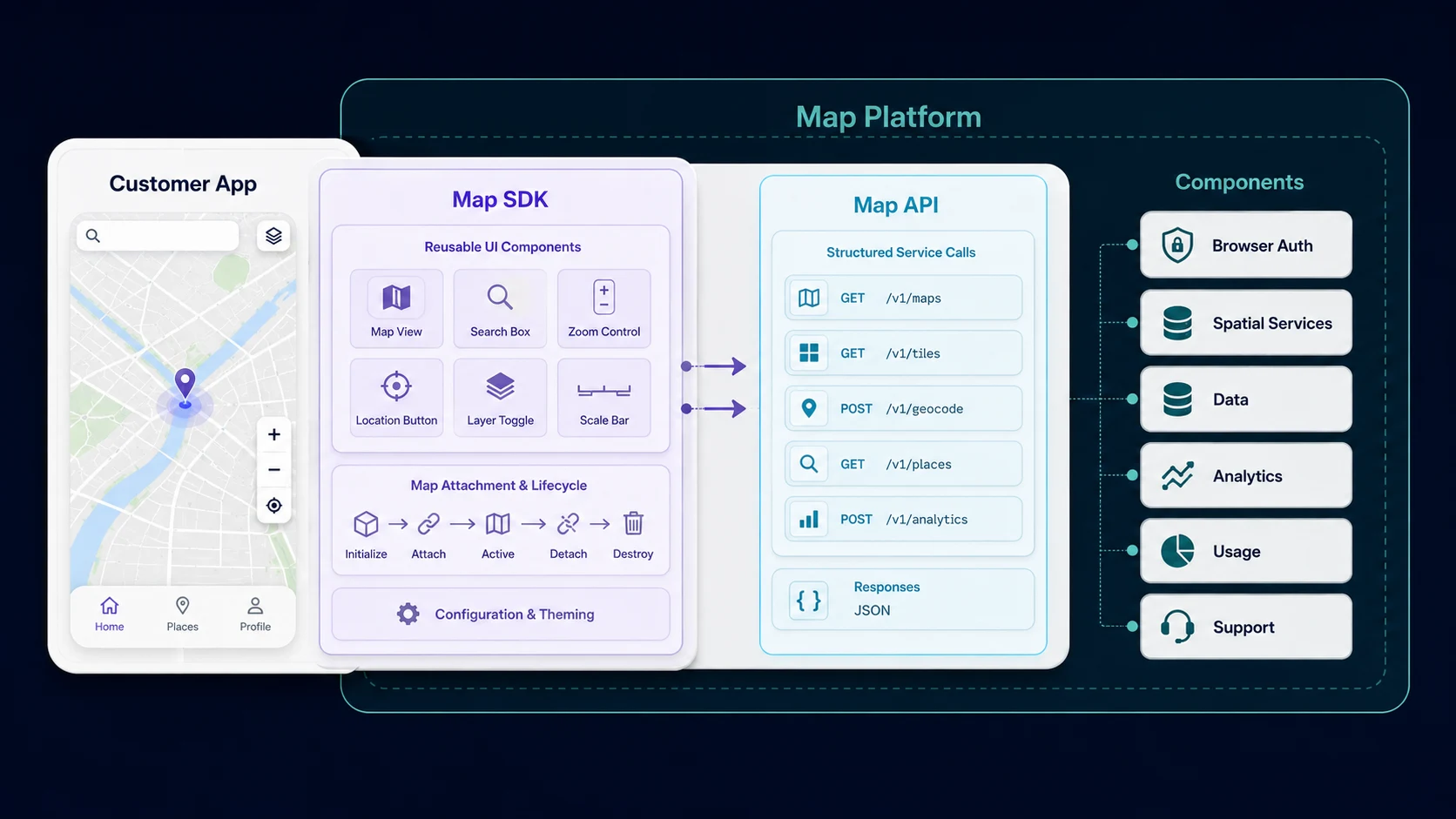
Map SDK vs. map API is an ownership split, not a product choice. A map SDK packages reusable client-side components, lifecycle, and browser authentication. A map API exposes spatial services through programmatic requests. A map platform supplies both layers plus authentication, data, analytics, usage controls, and support. Most production map products use more than one layer.
The sections below separate the three layers, assign ownership, then document Kaleidr from its current public developer pages. Related reading includes What Is an AI Map SDK?, No-Code Map Builder vs Map API, Map API Authentication, and What Is a Location Intelligence API?. Teams already choosing an implementation shape can skip to the Kaleidr mapping; teams still naming the layers should start with the comparison table.
Comparison essentials
- Name the job, then the layer: An SDK owns client behavior; an API owns the service contract; a platform owns shared operations.
- Do not treat the terms as rivals: Production products routinely use an SDK, an API, and platform controls together.
- Keep host rules authoritative: Identity, tenant permissions, private records, and transactions stay in the host application.
- Split credentials by runtime: Browser-safe publishable keys and server keys are different threat models.
- Confirm the current contract: Kaleidr developer docs currently describe
kaleidr.jsproducts, Platform API families, and key scopes; marketing copy is not the API contract.
How Does Map SDK vs. Map API Differ From a Map Platform?
The useful split is the job each layer performs. A map SDK lives in the client and packages reusable behavior: components, mount lifecycle, map attachment, events, and browser-safe session handling. A map API is a programmatic contract for a spatial capability such as search, routing, retrieval, inference, tiles, or design. A map platform is the broader system that can include both, plus authentication, data services, tooling, analytics, publishing, quotas, and support. AWS currently defines an SDK as a set of platform-specific building tools such as libraries, while an API is a mechanism that enables two software components to communicate using predetermined protocols, and notes that an SDK may include APIs among other resources (What's the Difference Between SDK and API?).
Vendor platforms use the same layering in public documentation. Google currently describes Google Maps Platform as a set of APIs and SDKs that lets developers embed maps into apps and pages or retrieve data from Google Maps (Google Maps Platform FAQ). The same vendor currently publishes those capabilities as separate API families by platform (Google Maps Platform APIs by Platform). Mapbox currently describes a modular location platform made of APIs, SDKs, and tools that developers combine for custom location experiences (Getting Started). Those pages are authoritative about how each vendor names its own stack. The same pages are not evidence that every product must buy a full platform for a single geocode.
| Question | Map SDK | Map API | Map platform |
|---|---|---|---|
| Primary job | Add reusable client-side behavior | Access a service programmatically | Provide the full spatial product stack |
| Typical runtime | Browser, mobile, or app client | Application layer or client where allowed | Client, application layer, and operational tooling |
| Integration style | Library, component, loader, or package | HTTP or other service request | Combination of SDKs, APIs, tools, auth, data, and analytics |
| Best for | UI, map lifecycle, embeds, interaction | Search, routing, inference, data retrieval | Products that need several spatial capabilities together |
| Main ownership | Client integration | Service contract | End-to-end platform capabilities |
| Authentication | Often a browser-safe key or session | Often a server key or scoped token | Key management, scopes, quotas, and organization controls |
| Does it include UI? | Often | Usually not | May include SDK UI plus APIs and tools |
| Does it replace the host application? | No | No | No; it supplies infrastructure and building blocks |
What Is a Map SDK?
A software development kit packages code developers can use directly inside an application. For maps, that package often includes map components, renderer adapters, controls, lifecycle management, browser-safe authentication, event handling, structured actions, embedded viewers or editors, and error normalization. The SDK usually sits closer to the user interface than a raw service call does, which is why teams reach for it when the job is “add this capability to the screen we already have.”
Web platforms make that packaging concrete. MDN currently describes custom elements as HTML elements the developer defines, extending the set of elements available in the browser (Using custom elements). A map SDK that installs a custom element is using that browser contract: the host page declares or mounts a component, and the SDK owns versioning, bundle loading, and lifecycle. Kaleidr currently documents kaleidr.js as a thin loader that installs window.Kaleidr and the <kaleidr-map> element, lazy-loads product bundles, and owns versioning, configuration, key passing, mount lifecycle, and error normalization (kaleidr.js — the loader).
An SDK does not replace the host application. The host still owns identity, tenant permissions, private data, and the business workflow. The AI-specific case of that boundary is the same: the SDK connects intent, structured places, and map actions to a live renderer without becoming the source of truth for inventory or eligibility.
What Is a Map API?
A map API exposes functionality through a defined programmatic contract. Typical families include place search, geocoding, routing, travel-time calculation, tile requests, static map generation, spatial inference, dataset management, and map-design operations. The API normally does not decide how the result should look in the interface. The host application does.
The request model is ordinary web architecture. MDN currently describes the Fetch API as an interface for fetching resources across the network using Request and Response objects (Fetch API). A map API call is that pattern applied to spatial work: the application sends a structured request, receives a structured response or stream, then decides what to render. Kaleidr currently places Platform API routes under https://api.kaleidr.com/inference-api/b2b/v1/ and documents chat, routing, POI enrichment, SDK session exchange, and design families on the public endpoint reference (Endpoints). The exact path list can evolve, so implementations should use the current developer reference rather than blog examples as the source of truth.
Choose the API layer first when the requirement is a service response without a prebuilt interface: retrieve place context, call an inference service, calculate a route, enrich a point of interest, run a design operation, or orchestrate those calls beside private records. The tradeoff is explicit. The application owns more integration code, including credentials, retries, errors, and, where applicable, streaming.
What Is a Map Platform?
A map platform combines multiple building blocks around a common account, data, security, and operational model. SDKs and APIs can appear inside that model, but the defining characteristic is breadth plus shared infrastructure: rendering, search, routing, place data, tiles, map design, authentication, usage controls, analytics, publishing, and support. Google’s FAQ currently frames Google Maps Platform as APIs and SDKs used together rather than as a single endpoint. Mapbox currently splits the same idea into maps, search, navigation, data products, and tools such as Mapbox Studio.
A platform becomes valuable when several connected concerns matter at once: browser auth and application-layer auth, map UI, tiles, an editor, inference, analytics, and usage controls. A single geocode or a single static map does not require that operational surface. A no-code builder can be one platform surface without being the whole platform, and a narrow API can still be the right starting point.
Kaleidr currently describes the developer introduction as one organization-level key system with capability scopes for AI, maps, and design, in publishable and server forms (Build with Kaleidr). Kaleidr Enterprise currently frames that commercial stack as spatial intelligence built for an existing product stack, with SDKs, inference APIs, ranking, analytics, and deployment support (Location Intelligence APIs and Map SDK). Confirm current plan allowances on Pricing & Plans before depending on a specific production workflow.
Which Layer Should Own Each Responsibility?
Clean integrations start by deciding which layer owns each responsibility. The host application should remain authoritative for identity, tenant permissions, customer state, private data, transactions, and product-specific workflow. The SDK may own mounting, reusable interface behavior, map attachment, browser session handling, and component lifecycle. The API may own inference, route calculation, place enrichment, design operations, and other service responses. The platform may own credentials, scopes, quotas, product access, infrastructure, support, and shared billing. Crossing those lines is how private authorization leaks into a widget, or how a language-model response is treated as a booking ledger.
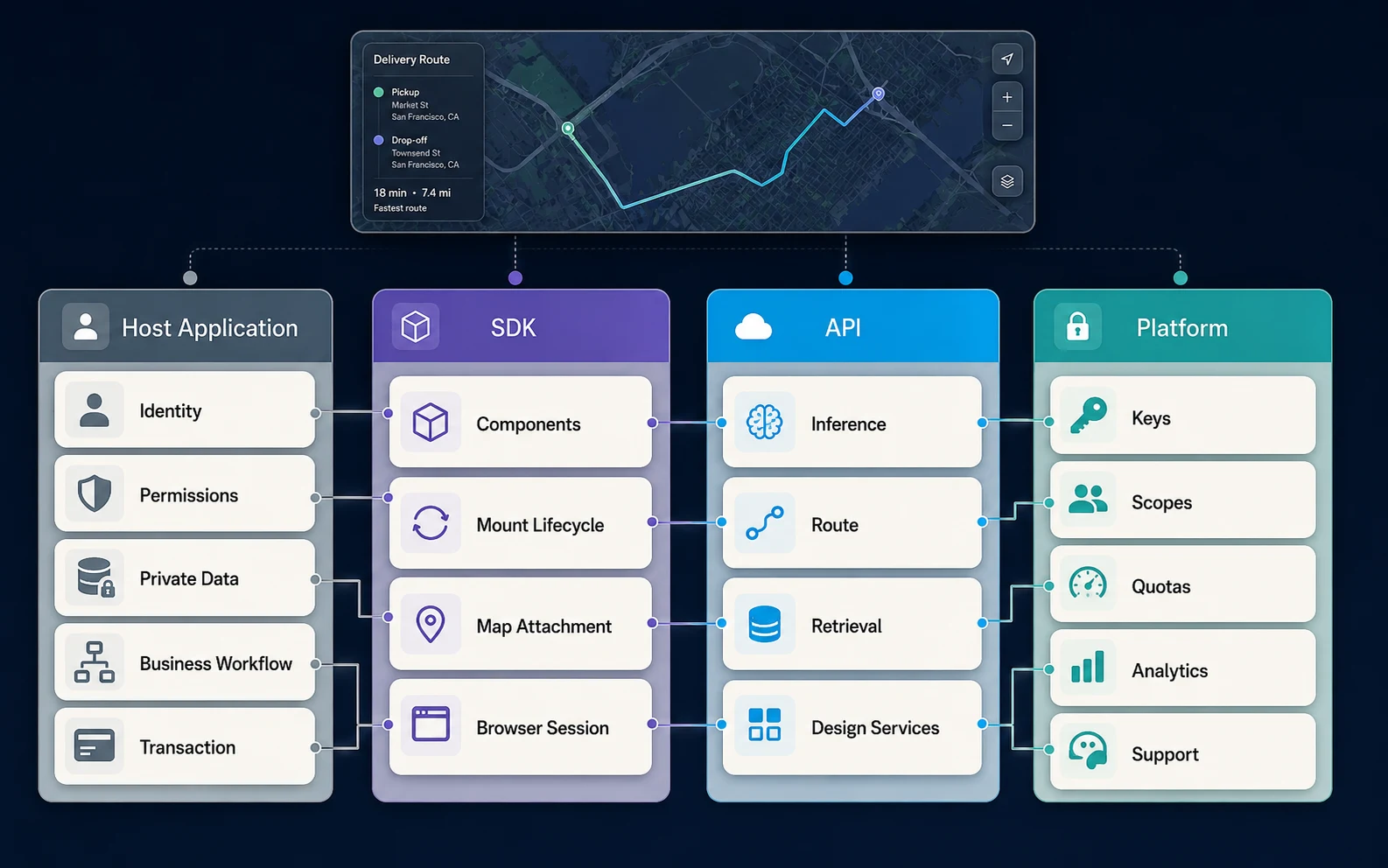
Private records usually push orchestration into the application layer. Listings, inventory, customer records, operational assets, and protected business rules should be authorized in the host before a minimized result reaches the map. The browser SDK can still present the result. The map component should not become the authorization service. Private Location Data for AI Map Workflows covers minimization for those records. Multi-tenant SaaS products add another boundary: a platform key authenticates the SaaS organization to the provider; it does not replace the host’s decision about which customer may see which map or which private row.
When Should a Team Choose an SDK, an API, or a Platform?
Start with the shallowest integration that satisfies the product requirement, then move deeper only when control or orchestration demands it. A published map or viewer embed is enough when the job is to show a designed map. An SDK component is enough when the job is to attach chat, an editor, or tiles to a host interface. A platform API is the right next step when the application layer must own request construction, private-data joins, or a custom UI. Enterprise integration is a governance and operations choice, not a requirement to replace the current renderer.
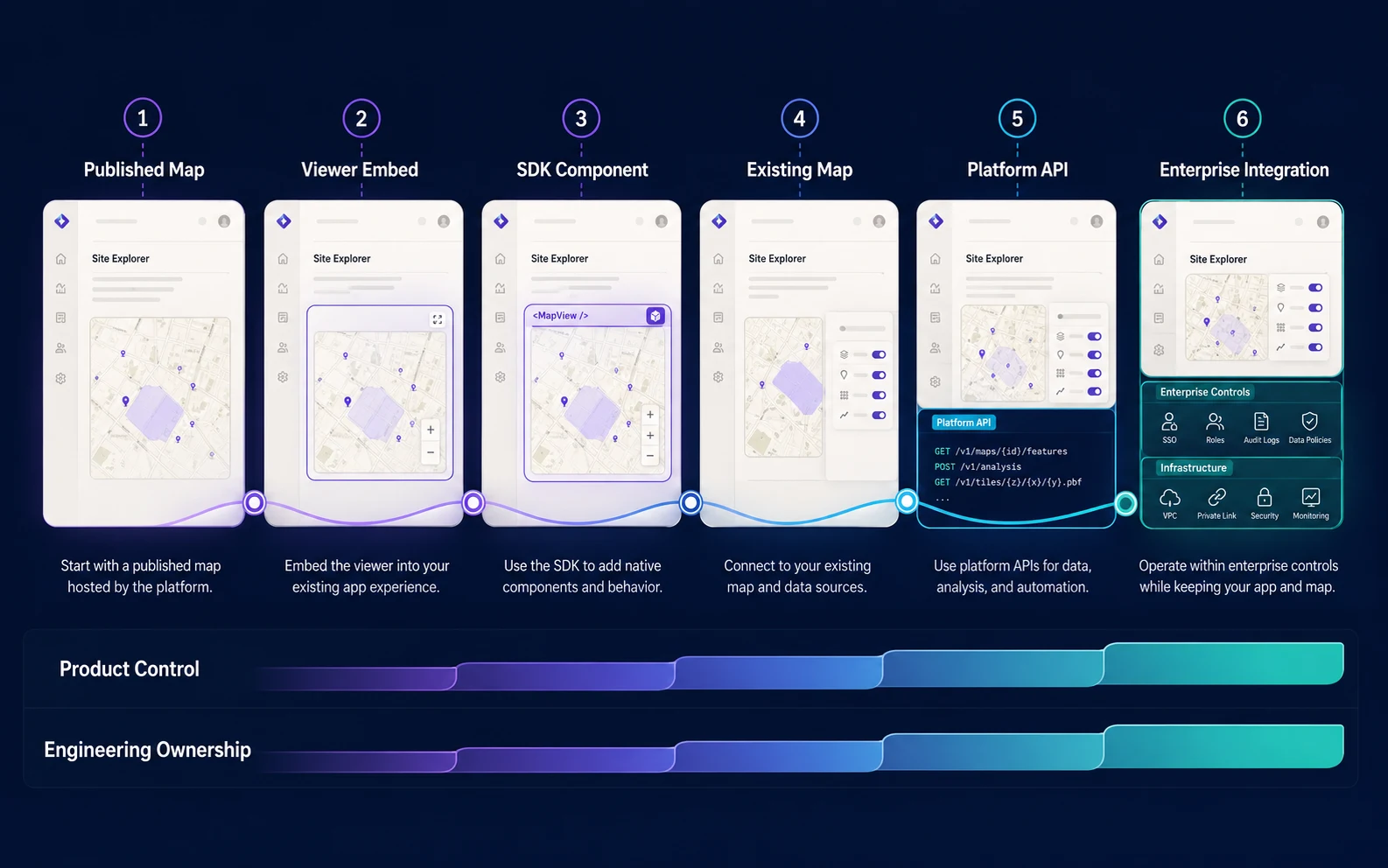
Choose SDK-first when a web app needs a supported map capability quickly, the existing component behavior fits, and browser integration is appropriate. Choose API-first when service responses belong in the application layer, the interface is custom, or private-data orchestration dominates. Choose platform-first when several spatial capabilities, shared auth, usage, analytics, and enterprise support matter across teams. Use Studio-first when the first problem is map authoring and publishing rather than application code; Kaleidr Studio currently documents that authoring path. Those paths can converge later without forcing a rewrite of the host map.
How Does Kaleidr Map Onto These Layers?
Kaleidr currently exposes a JavaScript SDK layer and a Platform API layer, while Enterprise provides the broader commercial and operational surface. The current developer quickstart uses one versioned loader at https://cdn.kaleidr.com/embed/v1/kaleidr.js. That loader can mount product bundles for chat, viewer, editor, and tile. Chat currently attaches to a live host Mapbox, MapLibre, Google Maps, or Leaflet instance rather than replacing the renderer (Quickstart). How to Add AI Chat to Mapbox, Google Maps, and MapLibre is the hands-on attach path. How to Embed an Interactive Map covers published-map embedding.
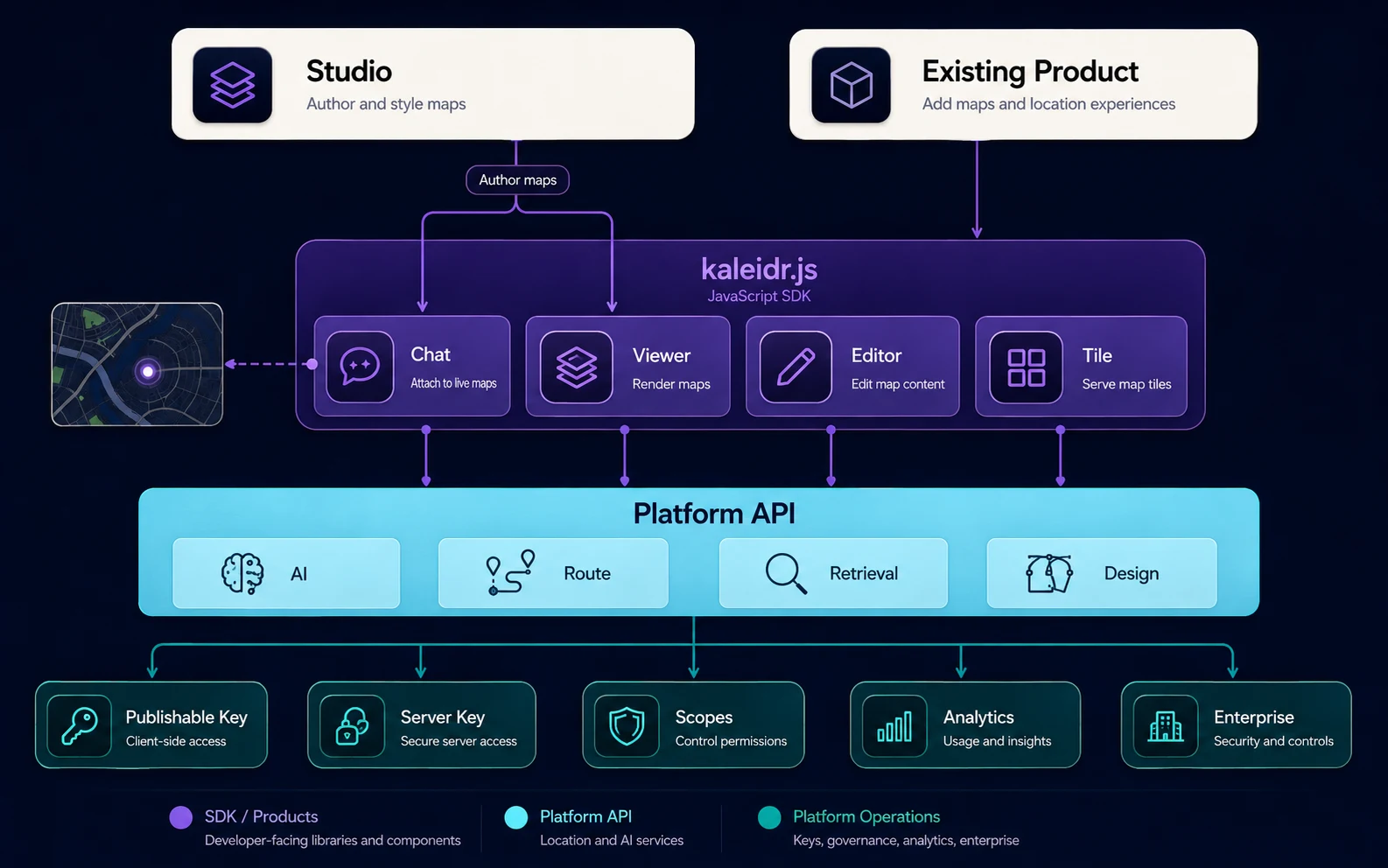
| Layer | Kaleidr example | Typical use |
|---|---|---|
| SDK | kaleidr.js, <kaleidr-map>, Kaleidr.mount() |
Add Chat, Viewer, Editor, or Tile behavior |
| API | Platform API endpoint families | Call inference, route, retrieval, or design services |
| Platform | Kaleidr Enterprise plus the developer stack | Manage capabilities, keys, scopes, usage, support, and integrations |
| Authoring tool | Kaleidr Studio | Create and publish branded maps without starting from code |
| Analytics layer | Kaleidr Analytics | Measure map and place engagement |
Product bundles are not interchangeable names for one component. Viewer is for showing a published map. Chat is for map-aware conversational interaction on a live host map. Editor is for embedding map-authoring capability; Map Editor SDK covers that SaaS case. Tile is for using a designed basemap style. Choose by product job. Technical details also change faster than positioning pages. The current developer quickstart and kaleidr.js reference say published Viewer uses a share ID and needs no key. For implementation, treat the developer documentation as the source of truth.
How Should Authentication Differ Between SDK and API?
A browser integration and an application-layer integration have different threat models. Anything delivered to the browser can usually be inspected, so a long-lived server secret does not belong in page source, client bundles, or public repositories. Kaleidr currently uses a publishable key for browser SDK use; the SDK exchanges it for a short-lived, origin-bound session. A server key is for trusted application-layer use and can be sent as a bearer or X-Api-Key. The current auth reference states that a publishable key presented directly as a bearer is rejected, that a server key gets no CORS grant, and that the SDK refuses server keys at mount so they stay server-side (Auth & scopes).
The SDK can hide the common browser path. The current endpoint reference documents POST /sdk/sessions as the exchange that accepts a publishable key, and it states that the SDK calls that exchange on mount in normal browser integrations (Endpoints). Without the SDK, the application would need to handle origin validation, product selection, scope checks, short-lived session exchange, and product-bundle lifecycle. Direct API use is still appropriate when the host must control request construction, streaming, retries, and private-data authorization. Kaleidr currently distinguishes missing or invalid credentials from a valid credential with insufficient scope, and documents a separate rate-limit condition. Application logs should preserve that distinction rather than collapsing every failure into “map failed.”
What Mistakes Should Teams Avoid?
The recurring failure is treating nearby terms as substitutes. SDK versus API is not an either/or purchase. An SDK often calls platform APIs behind the scenes; the SDK is a higher-level developer interface, not proof that no service contract exists. An API does not require building every interface from scratch; many products use an SDK for UI and an API for application-layer orchestration. A platform does not require replacing the current map stack. Kaleidr currently documents attaching Chat to an existing supported map, and Enterprise currently frames the commercial offer around an existing product stack.
| Mistake | Result | Better approach |
|---|---|---|
| Treat SDK and API as mutually exclusive | Architecture becomes artificial | Use each at the right layer |
| Assume the SDK owns business logic | Product boundaries blur | Keep host rules authoritative |
| Put a server key in the browser | Credential exposure | Use publishable SDK auth |
| Call the API directly for a standard UI need | More client code to maintain | Use the SDK when it fits |
| Use the SDK for private authorization | Tenant and data risk | Authorize in the host application |
| Assume the platform replaces the existing map | Migration cost rises | Attach where supported |
| Treat a marketing page as the API contract | Technical mismatch | Prefer current developer docs |
| Adopt the entire platform for one trivial need | Excess complexity | Start with the narrowest layer |
How Should Teams Start Integrating?
Pick the layer that matches the job, then add depth only where ownership requires it. Use the SDK for reusable client behavior, the API for service-level control, and the platform for shared spatial infrastructure. Kaleidr currently follows that model closely: kaleidr.js provides a lightweight browser integration layer, the Platform API exposes documented inference and design services, and Kaleidr Enterprise provides the broader commercial stack for teams building spatial products. Read the Kaleidr developer documentation for the current loader, auth, and endpoint contract. Explore Kaleidr Enterprise for SDKs, inference APIs, location intelligence, and deployment support described on the current public page.
FAQs
What is the difference between a map SDK and a map API?
A map SDK is reusable client-side code that helps developers integrate map functionality into an application, including UI, lifecycle, and often browser authentication. A map API is a programmatic interface used to request specific map or spatial services. Many products use both.
Is a map SDK just a wrapper around an API?
Sometimes partly, but not always. An SDK may also manage UI components, map lifecycle, browser authentication, provider adapters, events, and error handling. AWS currently notes that an SDK may include APIs among other resources.
What is a map platform?
A map platform is the broader set of SDKs, APIs, data, rendering, authentication, tools, analytics, publishing, quotas, and operational services used to build location-aware products. Google and Mapbox currently describe their commercial stacks in those combined terms.
Should a team use an SDK or an API?
Use an SDK when a supported client component fits the product. Use an API when the host needs direct service-level control or application-layer orchestration. Many products use both.
Does an SDK replace the map renderer?
Not necessarily. Kaleidr Chat currently documents attachment to an existing Mapbox, MapLibre, Google Maps, or Leaflet map. Other SDK products, such as Viewer or Editor, have different renderer-ownership models.
When should an API call happen in the application layer?
Use the application layer when the request involves server credentials, private data, tenant authorization, or business logic that should not be exposed to the browser.
What is the difference between a platform and a no-code map builder?
A no-code builder focuses on authoring and publishing. A platform can include builders and also SDKs, APIs, authentication, data services, analytics, and enterprise controls.
How does Kaleidr currently expose its SDK and APIs?
Kaleidr currently uses a versioned kaleidr.js loader that installs window.Kaleidr and <kaleidr-map>, with product bundles for Chat, Viewer, Editor, and Tile. The current public Platform API documents chat, routing, POI enrichment, SDK session exchange, and design families under its B2B inference API base URL.
Does Kaleidr Viewer require a publishable key?
The current developer quickstart and kaleidr.js reference say published Viewer uses a share ID and needs no key.
Can Kaleidr work with an existing map stack?
Kaleidr currently documents attaching Chat to supported live host maps, and Kaleidr Enterprise currently frames the offer as spatial intelligence built for an existing stack. Replacement of the current map provider is not the core positioning.
References
- Amazon Web Services. What's the Difference Between SDK and API?. Accessed 3 September 2026. https://aws.amazon.com/compare/the-difference-between-sdk-and-api/
- Google Maps Platform. Google Maps Platform FAQ. Accessed 3 September 2026. https://developers.google.com/maps/faq
- Google Maps Platform. Google Maps Platform APIs by Platform. Accessed 3 September 2026. https://developers.google.com/maps/apis-by-platform
- Mapbox. Getting Started. Accessed 3 September 2026. https://docs.mapbox.com/help/getting-started/
- MDN. Using custom elements. Accessed 3 September 2026. https://developer.mozilla.org/en-US/docs/Web/API/Web_components/Using_custom_elements
- MDN. Fetch API. Accessed 3 September 2026. https://developer.mozilla.org/en-US/docs/Web/API/Fetch_API
- Kaleidr. Build with Kaleidr. Developer documentation. Accessed 3 September 2026. https://docs.kaleidr.com/
- Kaleidr. Quickstart. Developer documentation. Accessed 3 September 2026. https://docs.kaleidr.com/quickstart
- Kaleidr. kaleidr.js — the Loader. Developer documentation. Accessed 3 September 2026. https://docs.kaleidr.com/sdk/kaleidr-js
- Kaleidr. Auth & scopes. Developer documentation. Accessed 3 September 2026. https://docs.kaleidr.com/platform-api/auth-and-scopes
- Kaleidr. Endpoints. Developer documentation. Accessed 3 September 2026. https://docs.kaleidr.com/platform-api/endpoints
- Kaleidr. Location Intelligence APIs and Map SDK. Accessed 3 September 2026. https://kaleidr.com/enterprise
@misc{aws_sdk_api_difference_2026_09_03,
  title  = {What's the Difference Between SDK and API?},
  author = {{Amazon Web Services}},
  note   = {Accessed 3 September 2026},
  url    = {https://aws.amazon.com/compare/the-difference-between-sdk-and-api/}
}

@misc{google_maps_platform_faq_2026_09_03,
  title  = {Google Maps Platform FAQ},
  author = {{Google Maps Platform}},
  note   = {Accessed 3 September 2026},
  url    = {https://developers.google.com/maps/faq}
}

@misc{google_maps_apis_by_platform_2026_09_03,
  title  = {Google Maps Platform APIs by Platform},
  author = {{Google Maps Platform}},
  note   = {Accessed 3 September 2026},
  url    = {https://developers.google.com/maps/apis-by-platform}
}

@misc{mapbox_getting_started_2026_09_03,
  title  = {Getting Started},
  author = {{Mapbox}},
  note   = {Accessed 3 September 2026},
  url    = {https://docs.mapbox.com/help/getting-started/}
}

@misc{mdn_using_custom_elements_2026_09_03,
  title  = {Using custom elements},
  author = {{MDN}},
  note   = {Accessed 3 September 2026},
  url    = {https://developer.mozilla.org/en-US/docs/Web/API/Web_components/Using_custom_elements}
}

@misc{mdn_fetch_api_2026_09_03,
  title  = {Fetch API},
  author = {{MDN}},
  note   = {Accessed 3 September 2026},
  url    = {https://developer.mozilla.org/en-US/docs/Web/API/Fetch_API}
}

@misc{kaleidr_docs_intro_2026_09_03,
  title  = {Build with Kaleidr},
  author = {{Kaleidr}},
  note   = {Developer documentation; accessed 3 September 2026},
  url    = {https://docs.kaleidr.com/}
}

@misc{kaleidr_quickstart_2026_09_03,
  title  = {Quickstart},
  author = {{Kaleidr}},
  note   = {Developer documentation; accessed 3 September 2026},
  url    = {https://docs.kaleidr.com/quickstart}
}

@misc{kaleidr_js_loader_2026_09_03,
  title  = {kaleidr.js -- the Loader},
  author = {{Kaleidr}},
  note   = {Developer documentation; accessed 3 September 2026},
  url    = {https://docs.kaleidr.com/sdk/kaleidr-js}
}

@misc{kaleidr_auth_scopes_2026_09_03,
  title  = {Auth \& scopes},
  author = {{Kaleidr}},
  note   = {Developer documentation; accessed 3 September 2026},
  url    = {https://docs.kaleidr.com/platform-api/auth-and-scopes}
}

@misc{kaleidr_endpoints_2026_09_03,
  title  = {Endpoints},
  author = {{Kaleidr}},
  note   = {Developer documentation; accessed 3 September 2026},
  url    = {https://docs.kaleidr.com/platform-api/endpoints}
}

@misc{kaleidr_enterprise_2026_09_03,
  title  = {Location Intelligence APIs and Map SDK},
  author = {{Kaleidr}},
  note   = {Accessed 3 September 2026},
  url    = {https://kaleidr.com/enterprise}
}