
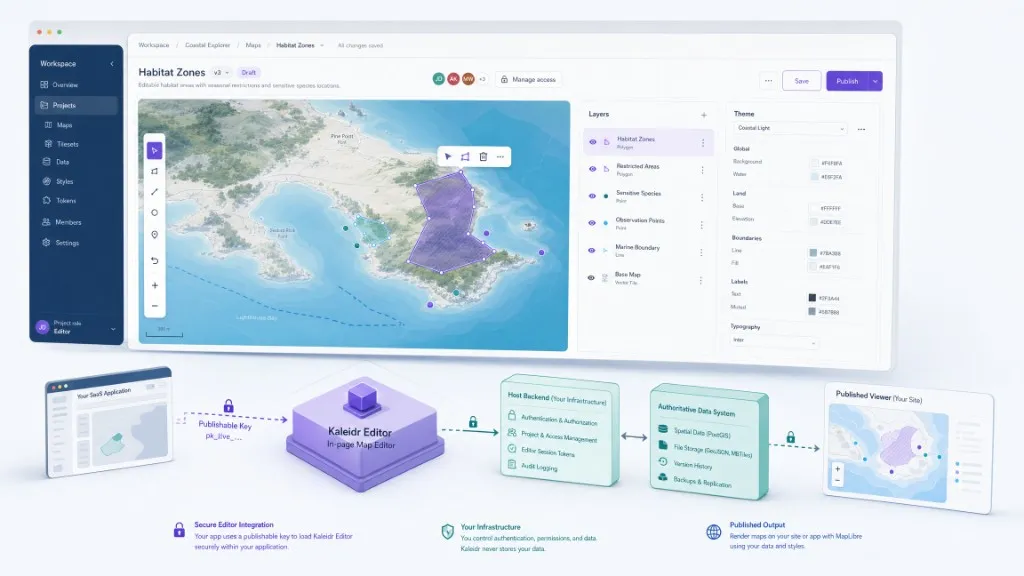
A map editor SDK adds map creation or editing inside a SaaS product without forcing users into a separate builder. The host application keeps identity, permissions, projects, billing, data ownership, and publishing policy, while the SDK supplies the in-page canvas and tools. Kaleidr Editor mounts its own MapLibre map, authenticates with an origin-restricted publishable key, and keeps edits in memory until the host defines persistence.
The sections below cover product boundaries, architecture, mounting, persistence, security, UX, and common mistakes. For conversational attachment to a live renderer, see How to Add AI Chat to a Map. For the broader SDK category, see What Is an AI Map SDK?.
Map editor SDK essentials
- Surface vs product: The editor owns the editing canvas; the host owns users, projects, permissions, persistence, and release.
- In-memory by default: The standalone Kaleidr Editor does not persist edits—plan save and publish before launch.
- Publishable key +
design: Use an origin-restricted browser key with thedesignscope; never expose server keys.- Mount once, destroy once: Tie lifecycle to SPA routes and tenant switches.
- Separate publish rights: Editing a draft is not the same permission as releasing a public map.
How Do You Add a Map Editor SDK to a SaaS Product?
This guide places a map-creation workspace inside an existing SaaS workflow so a user can open a project, edit on a MapLibre canvas, choose a basemap style, use available on-map tools, and leave without leaking SDK state. Save, publish, and handoff remain host-controlled once a persistence integration exists. The examples use Kaleidr Editor because it documents an in-page Editor product through the shared loader; the same ownership model applies when evaluating any third-party map editor SDK.
What Is a Map Editor SDK Versus Studio, Viewer, or GIS?
A map editor SDK is a reusable component that adds authoring tools—navigation, selection, drawing, styling, and related controls—to another application. It should not replace the host account system, database, entitlements, audit trail, or project workflow. A reliable boundary is that the editor owns the editing surface while the host product owns the user, project, permissions, persistence, and release decision.
| Product type | Main purpose | Best fit |
|---|---|---|
| Map editor SDK | In-product create or edit | SaaS workflows that must keep users in-app |
| Standalone map builder | Dedicated authoring app | Teams that can leave the host product |
| Published map viewer | Read-only delivery | Customer or public map consumption |
| Map renderer | Camera and layer APIs | Fully custom developer-built map products |
| GIS | Authoritative spatial operations | Organization-owned analysis and governance |
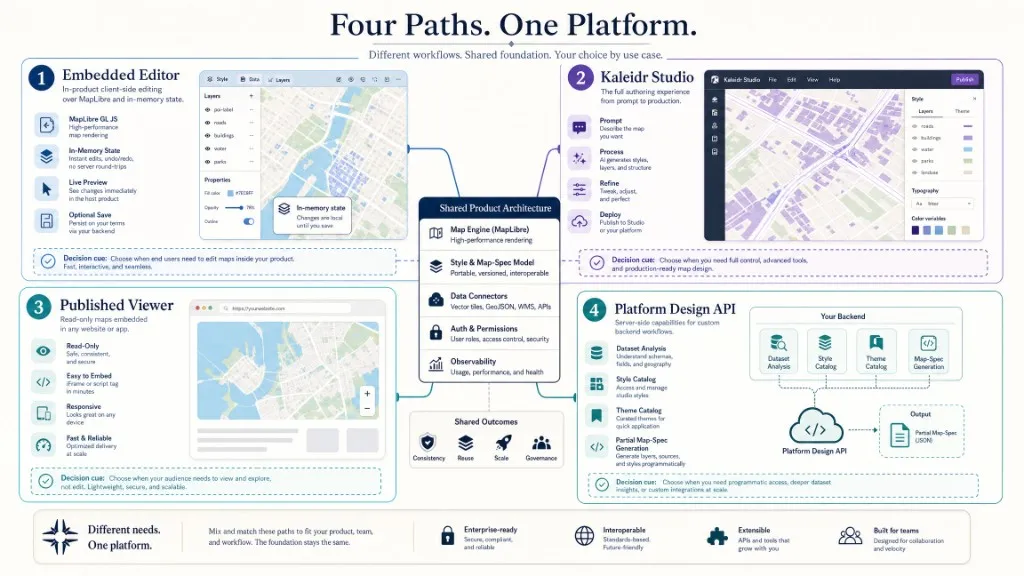
Kaleidr Studio is the full prompt-first authoring product organized around Prompt → Process → Refine → Deploy. Kaleidr Editor is the embeddable editing surface. Kaleidr Viewer displays a published map. These paths share rendering and style concepts but are not interchangeable product surfaces.
How Should SaaS Architecture Own Editor State?
A production map-editing workflow needs clear ownership across the shell, the editor, credentials, backend policy, data systems, and delivery. The host SaaS owns identity, tenant, navigation, projects, billing, permissions, and workflow. Kaleidr Editor owns the in-page editing surface, its MapLibre map, lifecycle, and available client-side tools. A publishable key grants browser access to the Editor product and the design capability. The host backend owns authorization, persistence, versioning, audit, imports, exports, and publishing policy. Authoritative data systems own datasets and business rules. A viewer or other destination delivers approved, read-only output.
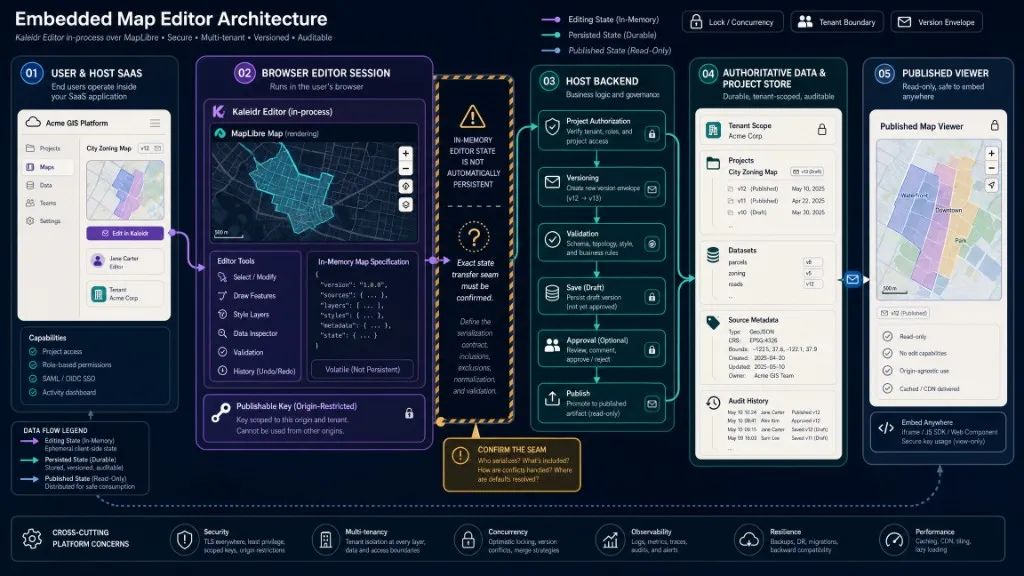
The host backend must not trust a browser-supplied project ID, tenant ID, dataset ID, or publishing target without re-authorizing it. Mounting the editor makes map creation feel native, but the browser remains an untrusted environment. Public documentation establishes that product: "editor" selects the Editor bundle, that the default doorway is attach/in-process rather than iframe, that styleId accepts a catalog basemap ID or full style URL, that the default basemap is kaleidr-morning, and that the handle always provides destroy() while camera and theme updates are available where supported. The standalone embed does not persist edits, and it does not include the full AI-driven Studio surfaces, Control Tower, or a self-contained 3D asset library without additional backend configuration.
How Do You Mount Kaleidr Editor Safely?
Confirm Pro or Enterprise access for API keys and embeds, a publishable key permitted for Editor with the design scope, exact allowed origins for development, staging, and production, a target element with explicit height, a starting style, a host project and permission model, a persistence strategy, and SPA teardown. Load the versioned loader once from https://cdn.kaleidr.com/embed/v1/kaleidr.js. The loader is dormant by default, so enable embeds before loading it or pass the per-mount enabled option. A minimal mount looks like this:
const editor = Kaleidr.mount("#editor", {
  product: "editor",
  publishableKey: "kld_pk_live_REPLACE_ME",
  styleId: "kaleidr-morning",
  enabled: true
});

window.addEventListener("pagehide", () => {
  editor.destroy();
});
Replace the placeholder key with a real publishable key, reserve enough canvas height for editing tools, and announce load or failure status outside the map. The example follows the current Editor attach reference, Editor integration guide, and kaleidr.js loader reference. It mounts the editor; it does not save the in-memory specification, because the public handle reference does not document persistence methods. The <kaleidr-map> element can select product="editor" with publishable-key and style-id when declarative markup is enough. Prefer the imperative API when the host needs an explicit handle or framework-managed lifecycle. In React or another SPA, mount once in an effect and call destroy() on cleanup—do not remount for every form-field change.
How Do You Plan Persistence, Security, and UX?
The standalone embed keeps edits in memory. Teams usually pick one of three paths: treat the Editor as a temporary surface for prototypes; keep full authoring in Kaleidr Studio when users can leave the SaaS shell; or build a host-integrated workflow with project load, validation, draft save, versioning, conflict handling, approval, publish, rollback, and audit. The public Editor SDK reference does not document inventable methods such as undocumented save or change listeners—confirm the supported state-transfer seam with Kaleidr before promising customer-facing save. Platform design routes such as dataset analysis, partial map-spec apply, and style or theme catalogs belong behind a server key on the host backend; the browser Editor continues to use the publishable key through the SDK.
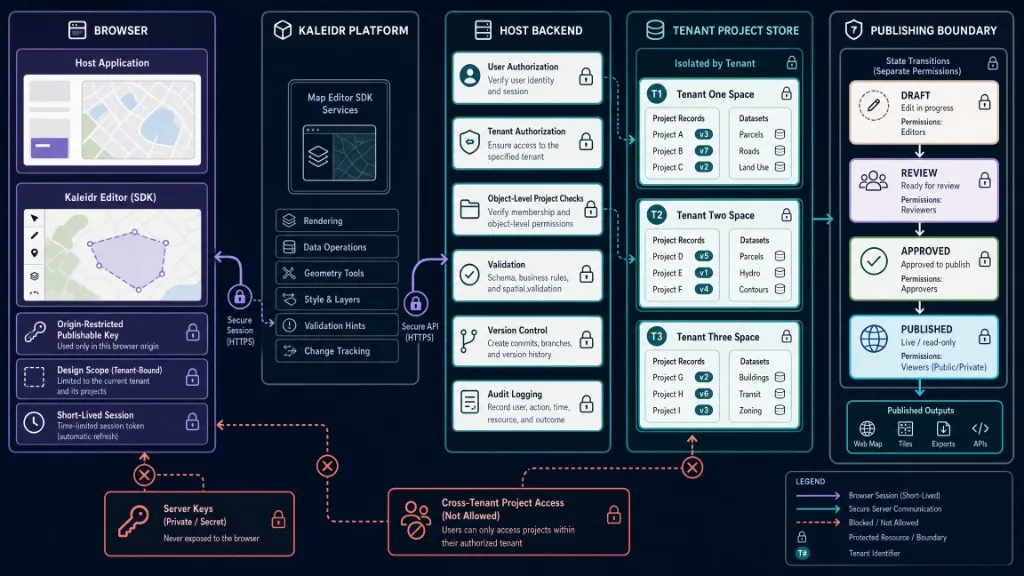
Restrict publishable keys to exact origins, require HTTPS outside local development, scope keys to design and only required products, and destroy the editor on account or tenant switching. On the backend, authorize every project and dataset by user and tenant, validate ownership independently of browser state, validate map specifications before persistence or publishing, and separate draft, review, and published permissions. The OWASP API Security Top 10 treats broken object-level authorization as a leading risk—a browser-provided project ID is never sufficient authorization. Keep the product shell visible so users know which project they are editing, put save and publish in the host chrome rather than inventing a false “Saved” state from in-memory edits alone, and reserve more vertical space than a viewer typically needs. Give the editor region an accessible name, preserve keyboard access to surrounding actions, avoid traps, announce save and error status, and provide non-drag alternatives where possible under WCAG 2.2.
| Mistake | What happens | Recommended correction |
|---|---|---|
| Assuming the standalone Editor persists work | Users lose changes when the session ends | Design persistence explicitly and confirm the integration seam |
| Inventing undocumented handle methods | Production depends on APIs that do not exist | Use documented methods only |
| Exposing a server key in browser code | A backend bearer becomes public | Use an origin-restricted publishable key |
| Mounting without enabling the SDK | The loader stays dormant | Enable embeds or pass enabled: true |
| Omitting container height | The editor collapses or becomes unusable | Reserve sufficient responsive height |
| Treating Editor and Studio as identical | Expectations exceed the standalone embed | Separate embedded editing from full Studio authoring |
| Trusting browser tenant IDs | Cross-tenant access becomes possible | Re-authorize every project on the backend |
| Ignoring teardown in an SPA | Duplicate editors and listeners accumulate | Retain the handle and call destroy() |
Final Verdict
A map editor SDK can add map creation to a SaaS product without rebuilding an entire editing canvas, renderer integration, and browser authentication model from scratch. Kaleidr Editor currently provides an embeddable, MapLibre-based, in-page surface authenticated through a publishable key with the design scope. The standalone embed keeps edits in memory, so mounting the editor is not the same as shipping a complete persistent authoring system. Choose the Editor SDK when the product needs an integrated editing surface and the host team will own projects, permissions, persistence, publishing, and auditability. Choose Kaleidr Studio when a separate full authoring workflow is acceptable. Confirm state-transfer and any AI-assisted seams before promising customer-facing save.
Add Map Editing to Your SaaS Product
Mount Kaleidr Editor with the versioned JavaScript loader, an origin-restricted publishable key, and the design scope. Read the Editor Integration Guide for attach options and lifecycle. For authentication, design endpoints, and host-integrated workflows, review the developer documentation and Enterprise requirements.
FAQs
What is a map editor SDK?
A map editor SDK is a reusable component that adds map creation or editing tools to another application. The host product usually retains users, projects, permissions, persistence, and publishing.
Can Kaleidr Editor be embedded in a SaaS product?
Yes. The current SDK documents product: "editor" for mounting inside a target element. The Editor creates its own MapLibre map in the page.
Does the standalone Editor save users' maps?
No. Public documentation states that edits live in an in-memory specification and are not persisted by the standalone embed. Plan host persistence before launch.
Which credential does the Editor use?
Use a publishable browser key through the SDK with the design scope, restricted to approved origins. Never place a server key in browser code.
Is Kaleidr Editor the same as Kaleidr Studio?
No. Studio is the full prompt-first creation and publishing product. Editor is the embeddable editing surface for use inside another application.
References
- Kaleidr. Attach the Map Editor. Kaleidr Developer Docs. Accessed 3 August 2026. https://docs.kaleidr.com/guides/attach-the-editor
- Kaleidr. Auth & Scopes. Kaleidr Developer Docs. Accessed 3 August 2026. https://docs.kaleidr.com/platform-api/auth-and-scopes
- Kaleidr. CORS & Allowed Origins. Kaleidr Developer Docs. Accessed 3 August 2026. https://docs.kaleidr.com/platform-api/cors-and-allowed-origins
- Kaleidr. Editor — Mount the Map Editor. Kaleidr Developer Docs. Accessed 3 August 2026. https://docs.kaleidr.com/sdk/editor-attach
- Kaleidr. Endpoints. Kaleidr Developer Docs. Accessed 3 August 2026. https://docs.kaleidr.com/platform-api/endpoints
- Kaleidr. kaleidr.js — the Loader. Kaleidr Developer Docs. Accessed 3 August 2026. https://docs.kaleidr.com/sdk/kaleidr-js
- Kaleidr. Pricing & Plans. kaleidr.com. Accessed 3 August 2026. https://kaleidr.com/pricing
- MapLibre. Map — MapLibre GL JS. Accessed 3 August 2026. https://maplibre.org/maplibre-gl-js/docs/API/classes/Map/
- OWASP. OWASP Top 10 API Security Risks — 2023. Accessed 3 August 2026. https://owasp.org/API-Security/editions/2023/en/0x11-t10/
- World Wide Web Consortium. Web Content Accessibility Guidelines (WCAG) 2.2. Accessed 3 August 2026. https://www.w3.org/TR/WCAG22/
@misc{kaleidr_editor_attach,
  title  = {Editor -- Mount the Map Editor},
  author = {{Kaleidr}},
  note   = {Kaleidr Developer Docs; accessed 3 August 2026},
  url    = {https://docs.kaleidr.com/sdk/editor-attach}
}

@misc{kaleidr_editor_guide,
  title  = {Attach the Map Editor},
  author = {{Kaleidr}},
  note   = {Kaleidr Developer Docs; accessed 3 August 2026},
  url    = {https://docs.kaleidr.com/guides/attach-the-editor}
}

@misc{kaleidr_loader,
  title  = {kaleidr.js -- the Loader},
  author = {{Kaleidr}},
  note   = {Kaleidr Developer Docs; accessed 3 August 2026},
  url    = {https://docs.kaleidr.com/sdk/kaleidr-js}
}

@misc{kaleidr_auth_scopes,
  title  = {Auth and Scopes},
  author = {{Kaleidr}},
  note   = {Kaleidr Developer Docs; accessed 3 August 2026},
  url    = {https://docs.kaleidr.com/platform-api/auth-and-scopes}
}

@misc{owasp_api_security,
  title  = {OWASP Top 10 API Security Risks -- 2023},
  author = {{OWASP}},
  note   = {Accessed 3 August 2026},
  url    = {https://owasp.org/API-Security/editions/2023/en/0x11-t10/}
}

@misc{wcag22,
  title  = {Web Content Accessibility Guidelines 2.2},
  author = {{World Wide Web Consortium}},
  note   = {Accessed 3 August 2026},
  url    = {https://www.w3.org/TR/WCAG22/}
}