
An AI map SDK connects artificial intelligence to a functional map experience through UI components, structured place events, map actions, and browser-safe authentication. The map renderer still displays the map, while authoritative systems remain responsible for factual records. Choose an AI map SDK when a product needs conversational map interaction, embedded spatial components, or a faster path from AI output to visible geographic action.
The sections below cover component responsibilities, architecture, Kaleidr integration paths, security boundaries, evaluation criteria, and common mistakes. For a hands-on mount walkthrough, see How to Add AI Chat to a Map. For the retrieval layer beneath the SDK, see What Is a Location Intelligence API?.
AI map SDK essentials
- Product integration layer: Connects host UI, AI inference, structured geography, and a live renderer—not a chatbot alone.
- Structured events: Prefer place, action, grounding, quota, end, and error envelopes over parsing coordinates from prose.
- Credential split: Origin-restricted publishable keys in the browser; server keys only on the host backend.
- Provider adapter: Attach to Mapbox, Google Maps, MapLibre, or Leaflet without replacing the renderer when the product supports it.
- Data authority: AI interprets intent; approved location and business systems validate facts.
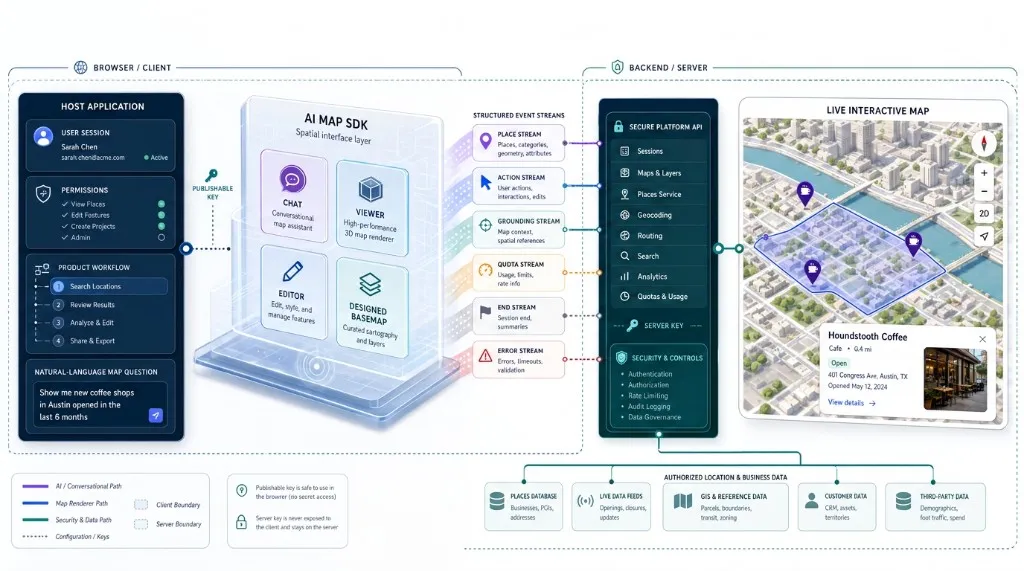
AI Map SDK at a Glance
An AI map SDK sits between the host application, the map renderer, and the systems that provide location facts. The SDK should not become the factual source for addresses, listing status, inventory, opening hours, routes, or private business records. A reliable production principle is that AI interprets geographic intent, authoritative systems validate the facts, and the SDK turns approved results into visible map behavior.
| Component | Primary responsibility |
|---|---|
| Host application | Users, sessions, tenant context, permissions, workflow, and business logic |
| AI map SDK | UI components, intent handoff, authentication, streaming, structured map actions, and lifecycle |
| Map renderer | Camera, layers, markers, controls, style, and provider-specific behavior |
| Platform API | Inference, place retrieval, routing, design, ranking, or other documented services |
| Location services | Geocoding, places, routes, boundaries, tiles, and spatial context |
| Business systems | Authoritative inventory, properties, assets, customers, eligibility, and operational records |
| Analytics | Questions, results, map actions, errors, task completion, and product outcomes |
What Does an AI Map SDK Actually Do?
The exact scope depends on the platform, but a capable AI map SDK usually handles seven coordinated jobs. First, the SDK connects AI output to a live map object already running in the application. Mapbox GL JS, Google Maps JavaScript API, and MapLibre GL JS each expose programmable map objects with camera, bounds, event, and rendering methods; the SDK needs a provider adapter so one structured action can become the correct provider-specific operation—frame a result area, pan to a place, add markers, highlight a feature, display a route, or preserve geographic context. Kaleidr’s current chat attachment accepts a live map instance and documents support for Mapbox, Google Maps, MapLibre, and Leaflet through the chat attachment SDK, while the existing provider continues to render the map.
Second, the SDK converts AI output into structured geographic events rather than forcing the host to parse important places from prose. A useful contract separates streamed text, resolved places, enriched metadata, map actions, grounding sources, quota information, and terminal success or error. Kaleidr’s Server-Sent Events contract includes place, place_linked, early_actions, grounding, quota, end, and error events; the end event is the authoritative terminal envelope. Developers using kaleidr.js do not need to parse the stream manually, and teams building a custom client can follow the documented SSE wire contract. MDN documents the browser Server-Sent Events model that such streams build on.
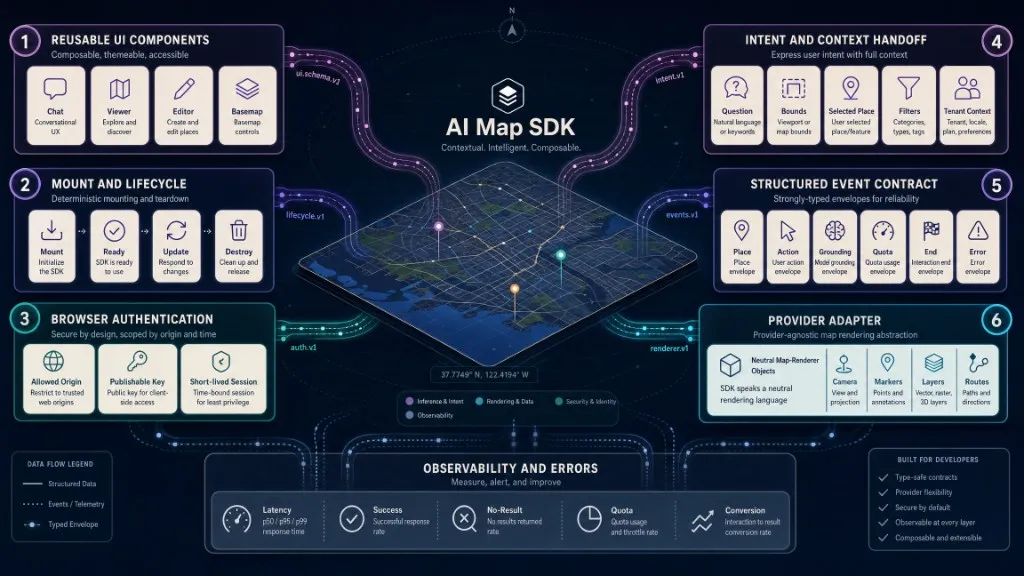
Third, the SDK can provide reusable UI components—a chat panel, viewer, editor, search control, or custom element—so every team does not rebuild the interface. Web Components support reusable custom HTML elements; Kaleidr’s loader installs both window.Kaleidr for imperative mounting and the <kaleidr-map> element for declarative embedding across chat, viewer, editor, and designed basemap products (kaleidr.js reference, <kaleidr-map> element).
Fourth, browser-safe authentication must distinguish publishable credentials, server credentials, allowed origins, short-lived sessions, capability scopes, revocation, and quotas. Kaleidr uses publishable keys (kld_pk_live_…) for browser SDK and web components—restricted to approved origins and exchanged for a short-lived session—and server keys (kld_sk_live_…) that must stay out of HTML, browser JavaScript, client bundles, and public repositories. Capability scopes separate ai, maps, and design route families; a valid key without the necessary scope returns 403, while an invalid or revoked credential returns 401. See authentication and scopes and allowed origins.
Fifth, the SDK normalizes lifecycle and provider differences: the map object may not exist yet, the container may lack height, the style may still be loading, a single-page application may change routes, or the component may unmount while a stream is active. Kaleidr’s loader returns a handle synchronously while the selected product bundle loads in the background; calls made before the bundle is ready are queued, and the handle exposes destroy() for teardown. Predictable mount and destroy behavior keeps SPA route changes and multi-map pages from leaking listeners or duplicate chat surfaces.
Sixth, the SDK connects browser components to platform APIs without conflating the two. The SDK is the application-facing integration layer for UI, session exchange, stream parsing, and map attachment. The API exposes server-accessible inference, retrieval, routing, design, and related routes under https://api.kaleidr.com/inference-api/b2b/v1/ (endpoint reference).
Seventh, a stable product contract makes supported actions, controlled map objects, required keys and scopes, errors, events, teardown, versioning, data authority, and metering explicit. Kaleidr pins embed assets under /embed/v1/ and requires a new major path for breaking wire changes (CDN versioning). That contract is what lets host applications upgrade the loader without reverse-engineering undocumented UI behavior.
How Does an AI Map SDK Differ From a Map API or GIS?
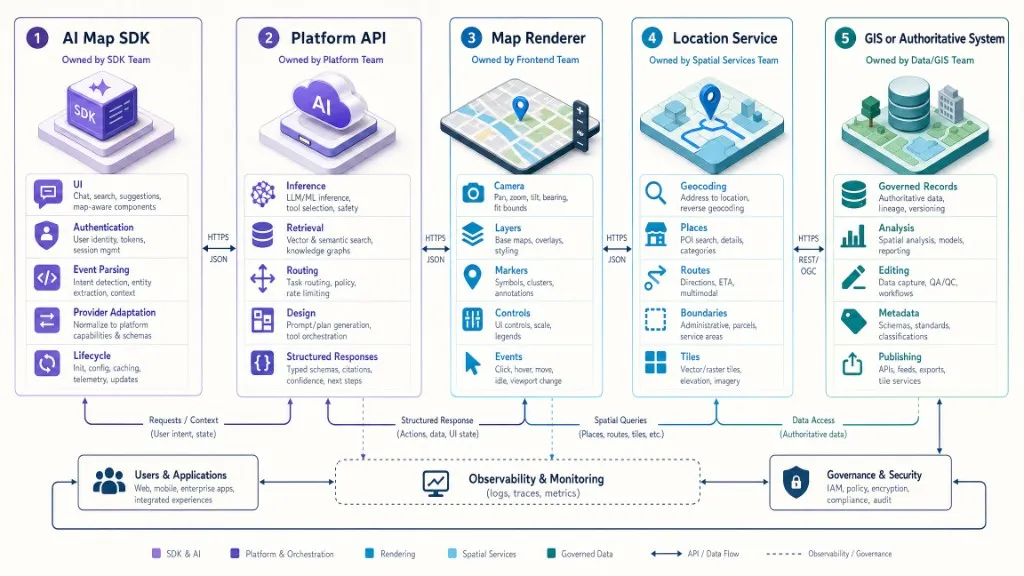
These terms are related but should not be treated as synonyms. A map library or renderer draws the map and controls camera, layers, and map events. A map or location API provides remote geographic data or operations such as geocoding, places, routes, or tiles. An AI API produces inference or model output. An AI map SDK provides product integration across AI, map state, authentication, UI, and structured actions. A GIS platform covers broader data management, analysis, editing, publishing, and governance. A renderer can show a map without understanding a user’s natural-language objective; an AI API can interpret a sentence without knowing how to control the map on the page; the SDK connects those systems through a documented application contract.
| Category | What it provides | Example responsibility |
|---|---|---|
| Map library or renderer | Map object and visual rendering engine | Draw the map, control camera, add layers, handle map events |
| Map or location API | Remote geographic data or operations | Geocode, find a place, calculate a route, return tiles |
| AI API | Inference or model output | Interpret a question, generate text, classify intent |
| AI map SDK | Product integration across AI, map state, auth, UI, and actions | Attach chat, stream places, apply map actions, manage lifecycle |
| GIS platform | Data management, analysis, editing, publishing, governance | Maintain authoritative layers, run spatial analysis, manage records |
How Does the Core Architecture Work?
A production AI map SDK usually follows a clear flow: the user asks a question or the application emits an event; the host supplies context and permissions; the SDK coordinates browser session or host-backend calls; inference, retrieval, routing, or design APIs return structured places, grounding, and allowed actions; a provider adapter translates those results; and the live map, viewer, editor, or designed basemap updates. The host application remains responsible for the signed-in user, tenant context, permissions, approved datasets, private-data retrieval, consequential business actions, retention and logging, and final error recovery. The SDK should not bypass those controls.
Map awareness requires reading or receiving geographic context—center and zoom, visible bounds, selected places, active layers, drawn geometry, filters, language, and region—and returning structured geographic results such as coordinates, stable place IDs, geometry, bounds, route geometry, action type, source, confidence, and explicit no-result or error status. Prefer an allowlisted action contract over letting a model generate arbitrary JavaScript or unrestricted provider calls. Conceptual action shapes such as fit_bounds with west, south, east, and north payload fields illustrate the idea; use the exact action shapes documented by the selected platform.
How Do You Integrate the Kaleidr SDK?
Load the current Kaleidr loader once from the version-pinned CDN path https://cdn.kaleidr.com/embed/v1/kaleidr.js before mounting a product. For an application that already owns a supported live map instance, place map and chat containers in the page, then mount chat with the imperative API after the live map object exists:
// myMap must be a live Mapbox, Google Maps, MapLibre,
// or other currently supported map instance.
const chatHandle = Kaleidr.mount("#map-chat", {
  product: "chat",
  publishableKey: "kld_pk_live_REPLACE_ME",
  map: myMap,
  enabled: true
});

// Keep the handle for cleanup in an SPA or component lifecycle.
window.addEventListener("beforeunload", () => {
  chatHandle.destroy();
});
The example is adapted from the current Kaleidr quickstart and loader reference. The application must initialize myMap before mounting chat. The publishable key must include the ai scope, and the application’s origin must appear in the key’s allowed-origin list. A published Kaleidr map uses the declarative Viewer path with <kaleidr-map product="viewer" share-id="…">; the Viewer is share-link gated and currently requires no API key, although publisher-defined allowed domains still apply (Viewer embed).
When Should Teams Use the SDK Versus the Platform API?
Use the SDK when the host application wants a supported chat, viewer, editor, or basemap component; automatic browser-session exchange; a reusable UI; provider attachment; stream parsing; lifecycle handling; and faster time to implementation. Use the Platform API directly when the host backend needs a custom user interface, server-side orchestration, private-data retrieval before inference, complete control over rendering, a non-browser client, direct access to documented route families, or custom logging and policy. A hybrid implementation is often strongest: SDK for browser UI and map interaction, host backend for authorization and private retrieval, and Platform API for controlled server workflows. Do not move a server key into browser code; keep server credentials on the backend and call documented streaming endpoints from trusted environments only (endpoints).
How Should Teams Ground Data and Secure Keys?
A map makes an answer look precise even when the underlying fact is weak. Common risks include fabricated places, incorrect coordinates, stale business status, unsupported route claims, place-name collisions, duplicate entities, results outside the intended geography, and summaries that conflict with private systems. Prefer this sequence: natural-language intent, authorized retrieval or place resolution, structured geographic object, allowed map action, then a visible answer with source context. Resolve important places to stable identifiers, preserve source and update time for critical attributes, keep internal systems authoritative for operational facts, display no-result and ambiguity states, require confirmation for consequential edits, restrict private retrieval by user and tenant, and treat the final structured result as the application contract.
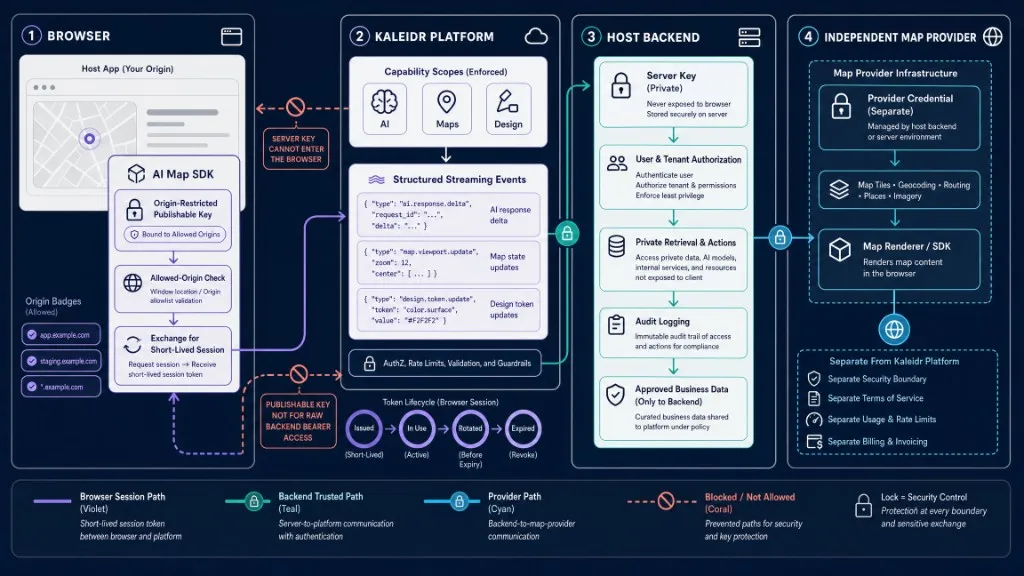
Browser rules include using a publishable key designed for browser use, restricting the key to exact production and staging origins, using HTTPS outside local development, destroying the SDK integration when the route or tenant changes, and never exposing private records merely because the map needs a marker. Backend rules include keeping server keys in a secrets manager, enforcing authorization before retrieval, limiting fields passed into inference, handling 401, 403, 422, 429, and transient 503 responses distinctly, treating a terminal SSE error event as the end of the stream, and auditing sensitive access. Mapbox, Google Maps, MapLibre tile providers, and other services retain their own credentials, terms, attribution, billing, and quotas; a Kaleidr key does not replace a map-provider credential. Kaleidr documents version-pinned CDN paths, organization-level usage metering, shared quota across organization keys, and quota events during a stream (quota and rate limits).
How Do You Evaluate an AI Map SDK?
Confirm renderer compatibility—supported providers and versions, whether the SDK needs a map object or CSS selector, whether it owns the map or attaches to one, readiness requirements, camera and marker behavior, multi-map support, and mobile or WebGL constraints. Ask whether the platform returns place objects, stable IDs, coordinates, geometry, source references, action objects, no-result states, terminal results, and explicit errors; avoid a production architecture that extracts geographic facts from model prose. Verify publishable and server credential separation, origin restrictions, short-lived browser sessions, scopes, revocation, CORS, tenant isolation, private-data boundaries, and audit support. Test script loading, framework teardown, route changes, server-side rendering boundaries, concurrent maps, error recovery, and lazy loading. Determine whether the SDK is only a UI wrapper or whether the platform also exposes documented APIs for custom workflows. Review major-version policy, changelog, deprecation windows, CDN pinning, provider portability, and data-export paths. Measure time to first useful result, stream duration, error and no-result rates, map-action success, provider and AI usage, quota utilization, and cost per completed user task—not SDK loads alone.
Common use cases include conversational place discovery; travel and destination products (AI-powered tourism map); property and marketplace search; store locators; embedded map creation inside a SaaS workflow; branded map experiences with designed basemaps; and internal operations over authorized assets and territories. In each case the AI layer interprets the request while the host systems validate facts and enforce permissions.
| Mistake | What happens | Recommended correction |
|---|---|---|
| Mounting before the live map exists | The SDK cannot attach to the intended renderer | Initialize the map first and pass the live object |
| Treating the SDK as the source of truth | Generated facts can override authoritative records | Keep place and business systems authoritative |
| Parsing coordinates from prose | The integration becomes brittle | Use structured place and action events |
| Exposing a server key in the browser | A backend bearer becomes public | Use an origin-restricted publishable key |
| Forgetting allowed origins | Browser requests fail with a CORS or origin error | Add exact staging and production origins |
| Mixing map-provider and AI credentials | Security, billing, and debugging become unclear | Manage each provider independently |
| Allowing arbitrary generated actions | The model can trigger unsupported behavior | Use a documented action allowlist |
| Ignoring teardown | SPAs leak listeners, streams, or duplicate components | Retain the handle and call destroy() |
| Tracking only SDK loads | Technical activation is mistaken for user value | Measure resolved tasks and downstream outcomes |
| Skipping mobile and accessibility testing | Chat can obscure the map or trap focus | Test responsive layout, keyboard order, and labels |
Final Verdict
An AI map SDK is the application layer that turns AI output into a governed spatial product experience. The layer connects natural-language intent to structured places, supported map actions, reusable interfaces, browser-safe authentication, and a live renderer. Use an AI map SDK when the product needs conversational map interaction, embedded spatial components, or a faster path from inference to visible geographic behavior. Use direct APIs when the host team needs a custom interface or server-side orchestration, and use both when the browser benefits from a maintained component while the backend must control private retrieval, policy, and authorization. Evaluate whether the SDK preserves data authority, produces structured geographic results, supports the renderer already in use, enforces secure credential boundaries, handles lifecycle and errors, and improves a measurable user task—not only how quickly a demo loads.
Add an AI Layer to the Map You Already Run
Attach Kaleidr chat to a supported Mapbox, Google Maps, or MapLibre implementation with one loader, a publishable key, and the live map instance. Read the Kaleidr SDK Quickstart to mount chat. Use the Platform API endpoints when the host backend needs server-side inference, retrieval, routing, or design workflows under a server key.
FAQs
What is an AI map SDK?
An AI map SDK is a software development kit that connects AI inference to a live map or embedded spatial component. It can manage UI, authentication, structured place events, map actions, provider adapters, lifecycle, and platform API access.
Is an AI map SDK the same as a map API?
No. A map API usually provides data or remote geographic operations. An AI map SDK provides the application integration layer that connects AI, UI, map state, authentication, and structured actions.
Does an AI map SDK replace Mapbox, Google Maps, or MapLibre?
Not necessarily. Kaleidr’s current chat SDK attaches to a supported live map while the existing provider continues to render the map.
Should the browser use a server API key?
No. Use a browser-safe publishable key through the SDK. Keep server keys on the backend.
Can an AI map SDK use private business data?
Yes, through an authorized architecture. The host backend should retrieve only permitted records, enforce tenant and object access, minimize exposed fields, and keep the business system authoritative.
References
- Google. Maps JavaScript API Overview. Google Maps Platform documentation. Accessed 1 August 2026. https://developers.google.com/maps/documentation/javascript/overview
- Google. Maps JavaScript API: Maps Reference. Google Maps Platform documentation. Accessed 1 August 2026. https://developers.google.com/maps/documentation/javascript/reference/map
- Kaleidr. Auth & scopes. Kaleidr Developer Docs. Accessed 1 August 2026. https://docs.kaleidr.com/platform-api/auth-and-scopes
- Kaleidr. CDN versioning. Kaleidr Developer Docs. Accessed 1 August 2026. https://docs.kaleidr.com/reference/cdn-versioning
- Kaleidr. Chat — attach AI to your map. Kaleidr Developer Docs. Accessed 1 August 2026. https://docs.kaleidr.com/sdk/chat-attach
- Kaleidr. CORS & allowed origins. Kaleidr Developer Docs. Accessed 1 August 2026. https://docs.kaleidr.com/platform-api/cors-and-allowed-origins
- Kaleidr. Endpoints. Kaleidr Developer Docs. Accessed 1 August 2026. https://docs.kaleidr.com/platform-api/endpoints
- Kaleidr. Introduction. Kaleidr Developer Docs. Accessed 1 August 2026. https://docs.kaleidr.com/
- Kaleidr. kaleidr.js — the loader. Kaleidr Developer Docs. Accessed 1 August 2026. https://docs.kaleidr.com/sdk/kaleidr-js
- Kaleidr. kaleidr-map — the element. Kaleidr Developer Docs. Accessed 1 August 2026. https://docs.kaleidr.com/sdk/kaleidr-map-element
- Kaleidr. Quota & rate limits. Kaleidr Developer Docs. Accessed 1 August 2026. https://docs.kaleidr.com/platform-api/quota-and-rate-limits
- Kaleidr. Quickstart. Kaleidr Developer Docs. Accessed 1 August 2026. https://docs.kaleidr.com/quickstart
- Kaleidr. SSE wire contract. Kaleidr Developer Docs. Accessed 1 August 2026. https://docs.kaleidr.com/platform-api/sse-wire-contract
- Kaleidr. Viewer — embed a published map. Kaleidr Developer Docs. Accessed 1 August 2026. https://docs.kaleidr.com/sdk/viewer-embed
- Mapbox. Map — Mapbox GL JS. Accessed 1 August 2026. https://docs.mapbox.com/mapbox-gl-js/api/map/
- MapLibre. Map — MapLibre GL JS. Accessed 1 August 2026. https://maplibre.org/maplibre-gl-js/docs/API/classes/Map/
- MDN Web Docs. Using Custom Elements. Accessed 1 August 2026. https://developer.mozilla.org/en-US/docs/Web/API/Web_components/Using_custom_elements
- MDN Web Docs. Using Server-Sent Events. Accessed 1 August 2026. https://developer.mozilla.org/en-US/docs/Web/API/Server-sent_events/Using_server-sent_events
@misc{kaleidr_sdk_loader,
  title  = {kaleidr.js -- the loader},
  author = {{Kaleidr}},
  note   = {Kaleidr Developer Docs; accessed 1 August 2026},
  url    = {https://docs.kaleidr.com/sdk/kaleidr-js}
}

@misc{kaleidr_chat_attach,
  title  = {Chat -- attach AI to your map},
  author = {{Kaleidr}},
  note   = {Kaleidr Developer Docs; accessed 1 August 2026},
  url    = {https://docs.kaleidr.com/sdk/chat-attach}
}

@misc{kaleidr_auth_scopes,
  title  = {Auth \& scopes},
  author = {{Kaleidr}},
  note   = {Kaleidr Developer Docs; accessed 1 August 2026},
  url    = {https://docs.kaleidr.com/platform-api/auth-and-scopes}
}

@misc{kaleidr_sse_contract,
  title  = {SSE wire contract},
  author = {{Kaleidr}},
  note   = {Kaleidr Developer Docs; accessed 1 August 2026},
  url    = {https://docs.kaleidr.com/platform-api/sse-wire-contract}
}

@misc{mdn_custom_elements,
  title  = {Using Custom Elements},
  author = {{MDN Web Docs}},
  note   = {Accessed 1 August 2026},
  url    = {https://developer.mozilla.org/en-US/docs/Web/API/Web_components/Using_custom_elements}
}

@misc{mdn_server_sent_events,
  title  = {Using Server-Sent Events},
  author = {{MDN Web Docs}},
  note   = {Accessed 1 August 2026},
  url    = {https://developer.mozilla.org/en-US/docs/Web/API/Server-sent_events/Using_server-sent_events}
}

@misc{mapbox_map_object,
  title  = {Map -- Mapbox GL JS},
  author = {{Mapbox}},
  note   = {Accessed 1 August 2026},
  url    = {https://docs.mapbox.com/mapbox-gl-js/api/map/}
}

@misc{maplibre_map_object,
  title  = {Map -- MapLibre GL JS},
  author = {{MapLibre}},
  note   = {Accessed 1 August 2026},
  url    = {https://maplibre.org/maplibre-gl-js/docs/API/classes/Map/}
}