
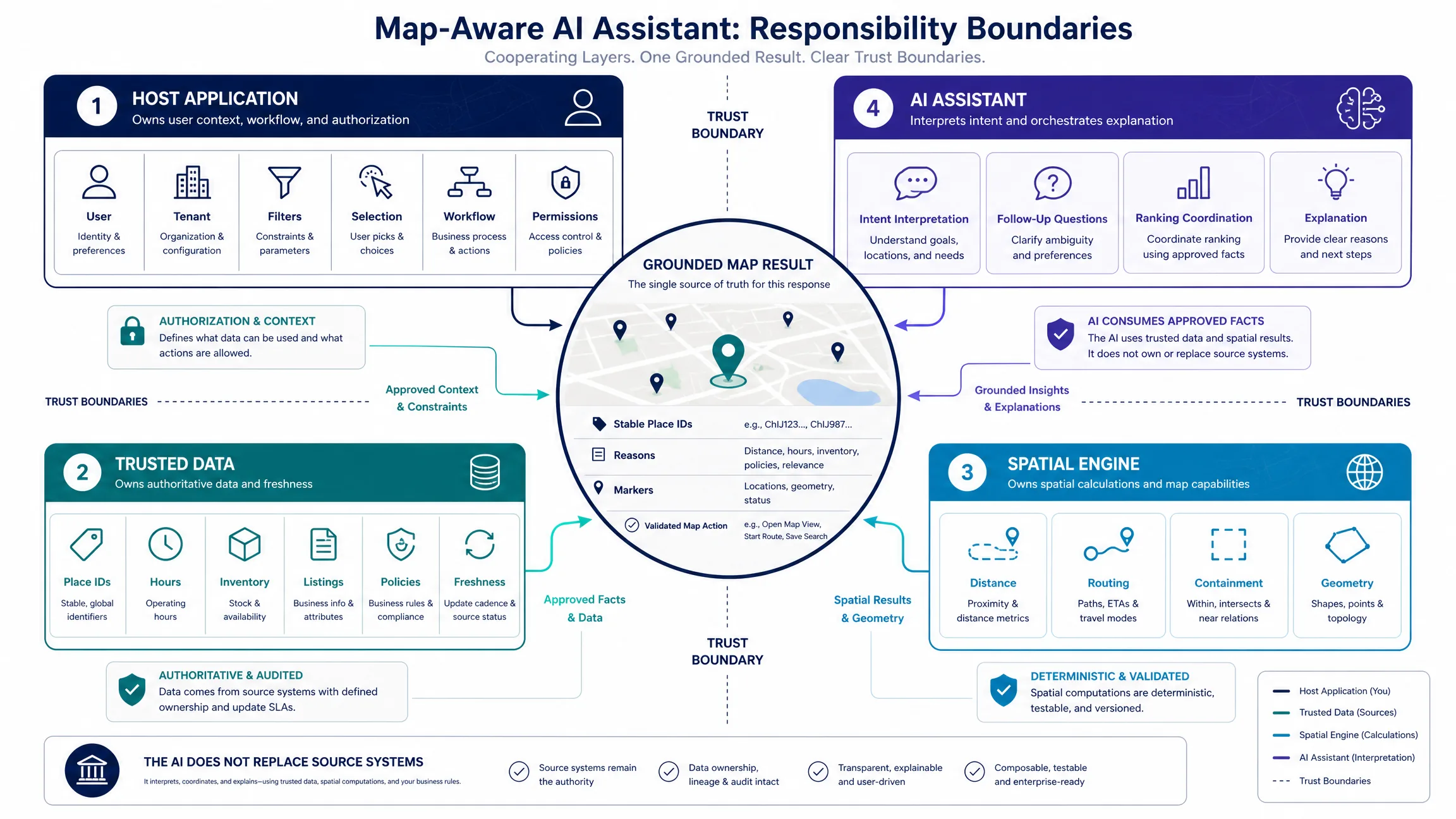
A map-aware AI assistant is a conversational interface that uses structured map context—viewport, selected place, filters, and approved location—to interpret a question and return both a grounded answer and a map action. The assistant can place markers, frame results, highlight an area, request a route, or focus a selected feature. Keep four responsibilities separate: the host owns state and permissions, trusted systems own facts, spatial tools perform geographic calculations, and the AI layer interprets intent and proposes supported actions.
The sections below cover shared state, action vocabulary, renderer adapters, Kaleidr Chat attachment, grounding, and common mistakes. Product context lives on Kaleidr Spatial AI. For SDK architecture, see What Is an AI Map SDK?. For renderer mounts, see AI chat on Mapbox, Google Maps, and MapLibre. For credentials and private records, see Map API Authentication and Private Location Data for AI Map Workflows.
Assistant essentials
- Share state, not pixels: Pass bounds, selection IDs, filters, and result IDs; do not ask the model to read the map as an image.
- Viewport is context: Visible bounds inform ranking unless the user asked to search this area.
- Semantic actions only: Emit
show_placesorfit_places, never renderer JavaScript.- Tag the source: User pans and assistant camera moves must not retrigger the model.
- Ground facts: Hours, identity, geometry, and travel time come from authoritative systems.
What Makes a Map-Aware AI Assistant Different?
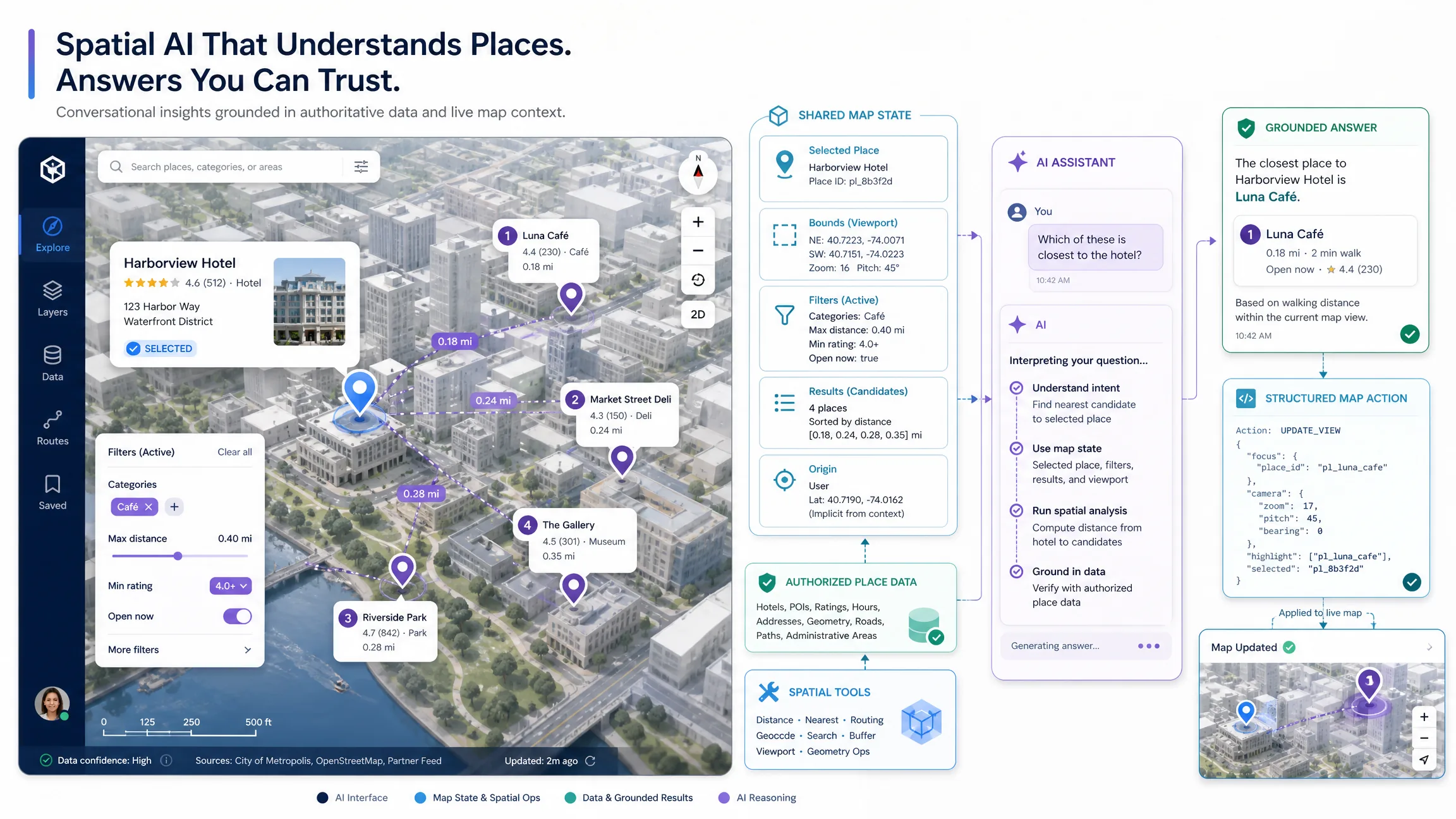
A text-only assistant beside a map may know that Paris is in France. A map-aware product also knows what the user is doing in the map: center, visible bounds, zoom, selected feature, filters, current route, previous results, approved location, and host application state. A request such as “which of these is closest to the hotel?” is ambiguous without that contract. “These” maps to the current result set, “the hotel” to the selected hotel or session origin, and “closest” to a distance or travel-time operation. The useful output is an answer plus a selected place, map focus, and reason.
Traditional map search starts from structured controls such as category, radius, and open-now. Conversation helps when the request mixes conditions that are awkward as fixed filters—“quiet cafes around this area that work for a client meeting and stay open after 7.” The AI layer can interpret category, area, preference, time, and intended use. Deterministic systems should still own place identity, hours, geometry, travel time, routing, and eligibility. Use the model to interpret the request; do not use it as the sole source of geographic facts.
| Capability | Text assistant beside a map | Map-aware AI assistant |
|---|---|---|
| Reads natural language | Yes | Yes |
| Knows visible map area | Not necessarily | Yes, when supplied |
| Knows selected place | Not necessarily | Yes |
| Uses current filters | Usually no | Can |
| Applies map actions | Usually limited | Yes |
| Shares host state | Weak | Explicit |
How Should Teams Architect Shared Map State?
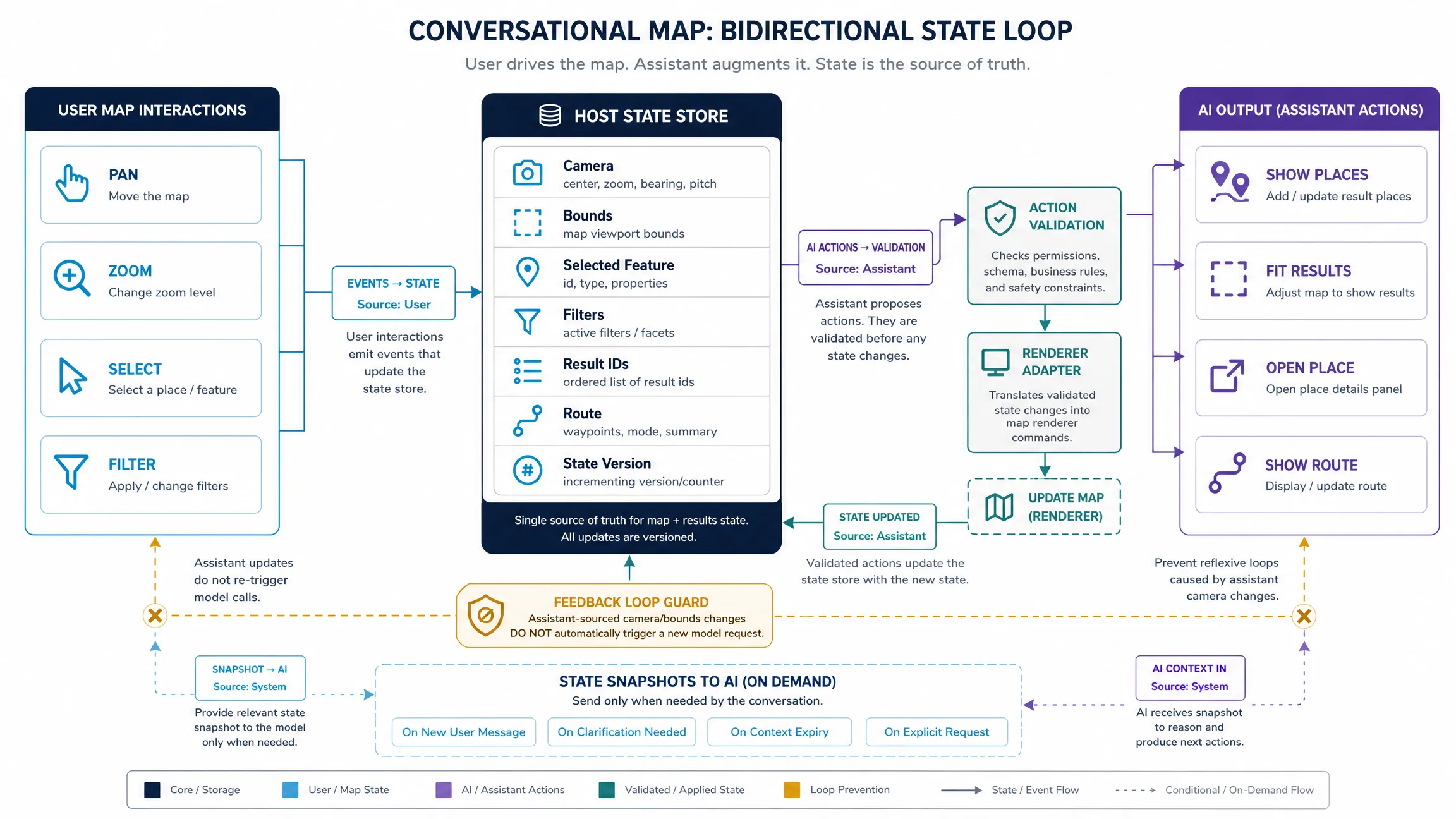
A production loop is: user question, host context snapshot, intent interpretation, authorized retrieval, spatial calculation, grounded answer, validated map action, renderer update. Start with an explicit state contract rather than hoping the model infers what is on screen. Include only what the current task needs: selected feature ID, current result IDs, relevant filters, visible bounds when useful, route context, approved origin, and a state version. Establish precedence so a selected place beats a stale result list, and a user-stated destination beats a default origin.
Do not treat the viewport as a hidden hard filter. Visible bounds can rank or bias results without silently excluding everything outside the camera. Keep stable place IDs across conversation turns so “the second cafe” resolves to the same record after a pan. Separate place identity from generated explanation: the host stores place_id and source fields; the language model may phrase why a place fits, but it must not invent a new identifier.
Bidirectional state is stronger than one-way chat. User pans, zooms, selections, and filters update a host store tagged as user events. Assistant actions such as show places, fit results, open place, or show route pass through validation and a renderer adapter, tagged as assistant events. Return a fresh snapshot to the model only when the next turn needs it. A loop guard should prevent assistant-generated camera changes from automatically starting another model request.
How Should Map Actions Stay Renderer-Independent?
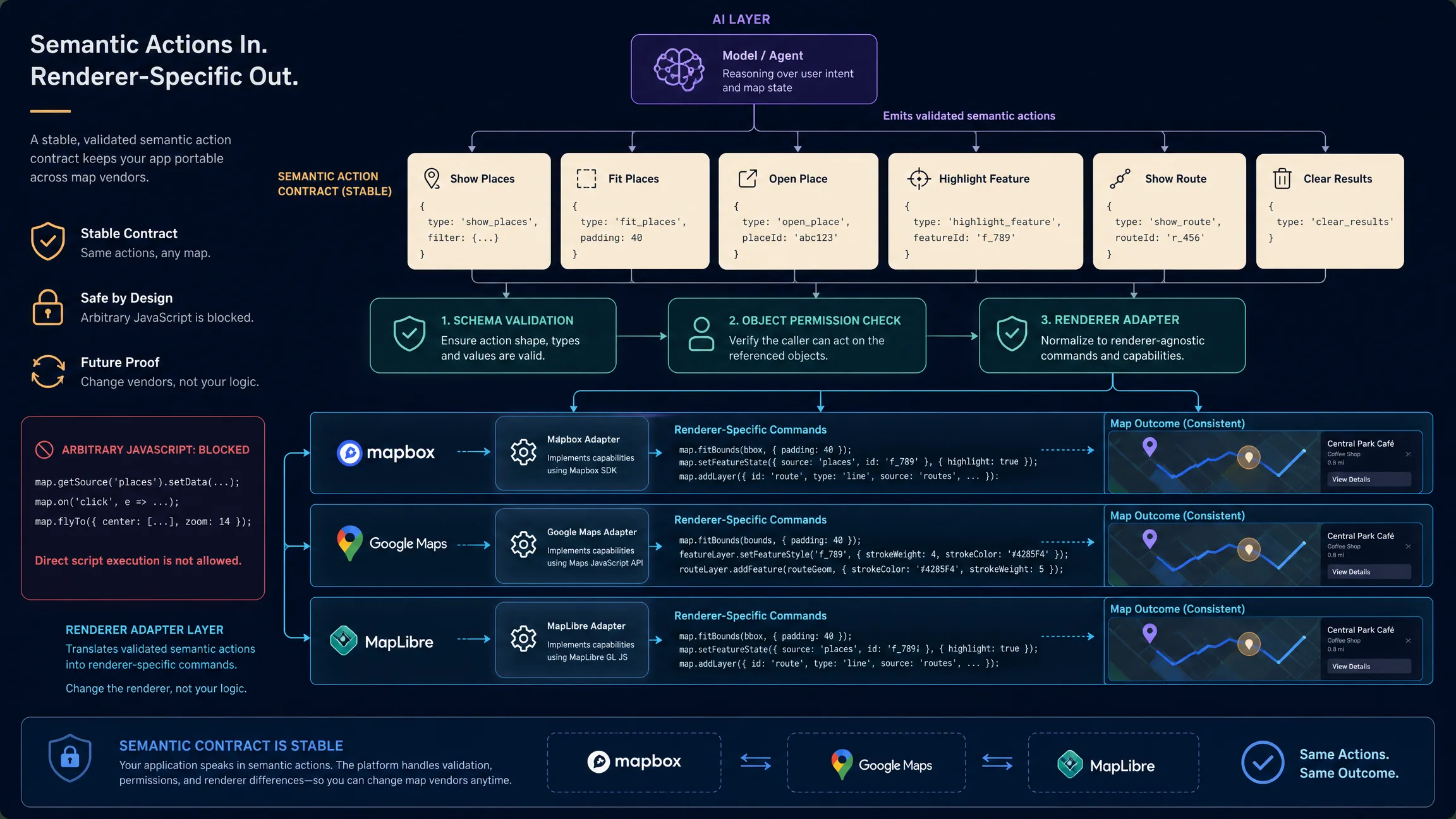
Design a small action vocabulary: show places, fit places, open place, highlight feature, show route, and clear results. Schema-validate every action, check object permissions, then translate the semantic card into Mapbox, Google Maps, or MapLibre calls inside a renderer adapter. Do not let the model emit arbitrary JavaScript. OWASP’s 2025 prompt-injection guidance notes that retrieved or conversational content can try to alter tool behavior; a manipulated model should still be unable to run unapproved map code or retrieve unauthorized objects.
Keep temporary AI result layers separate from persistent host data so a conversation can clear without deleting the user’s saved places. Handle no-result and ambiguity states with an explicit empty set and a follow-up, not a fabricated marker. Ranking should be explainable from authorized fields. Preserve user control: an assistant may propose a camera move, but a later user pan should win. Stream tokens for conversational latency, and delay camera motion until places are resolved so the map does not jump on a partial answer.
How Does Kaleidr Chat Attach to an Existing Map?
Kaleidr’s current Chat documentation says the SDK can attach to a live Mapbox, MapLibre, Google Maps, or Leaflet map, plot resolved places, and frame the camera as the conversation resolves locations (Chat attach). The host continues to render the map; Chat adds the conversational spatial layer. Guides exist for Mapbox, Google Maps, and MapLibre. The browser uses a publishable key with the ai scope, exchanged for a short-lived, origin-bound session (Auth & Scopes). Headless mode omits the map option for tests or chat-only UIs. Load the current kaleidr.js loader, then mount after the live map object exists.
// myMap must already be a live supported map instance
const chatHandle = Kaleidr.mount("#map-chat", {
  product: "chat",
  publishableKey: "kld_pk_live_REPLACE_ME",
  map: myMap,
  enabled: true
});
Private business data still belongs behind host authorization and minimized retrieval (Endpoints). User location should be opt-in. Do not send unnecessary precise coordinates or conversation logs to the browser or to analytics. Cache stable public facts, not permission decisions. Instrument whether users complete a location task—select a place, open directions, shortlist a property—rather than counting chat turns alone. Test shared-state races, geographic ambiguity, and adversarial action payloads before launch.
Which Mistakes Should Teams Avoid?
| Mistake | Risk | Better approach |
|---|---|---|
| Putting a text assistant beside an unaware map | Ambiguous “this” and “here” | Share structured map state |
| Using the viewport as a silent filter | Missing valid nearby results | Treat bounds as context unless asked |
| Letting the model emit renderer JavaScript | Injection and vendor lock-in | Semantic actions + adapter |
| Retriggering the model on every camera move | Feedback loops and cost | Source tags and a loop guard |
| Inventing place IDs in prose | Duplicate or fake records | Stable IDs from trusted data |
| Moving the camera on the first token | Jittery maps | Wait for resolved places |
| Mixing AI layers with saved user data | Accidental deletes | Separate temporary result layers |
| Shipping a server key to the browser | Credential theft | Publishable key + ai scope |
| Skipping no-result states | Fabricated markers | Empty set + follow-up |
| Measuring only chat volume | Vanity metrics | Task completion on the map |
Final Verdict
A map-aware AI assistant works when the conversation and the live map share one explicit state and action contract. The host owns permissions and renderer calls. Trusted data systems own identity and operational facts. Spatial engines own distance, routing, and geometry. The language model interprets intent, coordinates ranking, and explains results inside that boundary. Kaleidr Chat currently attaches that conversational layer to a map the host already renders, using a publishable browser key and documented Mapbox, Google Maps, and MapLibre guides. Build the state contract first; the chat panel is the last surface, not the architecture.
Add AI Chat to Your Existing Map
Attach Kaleidr Chat to a live Mapbox, Google Maps, MapLibre, or Leaflet map, then keep the host as the renderer of record. Read the Kaleidr Chat documentation for mount options, headless testing, and current key scopes.
FAQs
What is a map-aware AI assistant?
A map-aware AI assistant is a conversational interface that receives structured context from an interactive map—such as selected places, visible area, filters, or origin—and can return grounded results plus supported map actions.
How is a map-aware AI assistant different from a text-only assistant?
A text-only assistant primarily exchanges prose. A map-aware assistant shares state with the map and can coordinate geographic retrieval, spatial calculations, markers, camera movement, routes, and selections.
Should the AI read the map as an image?
Usually not for application state. Provide structured data such as bounds, selected feature IDs, filters, and result IDs. Visual understanding can be useful in other workflows, but application state should remain explicit.
Should the current map viewport always limit search results?
No. The visible viewport can be context without being a hard filter. Treat it as a hard boundary only when the user or product explicitly invokes a “search this area” behavior.
What map state should the assistant know?
Usually only the state required for the current task: selected feature, current result IDs, relevant filters, visible bounds when needed, route context, and user-approved origin.
How should an AI control a map?
Prefer a small structured action vocabulary such as show_places, fit_places, open_place, or show_route. Validate actions and translate them into renderer-specific calls in the host application.
Should the model output Mapbox or Google Maps JavaScript?
Not as the main control mechanism. Semantic actions make the assistant safer and renderer-independent.
Can a map-aware AI assistant use private business data?
Yes, when the host application authenticates the user, enforces tenant, object, and field permissions, and retrieves only the authorized records required for the task.
Can Kaleidr Chat attach to an existing map?
Yes. Kaleidr’s current developer documentation says Chat can attach to a live Mapbox, MapLibre, Google Maps, or Leaflet map and can plot resolved places and frame the camera as the conversation resolves locations.
Does Kaleidr Chat replace my map renderer?
No. In the attach workflow, the host application continues to render the map. Kaleidr Chat adds the conversational spatial layer.
What key does Kaleidr Chat use in the browser?
The current SDK uses a publishable browser key with the ai scope. The SDK exchanges it for a short-lived, origin-bound session.
Does map-aware AI work without a map?
The conversational layer can. Kaleidr’s current Chat documentation supports a headless mode by omitting the map option, which is useful for testing or chat-only interfaces.
How should a map-aware AI assistant be measured?
Measure whether users complete useful location tasks: select a relevant place, save it, open directions, shortlist a property, choose a store, complete a booking flow, or another application-specific outcome.
References
- Kaleidr. AI Maps You Can Talk To — Spatial AI. Accessed 20 August 2026. https://kaleidr.com/ai
- Kaleidr. Attach Kaleidr AI to a Google Map. Kaleidr Developer Docs. Accessed 20 August 2026. https://docs.kaleidr.com/guides/attach-ai-to-google-maps
- Kaleidr. Attach Kaleidr AI to a Mapbox Map. Kaleidr Developer Docs. Accessed 20 August 2026. https://docs.kaleidr.com/guides/attach-ai-to-mapbox
- Kaleidr. Attach Kaleidr AI to a MapLibre Map. Kaleidr Developer Docs. Accessed 20 August 2026. https://docs.kaleidr.com/guides/attach-ai-to-maplibre
- Kaleidr. Auth & Scopes. Kaleidr Developer Docs. Accessed 20 August 2026. https://docs.kaleidr.com/platform-api/auth-and-scopes
- Kaleidr. Chat — Attach AI to Your Map. Kaleidr Developer Docs. Accessed 20 August 2026. https://docs.kaleidr.com/sdk/chat-attach
- Kaleidr. Endpoints. Kaleidr Developer Docs. Accessed 20 August 2026. https://docs.kaleidr.com/platform-api/endpoints
- Kaleidr. kaleidr.js — the Loader. Kaleidr Developer Docs. Accessed 20 August 2026. https://docs.kaleidr.com/sdk/kaleidr-js
- Google. Load the Maps JavaScript API. Google Maps Platform documentation. Accessed 20 August 2026. https://developers.google.com/maps/documentation/javascript/load-maps-js-api
- Mapbox. Get started with Mapbox GL JS using a CDN. Mapbox GL JS documentation. Accessed 20 August 2026. https://docs.mapbox.com/mapbox-gl-js/guides/get-started/use-with-cdn/
- MapLibre. Display a map. MapLibre GL JS documentation. Accessed 20 August 2026. https://maplibre.org/maplibre-gl-js/docs/examples/display-a-map/
- OWASP Gen AI Security Project. LLM01:2025 Prompt Injection. Accessed 20 August 2026. https://genai.owasp.org/llmrisk/llm01-prompt-injection/
@misc{kaleidr_chat_attach_2026,
  title  = {Chat -- Attach AI to Your Map},
  author = {{Kaleidr}},
  note   = {Kaleidr Developer Docs; accessed 20 August 2026},
  url    = {https://docs.kaleidr.com/sdk/chat-attach}
}

@misc{kaleidr_spatial_ai_2026,
  title  = {AI Maps You Can Talk To -- Spatial AI},
  author = {{Kaleidr}},
  note   = {Accessed 20 August 2026},
  url    = {https://kaleidr.com/ai}
}

@misc{kaleidr_auth_scopes_2026,
  title  = {Auth and Scopes},
  author = {{Kaleidr}},
  note   = {Kaleidr Developer Docs; accessed 20 August 2026},
  url    = {https://docs.kaleidr.com/platform-api/auth-and-scopes}
}

@misc{kaleidr_attach_mapbox_2026,
  title  = {Attach Kaleidr AI to a Mapbox Map},
  author = {{Kaleidr}},
  note   = {Kaleidr Developer Docs; accessed 20 August 2026},
  url    = {https://docs.kaleidr.com/guides/attach-ai-to-mapbox}
}

@misc{kaleidr_attach_google_2026,
  title  = {Attach Kaleidr AI to a Google Map},
  author = {{Kaleidr}},
  note   = {Kaleidr Developer Docs; accessed 20 August 2026},
  url    = {https://docs.kaleidr.com/guides/attach-ai-to-google-maps}
}

@misc{kaleidr_attach_maplibre_2026,
  title  = {Attach Kaleidr AI to a MapLibre Map},
  author = {{Kaleidr}},
  note   = {Kaleidr Developer Docs; accessed 20 August 2026},
  url    = {https://docs.kaleidr.com/guides/attach-ai-to-maplibre}
}

@misc{kaleidr_endpoints_2026,
  title  = {Endpoints},
  author = {{Kaleidr}},
  note   = {Kaleidr Developer Docs; accessed 20 August 2026},
  url    = {https://docs.kaleidr.com/platform-api/endpoints}
}

@misc{kaleidr_js_loader_2026,
  title  = {kaleidr.js -- the Loader},
  author = {{Kaleidr}},
  note   = {Kaleidr Developer Docs; accessed 20 August 2026},
  url    = {https://docs.kaleidr.com/sdk/kaleidr-js}
}

@misc{google_maps_js_loader_2026,
  title  = {Load the Maps JavaScript API},
  author = {{Google}},
  note   = {Google Maps Platform documentation; accessed 20 August 2026},
  url    = {https://developers.google.com/maps/documentation/javascript/load-maps-js-api}
}

@misc{mapbox_cdn_guide_2026,
  title  = {Get started with Mapbox GL JS using a CDN},
  author = {{Mapbox}},
  note   = {Mapbox GL JS documentation; accessed 20 August 2026},
  url    = {https://docs.mapbox.com/mapbox-gl-js/guides/get-started/use-with-cdn/}
}

@misc{maplibre_display_map_2026,
  title  = {Display a map},
  author = {{MapLibre}},
  note   = {MapLibre GL JS documentation; accessed 20 August 2026},
  url    = {https://maplibre.org/maplibre-gl-js/docs/examples/display-a-map/}
}

@misc{owasp_llm01_prompt_injection_2025,
  title  = {LLM01:2025 Prompt Injection},
  author = {{OWASP Gen AI Security Project}},
  note   = {Accessed 20 August 2026},
  url    = {https://genai.owasp.org/llmrisk/llm01-prompt-injection/}
}