
A secure map API authentication design separates credentials by runtime. A browser needs a credential that is safe to expose and tightly restricted to approved origins and capabilities. A backend needs a secret credential that never enters client code and can authorize server-to-server operations. The two should not be interchangeable. Limit scopes, separate environments, monitor usage, rotate credentials, and distinguish authentication failures from authorization failures. Kaleidr implements this with publishable browser keys (kld_pk_live_…) and server keys (kld_sk_live_…).
The sections below cover browser versus server credentials, origins, CORS, scopes, lifecycle, multi-tenant trust boundaries, and common mistakes. Related product context lives in the developer documentation. For SDK architecture, see What Is an AI Map SDK?. For embedding and chat mounts, see How to Embed an Interactive Map and AI chat on Mapbox, Google Maps, and MapLibre.
Authentication essentials
- Runtime first: Browser credentials are designed for exposure; server credentials are designed for secrecy.
- Origin ≠ auth: CORS and allowed origins do not replace credential checks.
- Scope ≠ tenant: API capability scopes are not application user or row authorization.
- Rotate safely: Deploy a replacement before revoking a live key.
- Redact logs: Record key IDs and status codes, never credential values.
Why Is Map API Authentication Different in the Browser?
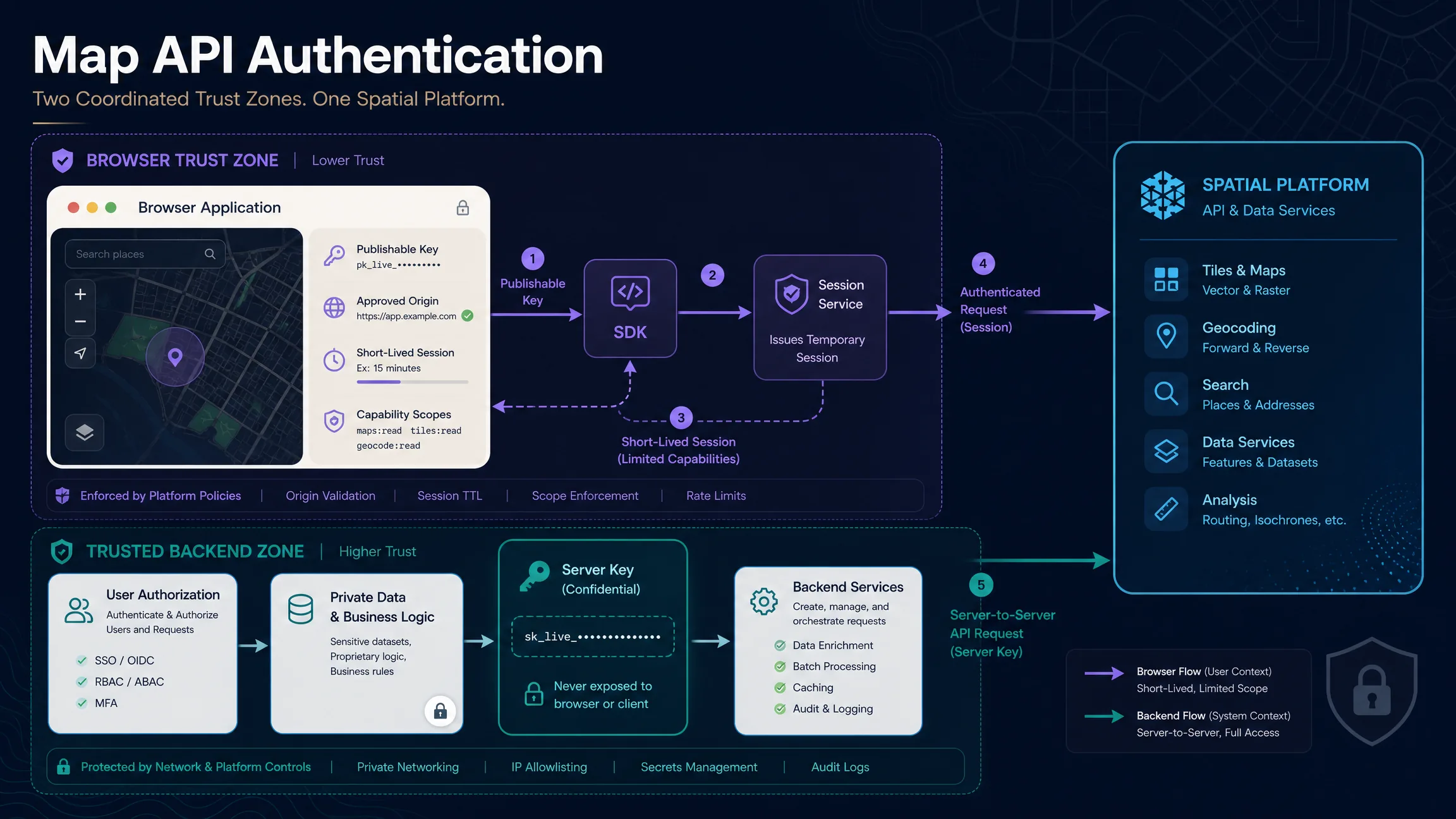
A browser is an untrusted runtime. Anything delivered to it can usually be inspected through page source, developer tools, network requests, bundled JavaScript, browser storage, or runtime objects. Placing a long-lived server secret in client code—React source, Next.js NEXT_PUBLIC_* variables, Vite VITE_* variables, HTML, mobile webviews, or frontend JSON—is unsafe because the browser cannot keep that secret from the person running it. Ask what the credential is allowed to do and where it is allowed to run, rather than where to hide a key in a frontend bundle.
| Property | Publishable / browser credential | Server credential |
|---|---|---|
| Intended runtime | Browser or client SDK | Trusted backend |
| Visible in client code | Potentially yes | Never |
| Security model | Restricted capability + approved origin + short-lived session where supported | Secret bearer credential |
| Primary risk | Unauthorized reuse or quota abuse | Account or data compromise |
Different platforms use different names, but the pattern is common. Kaleidr uses publishable and server keys (Auth & Scopes). Mapbox distinguishes public and secret token scopes and states that secret-token requests should be made on a server (How to Use Mapbox Securely). Google Maps Platform uses API keys with application and API restrictions and recommends protecting web-service credentials, with OAuth 2.0 where supported for server-to-server access (Security Guidance). Client credentials should be designed for exposure; server credentials should be designed for secrecy.
How Do Kaleidr Publishable and Server Keys Work?
Kaleidr’s current developer documentation defines two key forms for the same organization and capability system. Publishable keys use the kld_pk_live_… prefix in HTML, the Kaleidr SDK, <kaleidr-map>, and browser integrations. The SDK exchanges a publishable key for a short-lived, origin-bound session at runtime rather than using the publishable string as a standing bearer credential. Server keys use the kld_sk_live_… prefix only on trusted servers, typically as Authorization: Bearer … or X-Api-Key: …. Server keys are browser-blocked and receive no CORS grant (CORS & Allowed Origins). Never put a server key in client code, and do not treat a public frontend environment variable as secret storage.
Allowed origins should be bare origins with no path and no trailing slash—for example https://app.example.com, not https://app.example.com/maps. Kaleidr currently requires HTTPS for allowed origins except local testing on localhost or 127.0.0.1. Exact origin matching matters: root, www, app, admin, and preview hosts are different origins. Origin restrictions reduce unauthorized browser reuse; they are not a substitute for keeping server secrets off the client.
How Do CORS, Authentication, Scope, and App Authorization Differ?
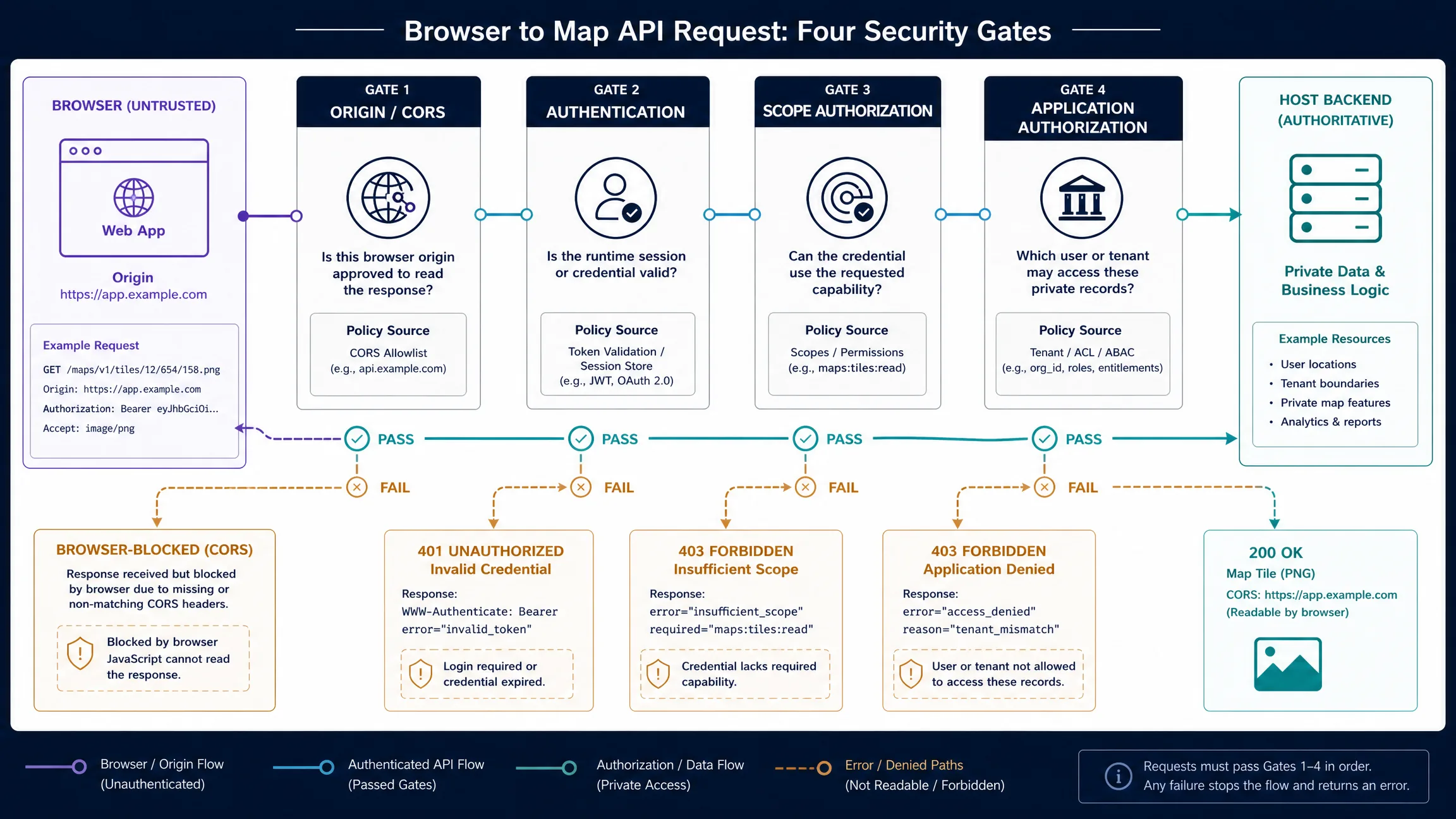
CORS controls whether a browser may read a cross-origin response (Fetch Standard). Authentication identifies the caller. Scope authorization asks whether the credential may use a requested capability. Application authorization—owned by the host backend—decides which user or tenant may access private records. Kaleidr’s CORS flow can allow a preflight while returning Access-Control-Allow-Origin only when the origin is allowed; server keys receive no browser CORS grant. A 401 generally means the credential is missing, invalid, expired, or revoked. A 403 generally means the credential is valid but lacks permission (RFC 9110); Kaleidr uses the OAuth 2.0 Bearer error code insufficient_scope (RFC 6750) when a key is valid but lacks the route’s required capability. Treat these as different failures in diagnostics and monitoring.
How Should Credentials Be Created, Stored, Rotated, and Revoked?
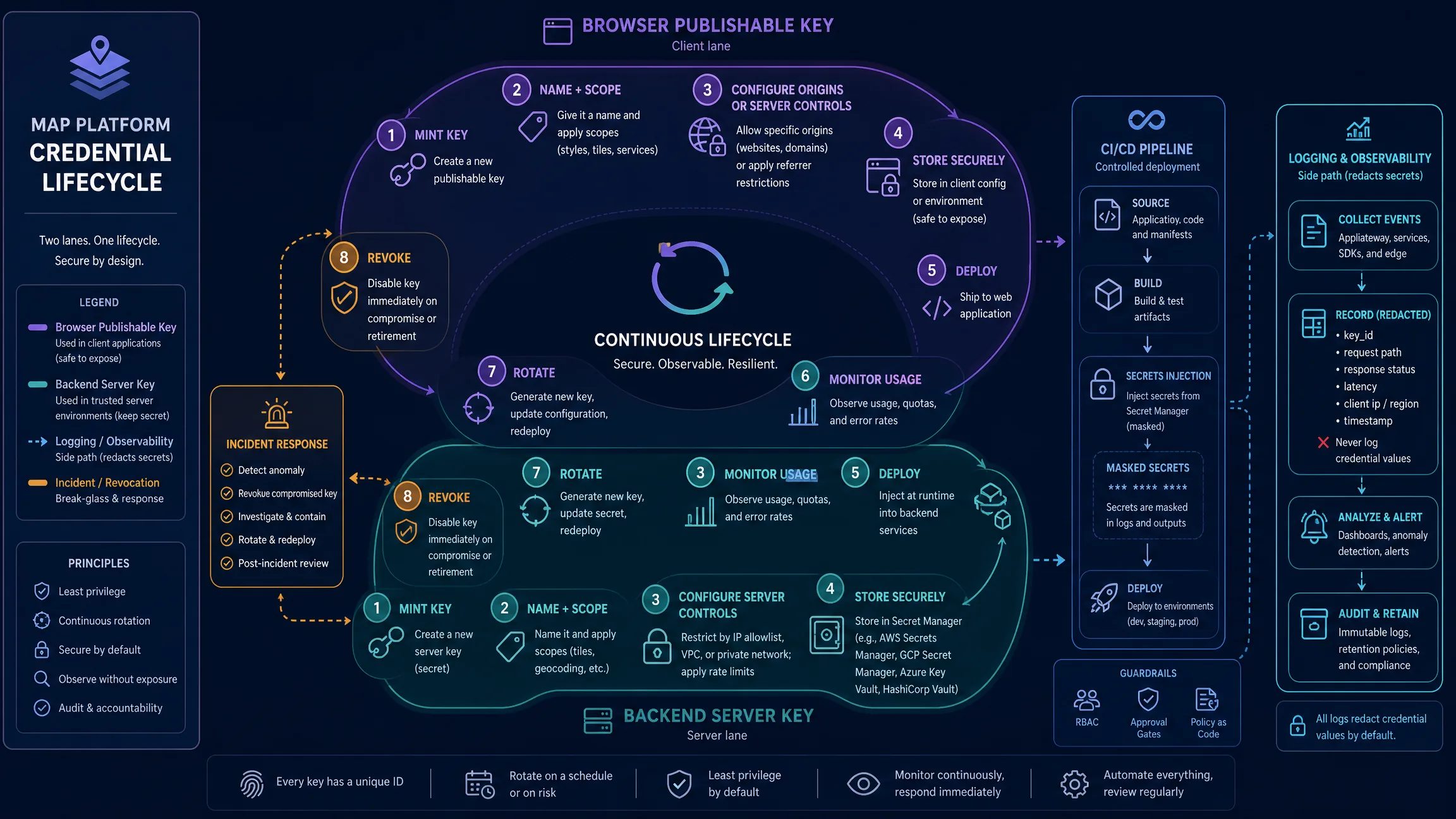
Apply least privilege: grant only the scopes each integration needs. Mapbox recommends limiting token scopes to the minimum required and using public-only scopes in browser applications; Google similarly recommends application restrictions plus API restrictions limited to APIs actually in use. Do not share one credential across every environment—separate development, preview, and production keys to reduce blast radius and make rotation safer. Mapbox recommends distinct tokens for environments or clients; Google recommends separate API keys per application (Token Management).
Newly minted Kaleidr key values are shown once and not displayed again—copy them into a secret manager immediately. Store server keys in a secret manager or protected server-side environment, never in public repositories or browser bundles. In CI/CD, inject secrets at deploy time, mask them in logs, and avoid printing environment dumps. Log key IDs, request status, and origin; redact authorization headers and credential values. Rotate by creating a replacement, configuring restrictions, deploying, verifying traffic, then revoking the previous key—move faster if the old credential is compromised. Quotas are also a security control: Platform API usage is metered at the organization level, and streaming endpoints have concurrency controls (Quota & Rate Limits). Treat 429 differently from 401 and 403; back off rather than retry storms.
// Unsafe: never ship a server key to the browser
const SERVER_KEY = "YOUR_KALEIDR_SERVER_KEY";
// Safer browser pattern: publishable key + SDK session exchange
Kaleidr.mount("#map", {
  publishableKey: "kld_pk_live_REPLACE_ME"
});
// Safer backend pattern: server key stays on the host
const response = await fetch("https://api.example.com/resource", {
  headers: {
    Authorization: `Bearer ${process.env.KALEIDR_SERVER_KEY}`
  }
});
How Should Production Apps Separate Platform Auth From Host Auth?
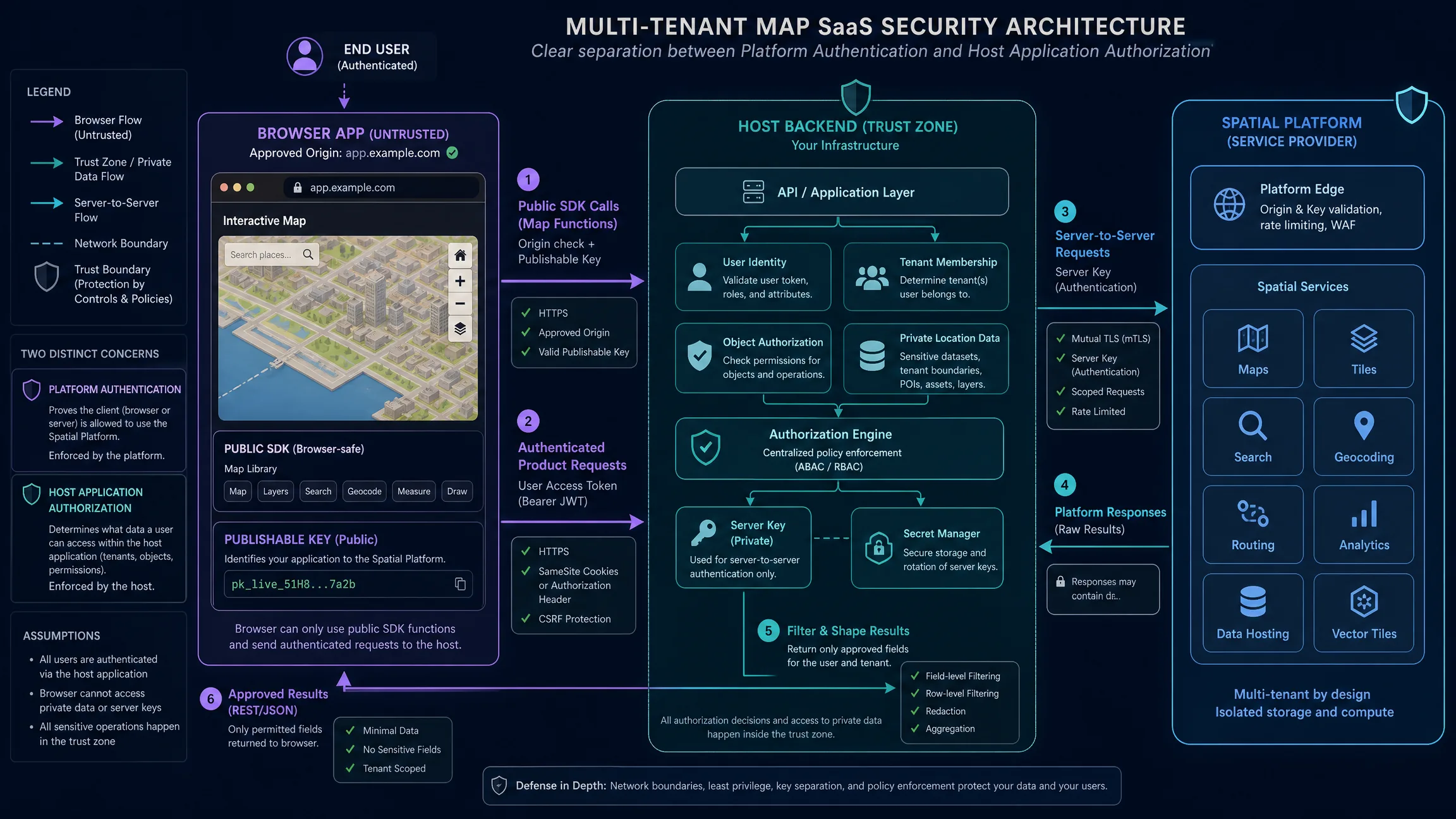
A recommended production pattern keeps the browser app on a publishable key for public SDK map functions through an approved origin, while authenticated product requests go to the host backend. The backend owns user identity, tenant membership, object authorization, private location data, and a server key in a secret manager, then makes server-to-server calls to the spatial platform and returns only approved fields. Publishable keys are not end-user authentication. Server keys are not database row authorization. For Viewer embeds, Kaleidr’s current documentation says a published Viewer map is share-link gated and requires no API key—still treat share links as access controls and avoid shipping private datasets through an unrestricted public view. CSP and safe HTML rendering are complementary controls; Mapbox warns that injecting untrusted HTML into popups can create XSS risk and recommends text rendering for untrusted content.
Which Mistakes Should Teams Avoid?
| Mistake | Risk | Better approach |
|---|---|---|
| Shipping a server key in JavaScript | Credential theft | Use a publishable browser key or backend proxy |
| Treating CORS as authentication | Non-browser callers bypass the assumption | Authenticate every protected request |
| Using one key everywhere | Large blast radius | Separate environments and applications |
| Giving every key every scope | Excess privilege | Apply least privilege |
| Adding paths to an origin allowlist | Origin matching fails | Use scheme://host[:port] |
| Logging authorization headers | Secrets leak into logs | Redact credentials |
| Using publishable key as user identity | Users become indistinguishable | Use real end-user authentication |
| Assuming API auth secures private rows | Tenant data may leak | Apply application authorization |
| Rotating without checking traffic | Production outage | Deploy replacement before revoking old key |
| Ignoring 429 | Retry storms and poor UX | Back off and monitor quota |
When browser integrations fail, check origin spelling, HTTPS requirements, publishable versus server key type, scope, and session exchange order before assuming the platform is down. When server integrations fail, check key type, environment, scope, secret injection, and whether the credential was accidentally revoked during rotation.
Final Verdict
Map API security starts with one architectural decision: do not use the same credential model for the browser and the backend. Browser integrations need credentials that are safe to expose and constrained by origin, scope, session lifetime, or equivalent provider controls. Backend integrations need secrets that stay in trusted infrastructure. Then layer least privilege, environment isolation, application authorization, monitoring, and rotation. Kaleidr’s current model follows this pattern directly: publishable browser keys are origin-restricted and exchanged by the SDK for short-lived sessions, while server keys are bearer credentials for server-to-server calls and are browser-blocked. That boundary matters more than trying to hide a key inside frontend code.
Secure Your Map API With Kaleidr Docs
Review the current key types, capability scopes, origin rules, and API behavior before deploying an integration. Read Kaleidr Auth & Scopes for publishable versus server credentials, then continue in the developer documentation for SDK mounts and Platform API routes.
FAQs
What is map API authentication?
Map API authentication is the mechanism used to identify an application or service that is requesting access to map, place, tile, routing, or spatial APIs. Common mechanisms include API keys, access tokens, sessions, bearer tokens, and OAuth.
Can an API key be safely used in a browser?
Only if the provider specifically designs that credential for client-side use. A browser-safe key should have restrictions such as allowed origins, public scopes, app restrictions, or short-lived session exchange. A server secret should never be placed in browser code.
Is a publishable API key a secret?
No. A publishable key should be designed so its security does not depend on the string remaining hidden. It still needs restrictions and monitoring.
Is a server API key a secret?
Yes. A server key or secret token should remain on trusted backend infrastructure and should not appear in HTML, JavaScript bundles, mobile webviews, public repositories, or client storage.
Is CORS authentication?
No. CORS controls whether a browser can read cross-origin responses. Authentication identifies the caller. Authorization determines what the caller may do.
What is the difference between 401 and 403?
A 401 generally means authentication failed because the credential is missing, invalid, expired, or revoked. A 403 generally means the credential is valid but does not have permission for the requested operation.
Should I create separate API keys for development and production?
Yes. Separate credentials reduce blast radius, simplify origin restrictions, improve usage visibility, and make rotation safer.
How should I rotate an API key?
Create a replacement key, configure its restrictions, deploy it, verify production traffic, and only then revoke the previous key. Move faster if the old credential is actively compromised.
Does Kaleidr Viewer require an API key?
Kaleidr’s current documentation says published Viewer maps are share-link gated and do not require an API key.
How does Kaleidr protect browser integrations?
The current Kaleidr model uses a publishable key with an allowed-origin list. The SDK exchanges that key for a short-lived, origin-bound session. Server keys are browser-blocked and intended for server-to-server calls.
References
IETF. HTTP Semantics (RFC 9110). RFC Editor. Accessed 17 August 2026. https://www.rfc-editor.org/rfc/rfc9110
IETF. The OAuth 2.0 Authorization Framework: Bearer Token Usage (RFC 6750). RFC Editor. Accessed 17 August 2026. https://www.rfc-editor.org/rfc/rfc6750
WHATWG. Fetch Standard. Accessed 17 August 2026. https://fetch.spec.whatwg.org/#http-cors-protocol
Google. Google Maps Platform Security Guidance. Google Maps Platform documentation. Accessed 17 August 2026. https://developers.google.com/maps/api-security-best-practices
Kaleidr. Auth & Scopes. Kaleidr Developer Docs. Accessed 17 August 2026. https://docs.kaleidr.com/platform-api/auth-and-scopes
Kaleidr. CORS & Allowed Origins. Kaleidr Developer Docs. Accessed 17 August 2026. https://docs.kaleidr.com/platform-api/cors-and-allowed-origins
Kaleidr. Quota & Rate Limits. Kaleidr Developer Docs. Accessed 17 August 2026. https://docs.kaleidr.com/platform-api/quota-and-rate-limits
Mapbox. How to Use Mapbox Securely. Mapbox documentation. Accessed 17 August 2026. https://docs.mapbox.com/help/dive-deeper/how-to-use-mapbox-securely/
Mapbox. Token Management. Mapbox documentation. Accessed 17 August 2026. https://docs.mapbox.com/accounts/guides/tokens/
@misc{ietf_rfc9110_2026,
  title  = {HTTP Semantics (RFC 9110)},
  author = {{IETF}},
  note   = {Accessed 17 August 2026},
  url    = {https://www.rfc-editor.org/rfc/rfc9110}
}

@misc{ietf_rfc6750_2026,
  title  = {The OAuth 2.0 Authorization Framework: Bearer Token Usage (RFC 6750)},
  author = {{IETF}},
  note   = {Accessed 17 August 2026},
  url    = {https://www.rfc-editor.org/rfc/rfc6750}
}

@misc{whatwg_fetch_cors_2026,
  title  = {Fetch Standard},
  author = {{WHATWG}},
  note   = {CORS protocol; accessed 17 August 2026},
  url    = {https://fetch.spec.whatwg.org/#http-cors-protocol}
}

@misc{kaleidr_auth_scopes_2026,
  title  = {Auth and Scopes},
  author = {{Kaleidr}},
  note   = {Kaleidr Developer Docs; accessed 17 August 2026},
  url    = {https://docs.kaleidr.com/platform-api/auth-and-scopes}
}

@misc{kaleidr_cors_origins_2026,
  title  = {CORS and Allowed Origins},
  author = {{Kaleidr}},
  note   = {Kaleidr Developer Docs; accessed 17 August 2026},
  url    = {https://docs.kaleidr.com/platform-api/cors-and-allowed-origins}
}

@misc{kaleidr_quota_2026,
  title  = {Quota and Rate Limits},
  author = {{Kaleidr}},
  note   = {Kaleidr Developer Docs; accessed 17 August 2026},
  url    = {https://docs.kaleidr.com/platform-api/quota-and-rate-limits}
}

@misc{mapbox_token_management_2026,
  title  = {Token Management},
  author = {{Mapbox}},
  note   = {Accessed 17 August 2026},
  url    = {https://docs.mapbox.com/accounts/guides/tokens/}
}

@misc{mapbox_secure_2026,
  title  = {How to Use Mapbox Securely},
  author = {{Mapbox}},
  note   = {Accessed 17 August 2026},
  url    = {https://docs.mapbox.com/help/dive-deeper/how-to-use-mapbox-securely/}
}

@misc{google_maps_security_2026,
  title  = {Google Maps Platform Security Guidance},
  author = {{Google}},
  note   = {Accessed 17 August 2026},
  url    = {https://developers.google.com/maps/api-security-best-practices}
}