
A no-code map builder is usually faster when a team needs to create, style, publish, and maintain an interactive map without owning the full application stack. A map API or SDK is stronger when developers need control over map state, private data, permissions, or custom product behavior. Many teams use a hybrid: visual authoring plus SDK embedding while the host keeps users, private data, and business logic.
The sections below compare ownership, fit criteria, progressive Kaleidr surfaces, and a practical decision framework. Related product context lives on Kaleidr Studio and the developer documentation. Confirm plan allowances on Pricing & Plans before you rely on API keys or embeds in production.
Comparison essentials
- Ownership first: Decide who owns authoring, rendering, application state, private data, and publishing—not only who can “make a map.”
- Content vs product: Published experiences often fit a builder; application-state maps usually need an API or SDK.
- SDK middle layer: Viewer, chat, editor, and tiles sit between visual authoring and fully custom backends.
- Hybrid default: Creators refine brand and content visually; engineers integrate runtime behavior in the host app.
- Credentials: Restrict browser-safe keys; keep server credentials on the server.
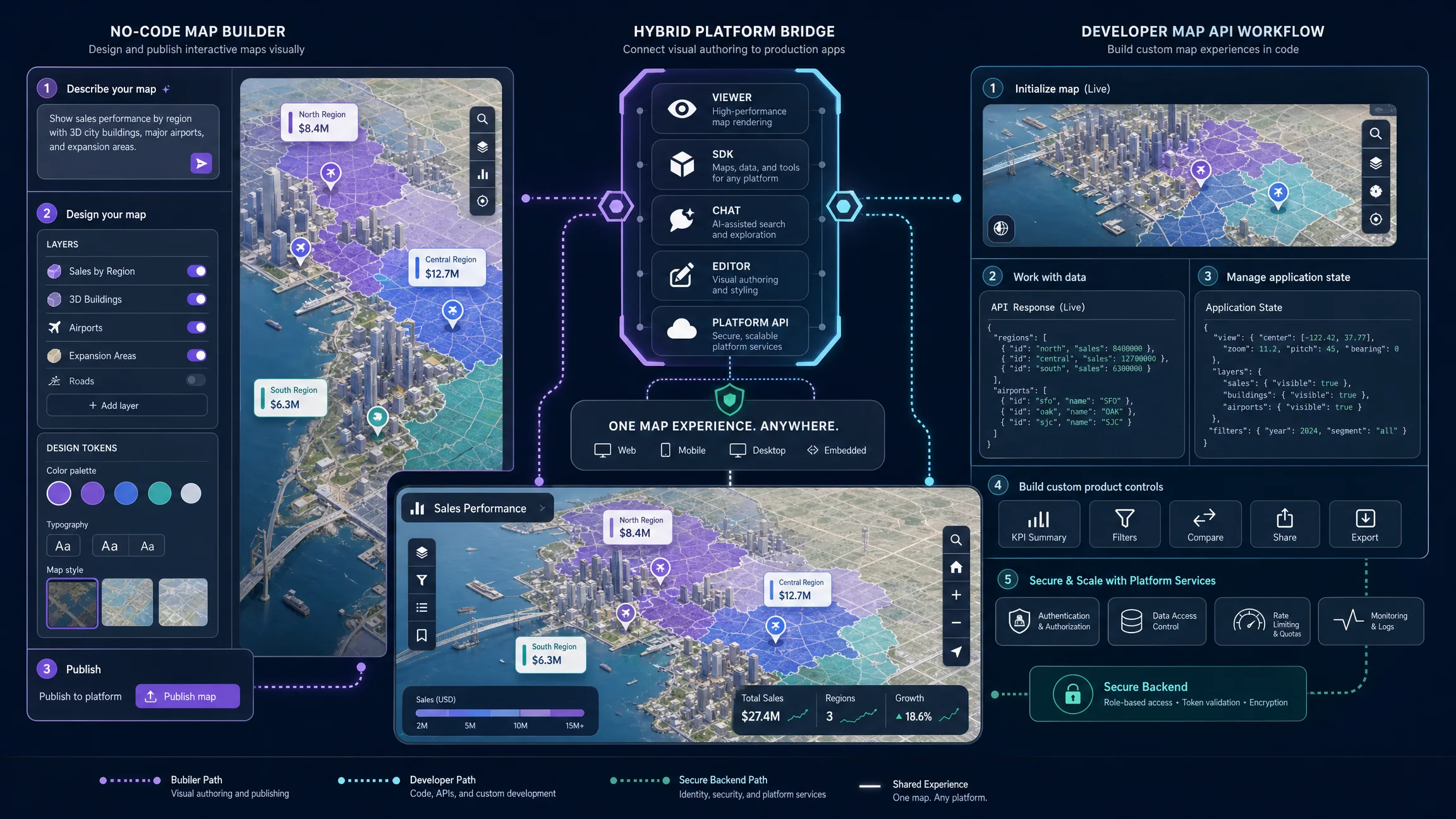
No-Code Map Builder vs Map API at a Glance
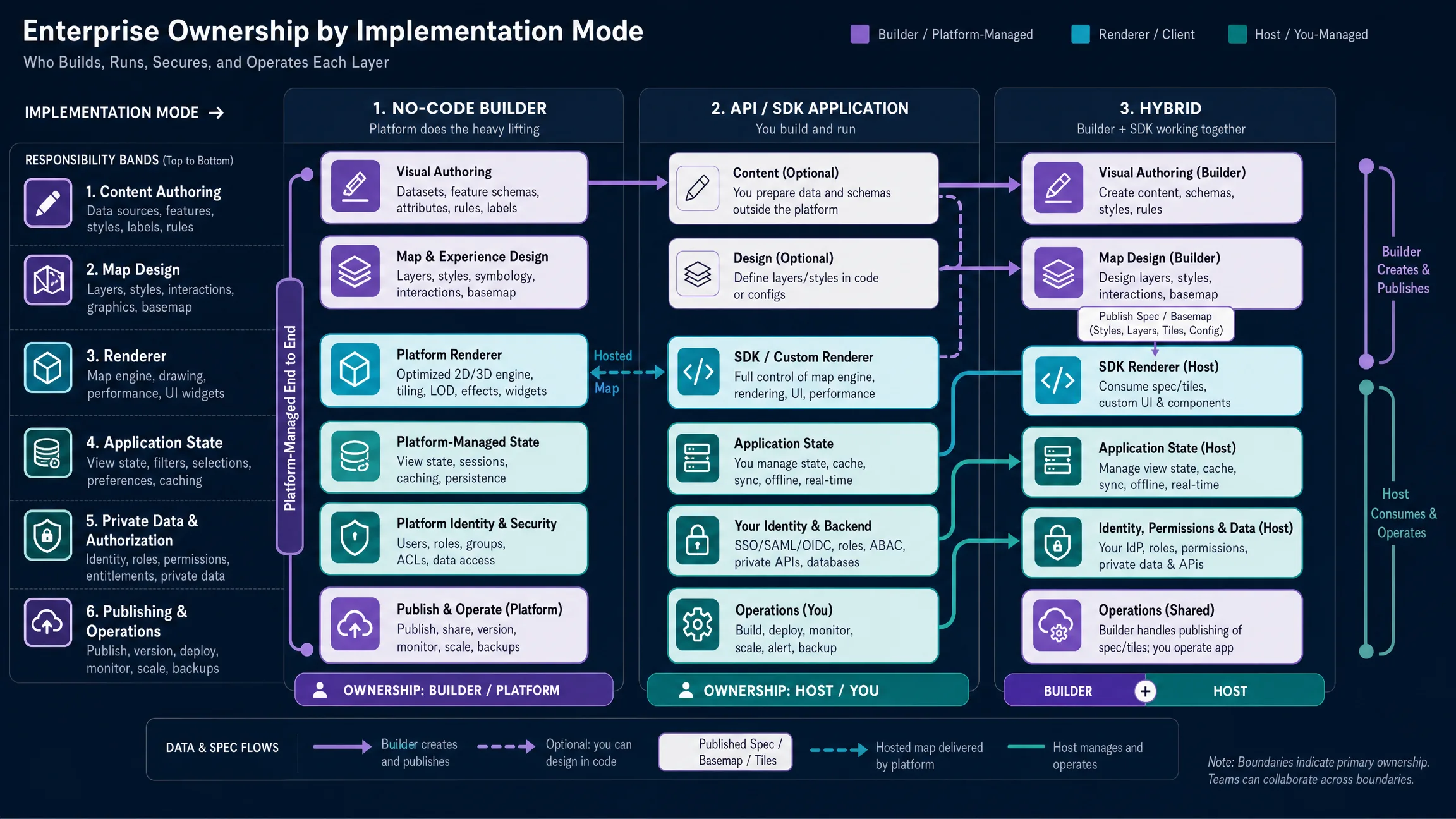
The decisive difference is not feature count. The decisive difference is which system owns each layer of the map workflow. Use the table as a responsibility map before counting features, because a long feature list can still leave the wrong owner responsible for state, private data, or publishing.
| Decision area | No-code map builder | Map API / SDK |
|---|---|---|
| Primary user | Creator, marketer, analyst, operator, product team | Developer or engineering team |
| Starting point | Visual editor, prompt, template, imported content | Code, map object, API request, SDK |
| Time to first map | Usually shorter | Usually longer |
| Custom application logic | Limited to documented controls | High |
| Map styling | Visual and preset-driven | Programmatic or style-spec driven |
| Data integration | Best for supported imports and platform workflows | Best for custom databases and services |
| User permissions | Usually platform-level | Can integrate with host application authorization |
| Private workflows | Depends on product support | Stronger with a host backend |
| Maintenance | Platform handles more infrastructure | Engineering team owns more implementation |
| Embedding | Share link, iframe, web component, or embed | Library, SDK, custom component, or native renderer |
| Analytics | Platform-provided or externally instrumented | Fully customizable but must be implemented |
| Best fit | Publishing and maintaining maps quickly | Building maps as a core product capability |
If the map is primarily content, a builder often wins. If the map is part of the product’s application state and business logic, an API or SDK usually becomes more important. Hybrid designs sit between those poles when creators need visual control and the host still owns identity, permissions, and private records.
What Is a No-Code Map Builder?
A no-code map builder lets a user create an interactive map without implementing the renderer, styling system, publishing layer, and front-end application from scratch. A capable builder may provide natural-language creation, visual editing, markers and regions, layers and datasets, reusable style presets, basemap design, 3D terrain or buildings, templates, publishing, sharing, website embedding, analytics, and optional AI interaction. The main problem it solves is shipping a useful map; the main problem it does not solve is calculating, authorizing, synchronizing, persisting, and mutating map behavior as part of a custom user workflow.
Kaleidr Studio currently follows a Prompt → Process → Refine → Deploy workflow. A creator describes the map concept, Studio generates and organizes the spatial structure, the creator refines content, design, style, and interaction, and the finished map can be published across digital platforms. Public Studio materials also describe custom basemaps, reusable layers, real-time data layers, typography, labels, icons, 3D terrain, and extruded buildings. Destination guides, event maps, campus maps, community directories, and campaign maps often fit this path when non-developers must own routine updates without a deployment for every content change.
What Is a Map API?
A map API exposes geographic data or operations programmatically—geocoding, reverse geocoding, places, routes, travel times, map tiles, styles, spatial features, elevation, boundaries, search, imagery, or location-aware AI—so developers can combine those services with a renderer or SDK. The API path fits when the map must become part of application code, not only a published artifact. Google’s Maps JavaScript API is a client-side web API for customizable 2D and 3D maps, markers, interactive data layers, styling, and location services (Maps JavaScript API overview). Mapbox describes its platform as APIs, libraries, SDKs, and tooling that developers combine for custom location experiences (Mapbox getting started). MapLibre GL JS is an open-source TypeScript library that renders interactive maps from vector tiles using WebGL (MapLibre GL JS introduction).
Using a map API does not mean writing a renderer from first principles. The engineering burden depends on how much of the stack the team chooses to own. Style and tiles, private data retrieval, identity, analytics, accessibility, observability, and incident response still sit outside a single Maps call.
Where Do SDKs Fit Between Builder and API?
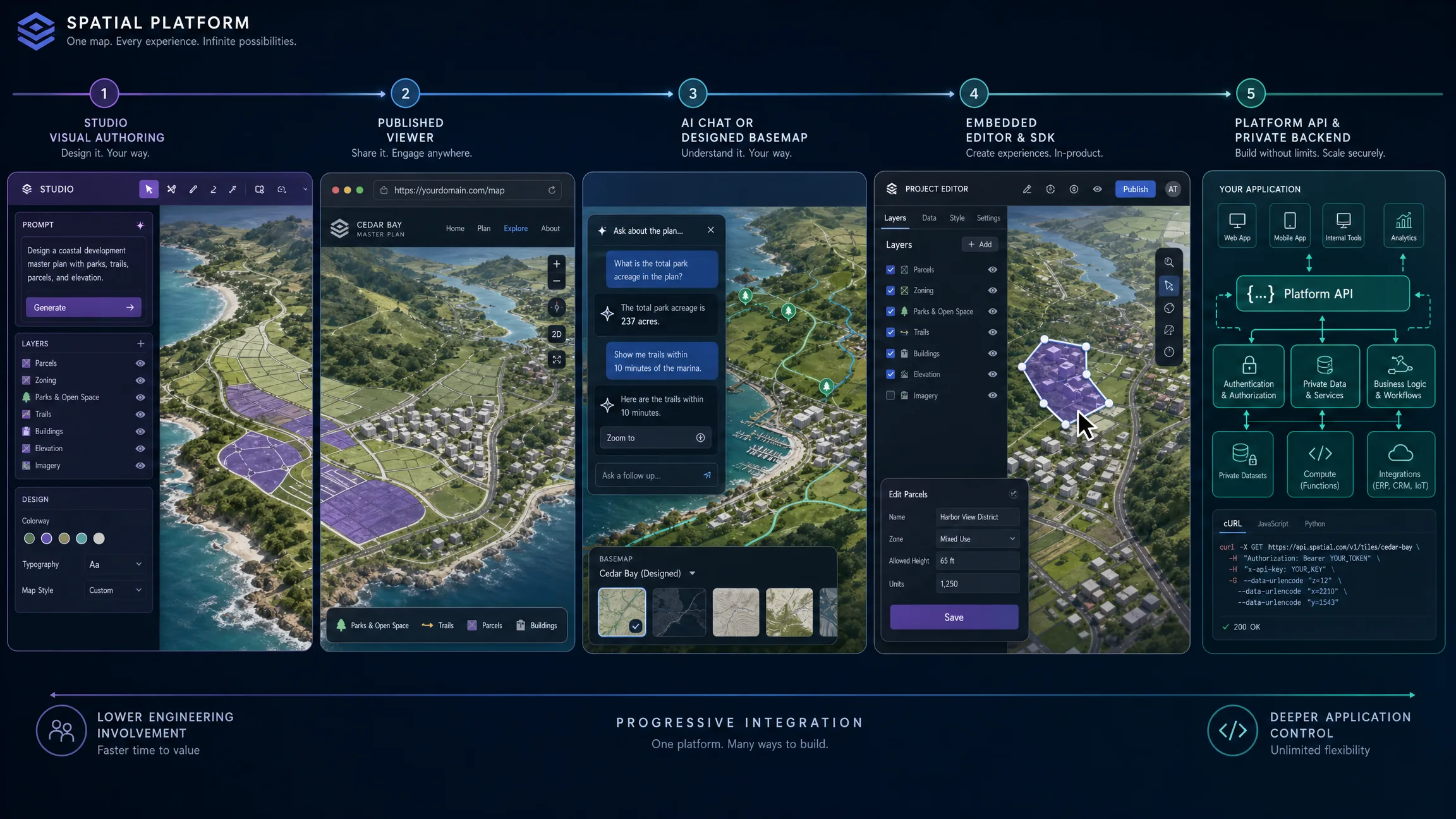
“No-code builder versus API” sounds more binary than modern mapping systems are. An SDK can provide reusable UI, browser-safe authentication, map lifecycle management, provider adapters, map events, structured actions, embedded viewers, embedded editors, chat controls, error handling, and versioned contracts. Kaleidr’s current developer platform uses one versioned loader at https://cdn.kaleidr.com/embed/v1/kaleidr.js. The loader installs window.Kaleidr and the <kaleidr-map> custom element; current documentation lists chat, viewer, editor, and tile as supported product values (quickstart). A team can therefore progress from visual authoring to a published map, then to Viewer or web-component embedding, then to Chat, designed basemaps, or an embedded Editor, then to Platform API workflows and a fully custom application. Start visually and move deeper into code only where the product requires it.
When Is a No-Code Map Builder the Better Choice?
Choose a builder when the map needs to launch quickly, when non-developers must own updates, when the interaction model already fits supported platform controls, and when the map behaves like a publication surface rather than an operational database. Typical examples include tourism guides, public event maps, editorial maps, development showcases, campus guides, and public-resource directories. Marker selection, place details, layers, filters, a published viewer, AI map chat, share links, designed basemaps, and map-centered templates are strong builder fits when they match documented controls.
A builder compresses map initialization, layer management, styling, responsive publishing, hosting, sharing, and embed delivery into one workflow. The team still has to validate content, accessibility, attribution, privacy, and data rights. No-code reduces implementation work; it does not remove product responsibility. Separating map authoring from application engineering also reduces routine dependency on developers when marketers, analysts, destination teams, operators, or editors need to add places, update descriptions, change labels, restyle categories, adjust the initial camera, publish revisions, or manage reusable layers.
When Is a Map API or SDK the Better Choice?
Choose an API or SDK when the map is part of application state, when the product uses private or licensed data, when workflows include custom business actions, or when the experience is highly differentiated. Property, retail, marketplace, and mobility products often synchronize signed-in users, saved searches, dynamic inventory, map bounds, selected results, server-side ranking, and account-specific permissions. The map SDK participates in that state; the host application remains the source of truth.
Private inventory, store stock, customer addresses, internal assets, fleet data, service eligibility, off-market listings, and operational incidents should be filtered by the host backend so the browser receives only records required for the current view. Custom actions such as creating a lead, reserving an asset, assigning a driver, updating a property record, saving a territory, or writing to a private database should be validated and executed by the host application even when the map initiates them. Synchronized list-and-map state, custom clustering, bespoke animation, real-time movement, geometry drawing, custom routing, WebGL layers, domain-specific controls, and complex overlays strengthen the case for developer control.
When Is a Hybrid Architecture Stronger?
Many teams should not choose only one path. A hybrid architecture separates authoring from runtime business logic: creators use a no-code map builder for places, routes, visual design, public storytelling, and branded guides; developers embed or extend that work through a viewer or SDK; the host application keeps member profiles, bookings, private partner inventory, account-specific recommendations, live listings, saved searches, permissions, draw-to-search, lead workflows, inventory, pickup availability, customer-specific pricing, and operational status. Tourism, real-estate, and retail teams often land here because public storytelling and private operations coexist.
The practical rule is progressive ownership. Keep editorial content and brand design where creators can update them. Keep identity, authorization, private data, and consequential actions in the host system. Reuse designed basemaps and published maps as integration inputs rather than rebuilding every visual decision in code.
How Does Kaleidr Bridge No-Code and Developer Workflows?
Kaleidr is structured around both visual creation and developer integration. Studio uses the Prompt → Process → Refine → Deploy model for visual customization of content, style, interaction, custom basemaps, layers, datasets, real-time data, and 3D visualization. A published map can embed through Viewer by share ID; the current quickstart states that a published Viewer is share-link gated and needs no API key (Viewer embed). Chat can attach to a supported live Mapbox, Google Maps, MapLibre, or Leaflet map with a publishable key while the existing renderer keeps display responsibility. Editor mounts map-creation tools inside a host SaaS product when users must create without leaving the product workflow. Platform API access on Pro and Enterprise supports publishable and server keys for deeper custom server-side logic (Pricing & Plans).
A minimal published Viewer places the custom element after the versioned loader is present on the page. Replace abcd1234 with the published map’s share ID, and keep an explicit height so the layout does not collapse before the map paints. Prefer the documented component over constructing an internal Viewer URL that is not part of the public contract.
<kaleidr-map
  product="viewer"
  share-id="abcd1234"
  style="display:block; height:520px;">
</kaleidr-map>
Chat attachment against an existing live map uses the imperative mount after the loader is available. Keep the publishable key restricted to browser-safe scopes, destroy the handle during SPA teardown, and leave map display responsibility with the host renderer. Confirm current product contracts in the developer documentation before locking an architecture.
const handle = Kaleidr.mount("#chat", {
  product: "chat",
  publishableKey: "kld_pk_live_REPLACE_ME",
  map: myMap
});
A practical progression is: start with Studio, publish through Viewer, add Chat or Tiles where useful, embed Editor when creation belongs inside the product, and use the Platform API when the workflow needs custom server logic. Treat each step as optional depth rather than a mandatory ladder. Teams that only need a published experience can stop at Viewer without adopting every later surface.
How Do Cost, Security, Accessibility, and Search Differ?
Builder cost usually concentrates in subscription, map loads, AI credits, collaborators, storage, premium data, publishing, and support. API cost spreads across map loads, tiles, geocoding, places, routes, AI inference, CDN, storage, engineering, observability, security, incident response, and ongoing maintenance. The expensive part of a custom architecture is often not the API call itself; it is the engineering and operations surrounding it. Kaleidr currently lists Free at $0, Pro at $29 per month, and Enterprise with custom pricing; Pro adds developer API access, publishable and server keys, and embed support. Check the live pricing page before purchase because allowances can change.
Security responsibilities differ by path. A builder still requires decisions about public versus private visibility, allowed embed domains, exposed fields, sharing permissions, and sensitive data. A custom API workflow adds browser versus backend credentials, API key restrictions, tenant authorization, CORS, rate limits, key rotation, audit logging, and private-data retrieval. Google Maps Platform recommends restricting API keys by application and API and separating client-side and server-side usage (Google Maps Platform security guidance). Mapbox distinguishes public client tokens from secret server tokens (Mapbox access tokens). Kaleidr distinguishes publishable browser keys from server keys with scoped capabilities. A browser-visible credential should be designed and restricted for browser use; a server credential should remain on the server.
Accessibility and search are not automatic on either path. Test keyboard access, visible focus, sufficient target size, text alternatives, synchronized list views, color contrast, non-color state indicators, screen-reader labels, modal focus, zoom, mobile layout, and alternatives to dragging. Provide crawlable page copy, meaningful headings, important place information outside the canvas where useful, accurate metadata, and structured data only when it matches visible content. Avoid hiding all meaningful content behind client-only interaction, and avoid generating thin pages for every coordinate or filter state.
Which Decision Mistakes Should Teams Avoid?
| Mistake | What happens | Recommended correction |
|---|---|---|
| Choosing no-code only because there are no developers | Custom workflow requirements appear later | Define state, permissions, data, and actions first |
| Choosing APIs because custom is assumed to be better | Engineering effort grows without user value | Start from required product behavior |
| Treating a published map as an operational database | Dynamic facts become stale | Keep source systems authoritative |
| Treating a map API as the complete application | UI, auth, analytics, and accessibility are underestimated | Budget for the host product |
| Coding every map from scratch | Editors depend on engineering for routine updates | Separate authoring from runtime logic |
| Hiding all content inside the map canvas | Search and accessibility suffer | Provide supporting crawlable and accessible content |
| Exposing server credentials | Backend access becomes public | Use browser-safe keys and server-side secrets |
| Ignoring migration | Prototype architecture becomes permanent | Define a path from builder to embed to API |
| Optimizing only for launch speed | Maintenance surprises the team | Compare total ownership |
| Optimizing only for flexibility | The team builds unused capabilities | Tie architecture to validated workflows |
How Should Teams Choose Builder, API, or Hybrid?
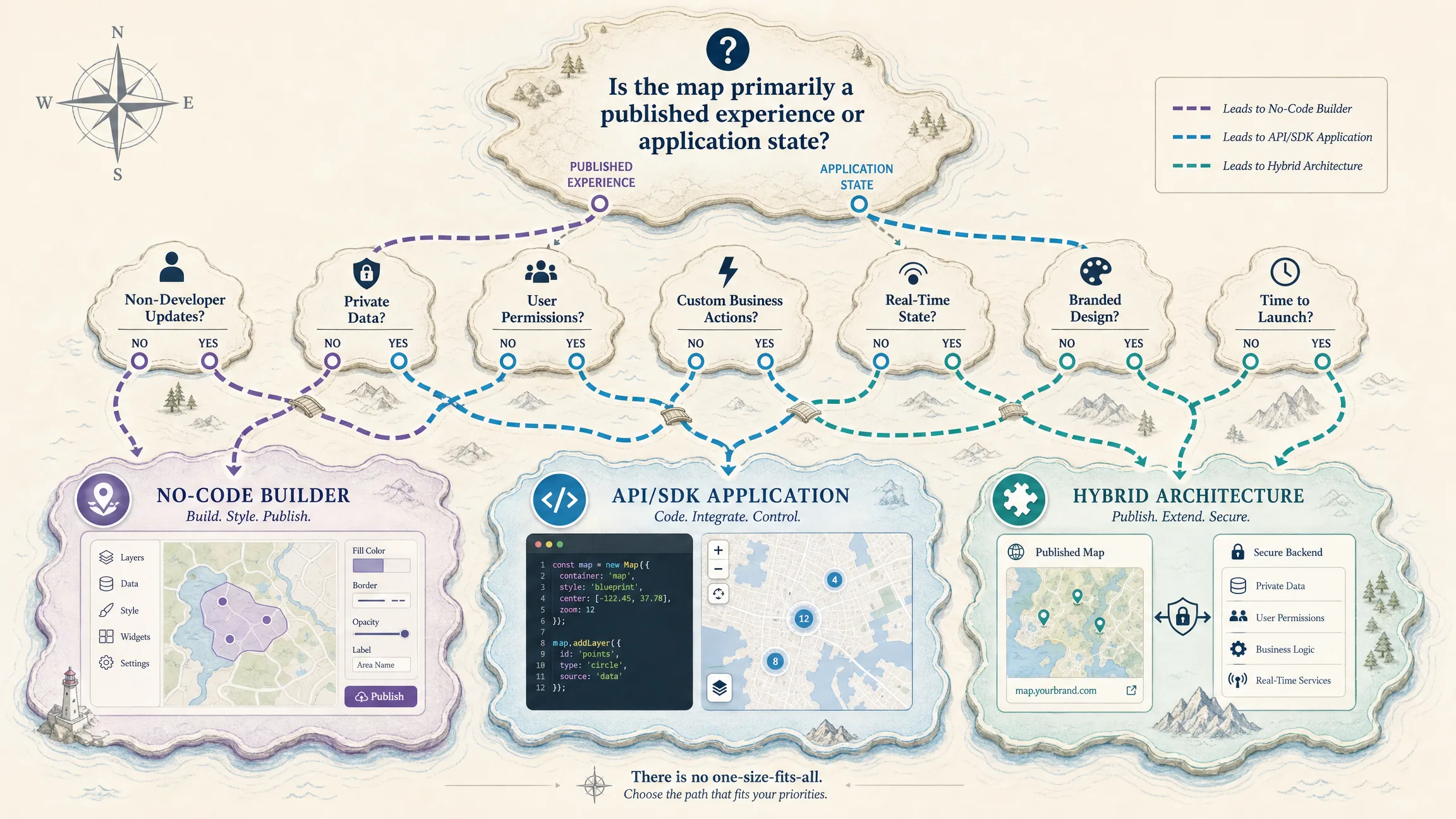
Choose a no-code map builder when most of these are true: the map is mainly a published experience; non-developers need to maintain it; the interaction model fits supported controls; data changes are editorial or platform-supported; speed to publication matters; user-specific state is limited; and the team prefers the platform to operate more infrastructure. Choose a map API or SDK when most of these are true: the map is central to application behavior; the host application owns user state; private or licensed data is required; business actions happen from the map; permissions differ by user or tenant; real-time state or unusual layers matter; and the map must synchronize with other product components. Choose a hybrid model when creators need visual authoring, developers need controlled integration, public and private data must coexist, brand design should be reusable, and the team wants a simple starting point with a deeper integration path.
Before commit, identify the primary map user, define publication versus application role, document data sources, separate private and licensed data, and name the content owner. List user-specific state and business actions, confirm renderer and design requirements, and define publishing and embedding. Set accessibility and SEO requirements, define analytics events, review browser and server credentials, estimate engineering maintenance, and define a migration path from builder to embed to API.
Final Verdict
A no-code map builder and a map API solve different layers of the same product problem. Choose a no-code map builder when the team needs to create, style, publish, and maintain an interactive map with minimal engineering. Choose a map API or SDK when the map must participate deeply in application state, private data, permissions, business logic, or custom interaction. For many teams, the strongest architecture is progressive: build visually where possible, embed through maintained components, add code where the workflow requires it, and keep authoritative data and consequential actions in the host system. Kaleidr’s Studio, Viewer, Chat, Editor, Tiles, and Platform API follow that progression so the first publishing decision does not have to become the permanent architecture.
Start With Visual Map Creation in Kaleidr Studio
Use Kaleidr Studio to move from a prompt to a refined, branded interactive map. Deepen integration through Viewer, Chat, Editor, Tiles, and the Platform API when the host product requires it. Start building in Kaleidr Studio when the next step is a published map experience rather than a blank application skeleton.
FAQs
What is a no-code map builder?
A no-code map builder is a visual or prompt-driven product that lets users create, style, and publish interactive maps without implementing the renderer and publishing stack themselves.
What is a map API?
A map API exposes geographic data or operations programmatically, such as geocoding, place search, routes, tiles, styles, or spatial features.
Is a no-code map builder better than a map API?
Neither is universally better. A builder is stronger for visual authoring and publication. An API is stronger when the map requires custom state, private data, permissions, or business logic.
Can I start with no-code and use an API later?
Yes, when the platform provides an integration path. Kaleidr separates visual creation in Studio from Viewer, Chat, Editor, Tiles, and Platform API surfaces.
Does Kaleidr Studio require coding?
Kaleidr Studio is currently positioned as prompt-first and visual. Coding becomes relevant when a team needs SDK embedding, private integrations, custom application state, or Platform API workflows.
Can a no-code map be embedded on a website?
Yes, when the builder supports publishing and embedding. Kaleidr’s current Viewer can embed a published map by share ID.
When should I use an SDK instead of a raw API?
Use an SDK when you want maintained UI components, browser authentication, lifecycle handling, map attachment, or provider adapters. Use a raw API when you need custom server orchestration or a completely custom interface.
Is MapLibre a map API?
MapLibre GL JS is primarily an open-source map rendering library. The host team supplies or chooses the styles, tiles, and data services used by the renderer.
References
- Google. Overview — Maps JavaScript API. Google Maps Platform documentation. Accessed 7 August 2026. https://developers.google.com/maps/documentation/javascript/overview
- Google. Google Maps Platform security guidance. Google Maps Platform documentation. Accessed 7 August 2026. https://developers.google.com/maps/api-security-best-practices
- Kaleidr. Create Custom Maps with AI Map Maker. kaleidr.com. Accessed 7 August 2026. https://kaleidr.com/studio
- Kaleidr. Pricing & Plans. kaleidr.com. Accessed 7 August 2026. https://kaleidr.com/pricing
- Kaleidr. Introduction. Kaleidr Developer Docs. Accessed 7 August 2026. https://docs.kaleidr.com/
- Kaleidr. Quickstart. Kaleidr Developer Docs. Accessed 7 August 2026. https://docs.kaleidr.com/quickstart
- Kaleidr. Viewer Embed. Kaleidr Developer Docs. Accessed 7 August 2026. https://docs.kaleidr.com/sdk/viewer-embed
- Mapbox. Getting Started. Mapbox Help. Accessed 7 August 2026. https://docs.mapbox.com/help/getting-started/
- Mapbox. Maps Products Overview. Mapbox Help. Accessed 7 August 2026. https://docs.mapbox.com/help/getting-started/maps/
- Mapbox. Access Tokens. Mapbox Help. Accessed 7 August 2026. https://docs.mapbox.com/help/getting-started/access-tokens/
- MapLibre. Introduction — MapLibre GL JS. Accessed 7 August 2026. https://maplibre.org/maplibre-gl-js/docs/
- MapLibre. Map — MapLibre GL JS API. Accessed 7 August 2026. https://maplibre.org/maplibre-gl-js/docs/API/classes/Map/
@misc{kaleidr_studio,
  title  = {Create Custom Maps with AI Map Maker},
  author = {{Kaleidr}},
  note   = {Accessed 7 August 2026},
  url    = {https://kaleidr.com/studio}
}

@misc{kaleidr_quickstart,
  title  = {Quickstart},
  author = {{Kaleidr}},
  note   = {Kaleidr Developer Docs; accessed 7 August 2026},
  url    = {https://docs.kaleidr.com/quickstart}
}

@misc{google_maps_js,
  title  = {Overview -- Maps JavaScript API},
  author = {{Google}},
  note   = {Google Maps Platform documentation; accessed 7 August 2026},
  url    = {https://developers.google.com/maps/documentation/javascript/overview}
}

@misc{google_maps_security,
  title  = {Google Maps Platform security guidance},
  author = {{Google}},
  note   = {Accessed 7 August 2026},
  url    = {https://developers.google.com/maps/api-security-best-practices}
}

@misc{mapbox_getting_started,
  title  = {Getting Started},
  author = {{Mapbox}},
  note   = {Accessed 7 August 2026},
  url    = {https://docs.mapbox.com/help/getting-started/}
}

@misc{maplibre_intro,
  title  = {Introduction -- MapLibre GL JS},
  author = {{MapLibre}},
  note   = {Accessed 7 August 2026},
  url    = {https://maplibre.org/maplibre-gl-js/docs/}
}