
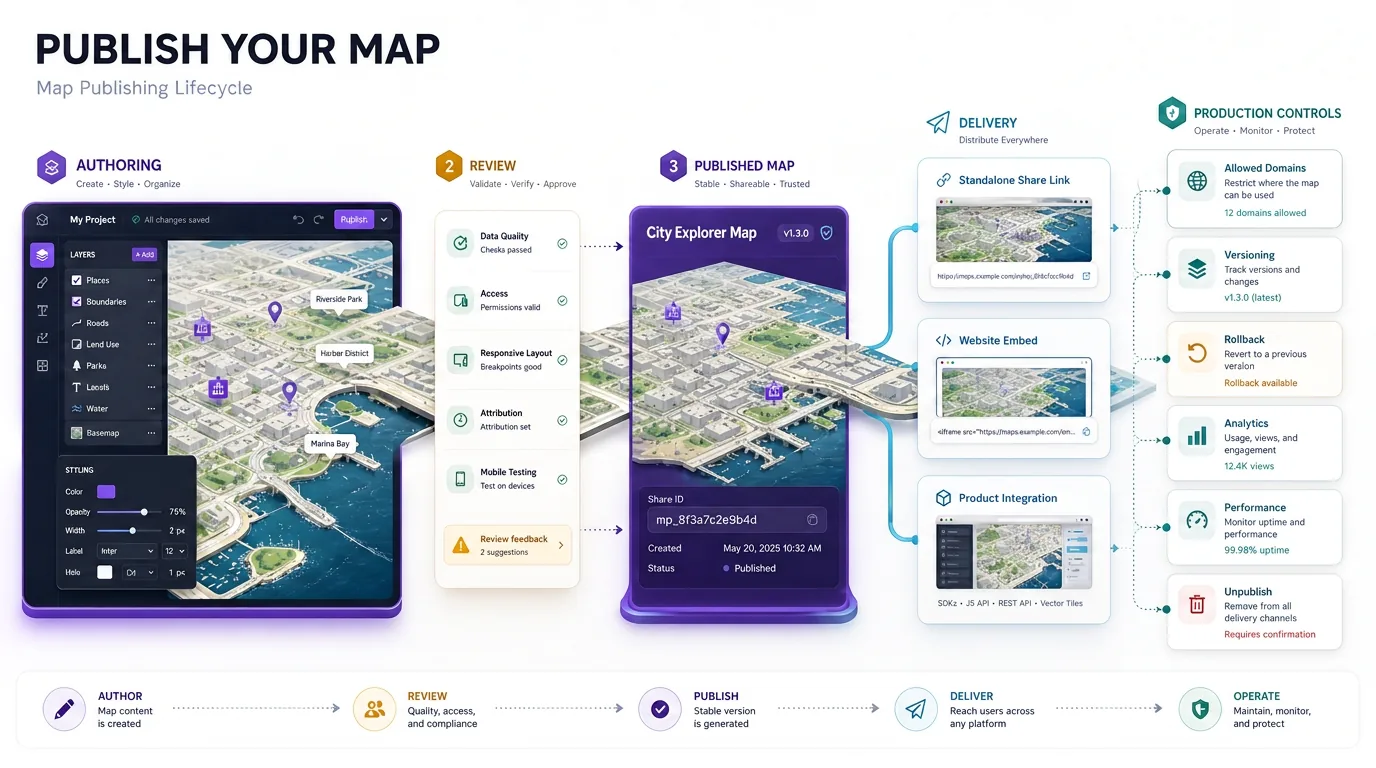
Map publishing turns an editable map into a stable experience that other people can open, embed, or use inside a product. The main choices are a standalone share link, an embedded viewer, or a deeper application integration. A production map also needs access rules, allowed embed domains, a live version, mobile layout, rollout and unpublish paths, and measurement—not just a URL.
The sections below cover publishing models, access and domain controls, embed layout, messaging, versioning, analytics, and Kaleidr Studio and Viewer surfaces. Product context lives on Kaleidr Studio. For embed mechanics, see How to Embed an Interactive Map. For builder versus API ownership, see No-Code Map Builder vs Map API. For SDK mounts, see What Is an AI Map SDK?.
Publishing essentials
- Authoring ≠ publishing: Drafts can change; published maps need a stable consumption surface.
- Choose coupling: Share links stay light; embeds sit in a page; product integration shares application state.
- Gate the host: Allowed domains and origin checks belong in the publish contract.
- Reserve space: A collapsed embed is a layout bug, not a map bug.
- Version behind a stable ID: Measure, review, release, and roll back without rewriting every host page.
What Does Map Publishing Mean?
Creating a map and publishing a map are different stages. During authoring, a team may change places, layers, labels, colors, tiles, camera, filters, interactions, and data sources. Publishing creates a consumption surface: a standalone page, a website embed, a SaaS locator, an editorial map, or an internal read-only view. An authoring tool can tolerate drafts. A published map needs predictable access, layout, performance, behavior, versioning, attribution, and monitoring. Kaleidr Studio currently describes authoring as Prompt → Process → Refine → Deploy and says finished maps can be published as standalone pages or embedded as widgets (Studio).
Should Teams Share, Embed, or Integrate a Published Map?
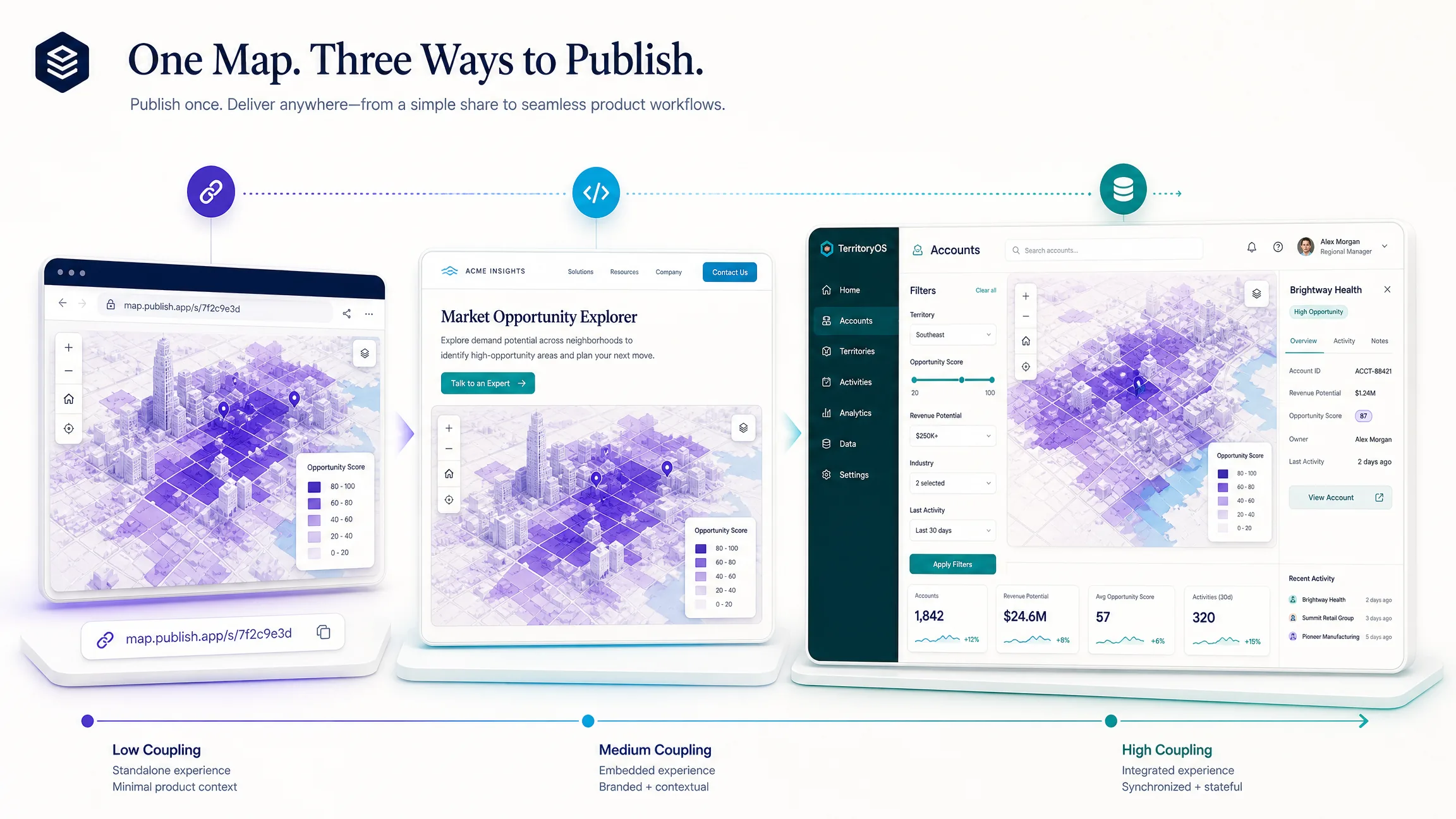
Three models cover most launches. A share link is fastest for review, campaigns, and guides because the host site needs almost no implementation. An embedded viewer belongs on websites, landing pages, CMS pages, and customer portals when the map should sit beside host copy and a call to action. Product integration is for SaaS, marketplaces, and custom workflows where filters, selected records, and application state stay synchronized with the map. The right choice depends on whether the map is primarily content, an embedded experience, or part of application state. A map can start as a share link and later become an embed or a product component.
| Model | Best for | Host development | Product coupling |
|---|---|---|---|
| Share link | Review, campaigns, guides | Minimal | Low |
| Embedded viewer | Websites, CMS, portals | Low | Medium |
| Product integration | SaaS and custom workflows | Higher | High |
Kaleidr’s current developer documentation describes published Viewer maps as share-link gated and addressed by a share identifier rather than by a general API key (Viewer Embed). A share ID identifies a published experience; it is not a server secret and should not be treated as one. Studio currently states that maps can be embedded as widgets after publishing. Chat can attach to an existing host map, while Viewer is designed around a published map experience (kaleidr.js).
How Should Production Embeds Handle Layout, Access, and Messaging?
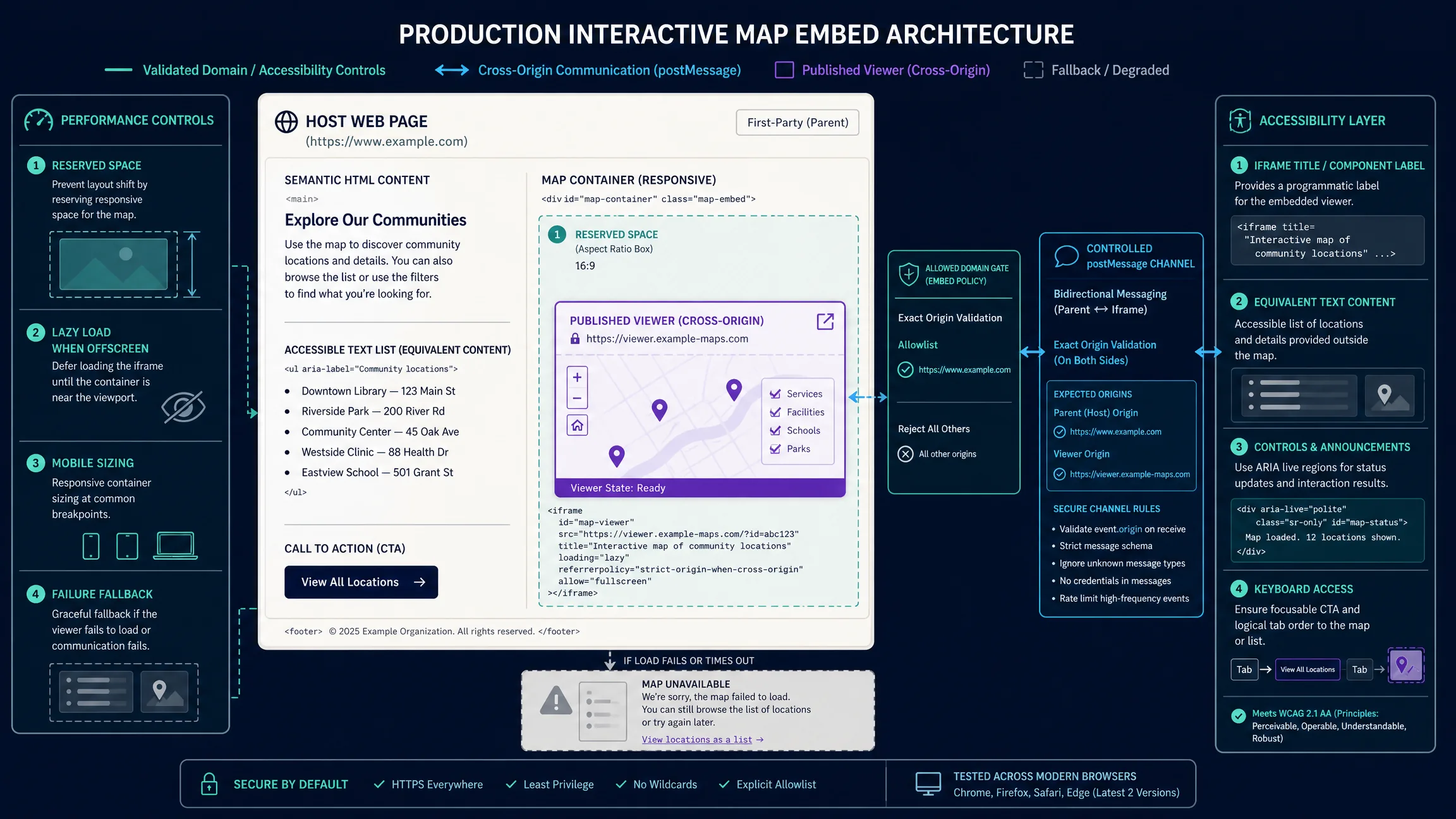
Decide the publishing contract before launch: public versus restricted access, allowed embed domains, draft versus published versus archived states, and whether the live surface shows a reviewed data snapshot. Domain controls should use bare origins such as https://www.example.com and https://app.example.com. Kaleidr’s current Viewer documentation describes publisher-set allowed domains for embedded published maps. A login-protected host page does not automatically make an independently accessible map URL private; private business data needs an authorization architecture designed for that case.
Reserve height and width so the embed cannot collapse. The HTML specification recommends a concise iframe title so assistive technology can name the nested browsing context (HTML Standard); the hard accessible-name requirement for frames sits in WCAG 4.1.2. Lazy-load offscreen embeds with the platform’s supported loading="lazy" behavior; the HTML Standard defines lazy-loading attributes, and web.dev recommends deferring offscreen iframes to reduce network and startup work. An above-the-fold primary map should load as part of the critical experience instead. Keep a textual fallback—place names, addresses, or a list—so the page still works if the viewer fails.
Cross-origin communication belongs on a controlled channel. window.postMessage() is the standard mechanism between windows and iframes (HTML Standard). Validate event.origin on inbound messages and set a specific target origin on outbound messages; do not default to "*". Kaleidr’s Viewer documentation describes a kaleidr-embed:* message seam for supported viewer behavior. Viewer state and host state should stay distinct: the published map owns camera and selection inside the viewer, while the host page owns navigation, forms, and conversion.
// Published Viewer mount: share ID, not a server key
Kaleidr.mount("#published-map", {
  product: "viewer",
  shareId: "YOUR_SHARE_ID"
});
How Should Teams Version, Measure, and Roll Back Published Maps?
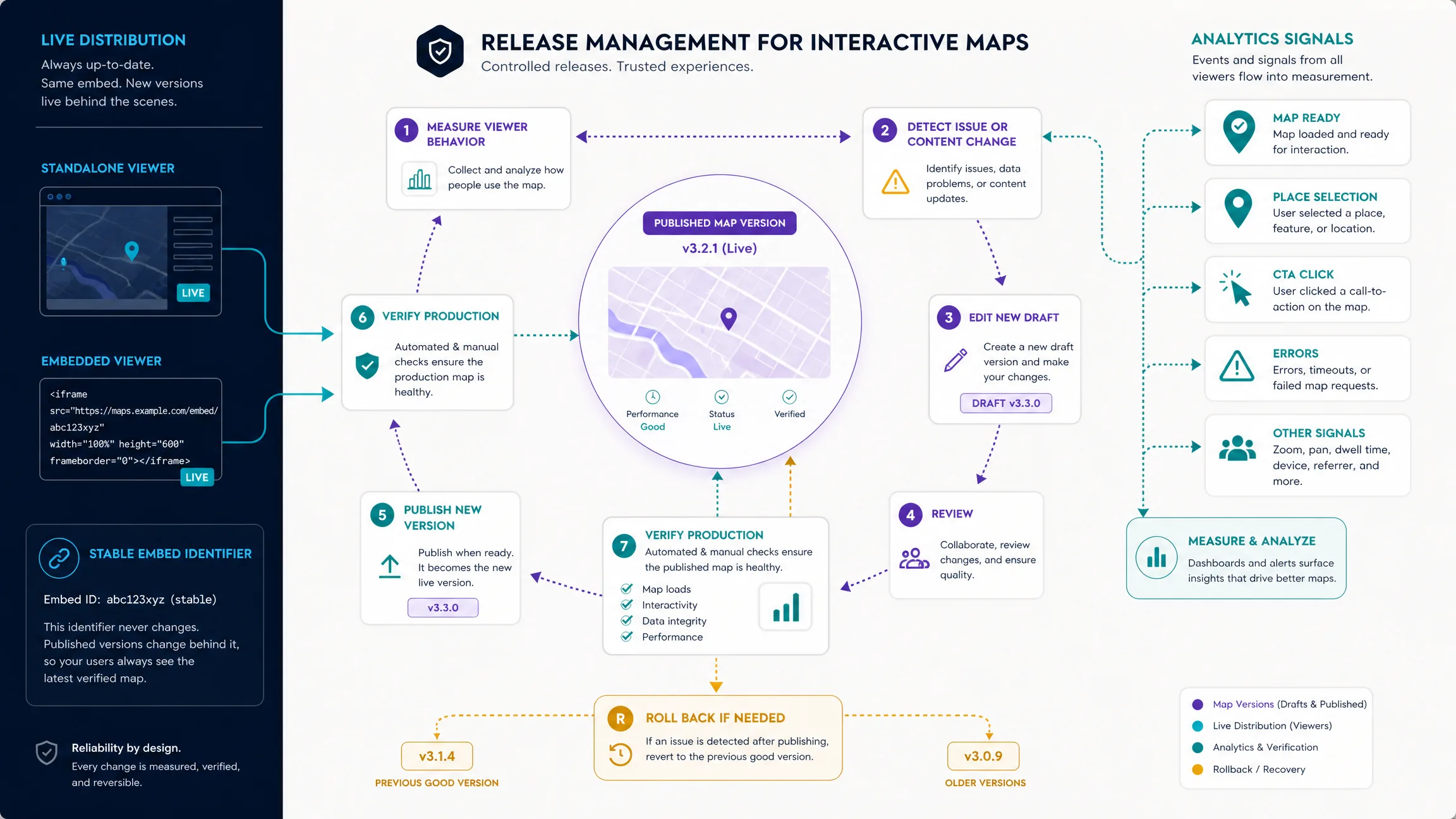
Saving a draft is not the same as publishing a live version. Keep stable identifiers for places and the embed itself so host pages do not break when content changes. Version behind that stable ID: edit a new draft, review data quality and mobile layout, publish, verify production, and roll back if the release fails. Measure more than map loads. Useful signals include map-ready, place selection, CTA, and errors; treat those names as editorial recommendations unless a product documents them as automatic events. Separate authoring analytics from viewer analytics so draft experiments do not pollute production funnels.
Test failure states: blocked domain, unpublished share ID, slow network, and missing fallback text. Production domains, Content Security Policy, attribution, and outbound link safety are part of the same release. CMS pages need a reserved container and a reviewed snapshot. SaaS products need the map coupled to application state. Marketing pages need a conversion path that does not depend on map interaction alone. Real-time and 3D maps add heavier performance and fallback requirements; publish them only when the host page can absorb the cost.
Which Map Publishing Mistakes Should Teams Avoid?
| Mistake | Risk | Better approach |
|---|---|---|
| Treating a draft URL as production | Unstable content and broken embeds | Publish a reviewed snapshot |
| Shipping an embed with no reserved height | Layout shift and a collapsed map | Set aspect ratio or explicit size |
| Lazy-loading the primary map | Empty first screen | Eager-load above-the-fold maps |
Using postMessage("*") |
Cross-origin spoofing | Validate origin and target |
| Treating a share ID as a secret key | Confused access model | Keep server keys on the backend |
| Skipping allowed-domain checks | Unexpected host reuse | Restrict embed origins |
| Publishing private rows on a public share | Data leakage | Authorize before publish |
| Rewriting the embed ID on every edit | Broken host pages | Version behind a stable ID |
| Measuring only map loads | Blind product quality | Track ready, selection, CTA, errors |
| Leaving no text fallback | Blank page on viewer failure | Duplicate key facts in HTML |
Final Verdict
Map publishing succeeds when the team treats the live map as a product surface, not an export. Choose share, embed, or integration by how tightly the map must couple to host content and application state. Then add the production contract: access, allowed domains, reserved layout, origin-validated messaging, versioning, measurement, and rollback. Kaleidr Studio currently publishes standalone pages and embeddable widgets, and Kaleidr Viewer addresses a published map by share ID. That split keeps authoring fast while the host page stays responsible for conversion, accessibility, and release discipline.
Publish Maps With Kaleidr Studio
Create, review, and deploy a map as a standalone page or embeddable widget, then mount published Viewer embeds where the host site needs them. Open Kaleidr Studio to publish, and use the developer documentation for Viewer share IDs, allowed domains, and SDK mounts.
FAQs
What is map publishing?
Map publishing is the process of turning an editable map into a stable experience that other people can open, embed, or use inside a product, with access, layout, versioning, and measurement controls.
What is the difference between a share link and an embed?
A share link opens the published map as its own page. An embed places that published map inside a host website or product layout.
When should a team use product integration instead of an embed?
Use product integration when filters, selected records, or workflow state must stay synchronized with the map rather than sitting around a standalone viewer.
Does Kaleidr Viewer need an API key?
The current Viewer documentation describes published Viewer maps as share-link gated rather than API-key gated. Check the current developer documentation before deployment because access models can evolve.
Is a share ID the same as an API key?
No. A share ID identifies a published map experience. A server API key authorizes privileged API operations and must remain secret.
Should I lazy-load a map embed?
Usually when it is below the fold or secondary to the page. If the map is the primary interaction, load it as part of the critical experience and optimize its startup instead.
How do I make an iframe map accessible?
Give a raw iframe a concise title, provide useful surrounding HTML, support keyboard-accessible tasks, and offer textual information that does not require map dragging.
Can two cross-origin pages communicate with an embedded map?
Yes, when the integration supports it. window.postMessage() provides controlled cross-origin messaging. Use a specific target origin and validate incoming message origins.
Can I publish private business data through a map embed?
Only if the publishing and authorization architecture is designed for that use case. A login-protected host page does not automatically make an independently accessible map URL private.
Should a published map have versioning?
Yes when changes can affect customers, embeds, reporting, or business workflows. Versioning makes rollback and debugging much safer.
Can Kaleidr Studio publish maps without code?
Yes. Kaleidr’s current Studio page says authors can create and refine maps visually, then publish them as standalone pages or embeddable widgets.
References
- Kaleidr. Design Custom Maps, Powered by Spatial AI. Kaleidr Studio. Accessed 19 August 2026. https://kaleidr.com/studio
- Kaleidr. kaleidr.js Loader. Kaleidr Developer Documentation. Accessed 19 August 2026. https://docs.kaleidr.com/sdk/kaleidr-js
- Kaleidr. Viewer Embed. Kaleidr Developer Documentation. Accessed 19 August 2026. https://docs.kaleidr.com/sdk/viewer-embed
- WHATWG. HTML Standard — Lazy loading attributes. Accessed 19 August 2026. https://html.spec.whatwg.org/multipage/urls-and-fetching.html#lazy-loading-attributes
- WHATWG. HTML Standard — The iframe element. Accessed 19 August 2026. https://html.spec.whatwg.org/multipage/iframe-embed-object.html#the-iframe-element
- W3C. Understanding Success Criterion 4.1.2: Name, Role, Value. WCAG 2.2. Accessed 19 August 2026. https://www.w3.org/WAI/WCAG22/Understanding/name-role-value.html
- WHATWG. HTML Standard — Posting messages. Accessed 19 August 2026. https://html.spec.whatwg.org/multipage/web-messaging.html#posting-messages
- web.dev. Lazy load images and iframe elements. Accessed 19 August 2026. https://web.dev/learn/performance/lazy-load-images-and-iframe-elements
@misc{kaleidr_studio_publish_2026,
  title  = {Design Custom Maps, Powered by Spatial AI},
  author = {{Kaleidr}},
  note   = {Kaleidr Studio; accessed 19 August 2026},
  url    = {https://kaleidr.com/studio}
}

@misc{kaleidr_viewer_embed_2026,
  title  = {Viewer Embed},
  author = {{Kaleidr}},
  note   = {Kaleidr Developer Documentation; accessed 19 August 2026},
  url    = {https://docs.kaleidr.com/sdk/viewer-embed}
}

@misc{kaleidr_js_loader_2026,
  title  = {kaleidr.js Loader},
  author = {{Kaleidr}},
  note   = {Kaleidr Developer Documentation; accessed 19 August 2026},
  url    = {https://docs.kaleidr.com/sdk/kaleidr-js}
}

@misc{whatwg_iframe_2026,
  title  = {HTML Standard -- The iframe element},
  author = {{WHATWG}},
  note   = {Accessed 19 August 2026},
  url    = {https://html.spec.whatwg.org/multipage/iframe-embed-object.html#the-iframe-element}
}

@misc{wcag_412_2026,
  title  = {Understanding Success Criterion 4.1.2: Name, Role, Value},
  author = {{W3C}},
  note   = {WCAG 2.2; accessed 19 August 2026},
  url    = {https://www.w3.org/WAI/WCAG22/Understanding/name-role-value.html}
}

@misc{whatwg_lazy_loading_2026,
  title  = {HTML Standard -- Lazy loading attributes},
  author = {{WHATWG}},
  note   = {Accessed 19 August 2026},
  url    = {https://html.spec.whatwg.org/multipage/urls-and-fetching.html#lazy-loading-attributes}
}

@misc{whatwg_postmessage_2026,
  title  = {HTML Standard -- Posting messages},
  author = {{WHATWG}},
  note   = {Accessed 19 August 2026},
  url    = {https://html.spec.whatwg.org/multipage/web-messaging.html#posting-messages}
}

@misc{webdev_lazy_iframe_2026,
  title  = {Lazy load images and iframe elements},
  author = {{web.dev}},
  note   = {Accessed 19 August 2026},
  url    = {https://web.dev/learn/performance/lazy-load-images-and-iframe-elements}
}