
A hotel destination map is a curated local guide on the hotel's own website, anchored on the property. Before booking, it shows how the beach, the venue, or the airport relates to the stay. During the stay, the same map helps a guest choose dinner, a rainy-day plan, or a late kitchen. Kaleidr Studio publishes the map, Viewer embeds it, and booking plus guest records stay in the hotel's systems.
A useful guide answers the questions guests already ask, rather than listing every business near the coordinate. Walkable dinner, a plan for children, a rainy afternoon, the train station, and the places the front desk would actually name are enough to start. Hotel Tech Report's 2026 website guidance says maps can center the property as the local authority on activities, dining, nightlife, and attractions, with filters for points of interest such as landmarks, restaurants, beaches, golf, and transportation centers, including airports and train stations (Hotel Tech Report, 2026). The hotel owns that point of view, and the map gives that point of view a geography. The list below is the working set.
- Put the hotel marker at the center of the opening view.
- Start with a short catalog the staff would recommend, not hundreds of anonymous pins.
- Name categories after guest decisions, such as dinner within a walk, rainy day, or getting here.
- Give each place a stable name, a category, a location, and a short reason to visit.
- Keep hours, closures, and event dates tied to a current source.
- Put the same place facts in HTML outside the canvas.
- Let conversation complement browsing.
- Leave room inventory, payment, and guest records in the hotel's systems.
What Is a Hotel Destination Map?
A hotel destination map is a curated interactive map on the hotel's own site, with the property as the anchor and a chosen set of nearby places. Restaurants, cafés, landmarks, parks, family activities, transit, and arrival points can all belong, and the important word is curated. A generic nearby map answers which businesses exist around a coordinate. A hotel guide answers what this property thinks a guest should know about the destination. That shift changes the content from coverage to usefulness, brand fit, distance from the lobby, and a staff recommendation.
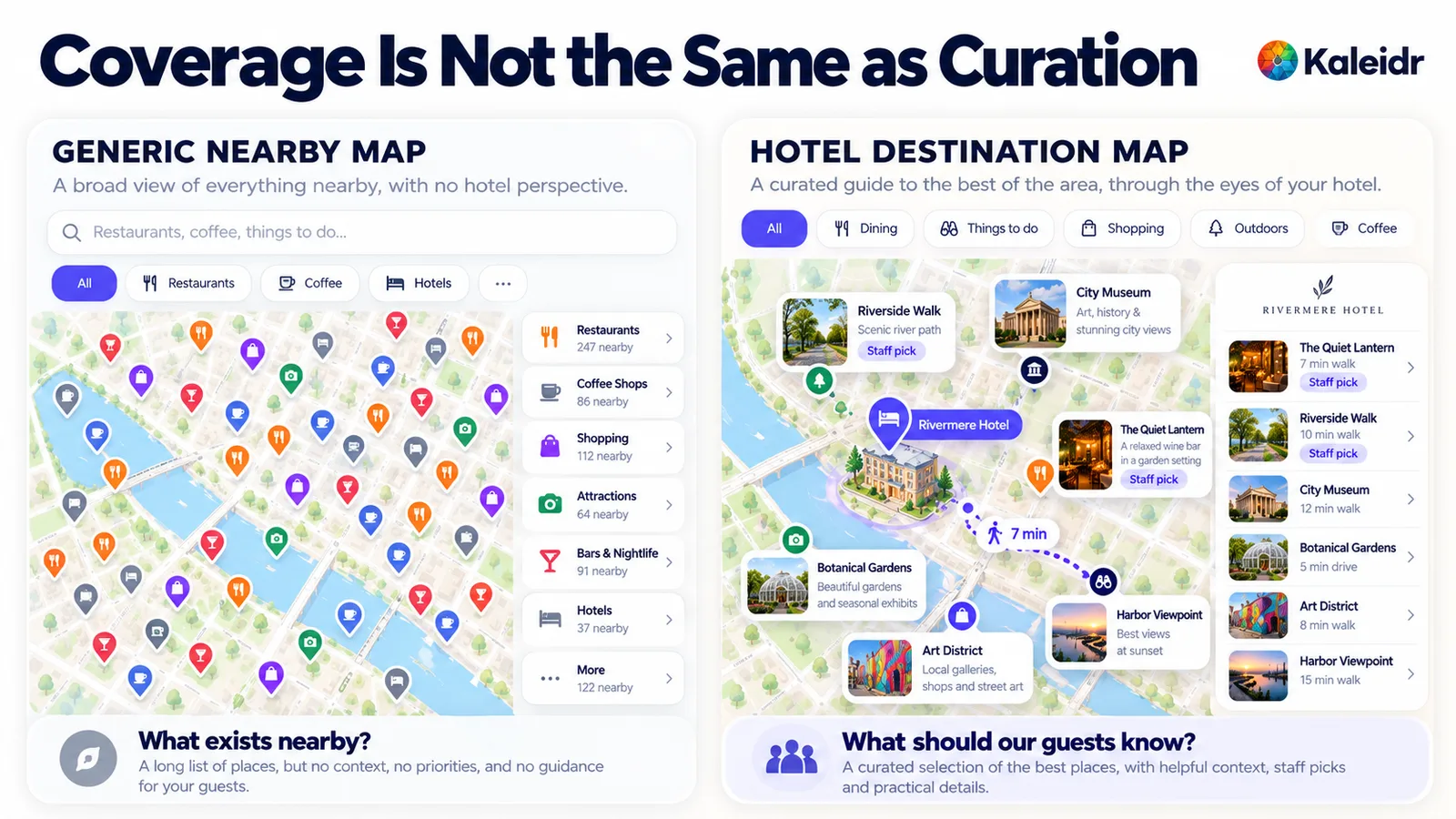
The left panel is a generic nearby map crowded with anonymous pins and directory counts. The right panel is a hotel guide with one property marker, a short list, staff-pick labels, and a walking route. The nearby counts on the left, including 247 restaurants, are sample labels on the figure. The place names, including The Quiet Lantern and Rivermere Hotel, are illustrations.
When Does One Map Serve Two Guest Jobs?
Location is part of the hotel product, and a guest weighs the neighborhood along with the room and the rate. A sentence such as "in the heart of downtown" does not say whether the convention center is a walk, whether the beach needs a car, or what sits between the lobby and the museum. Before booking, the map's job is location confidence: hotel to airport, hotel to venue, hotel to beach, hotel to station. The same published map changes jobs after check-in, when the guest needs a decision rather than a comparison.
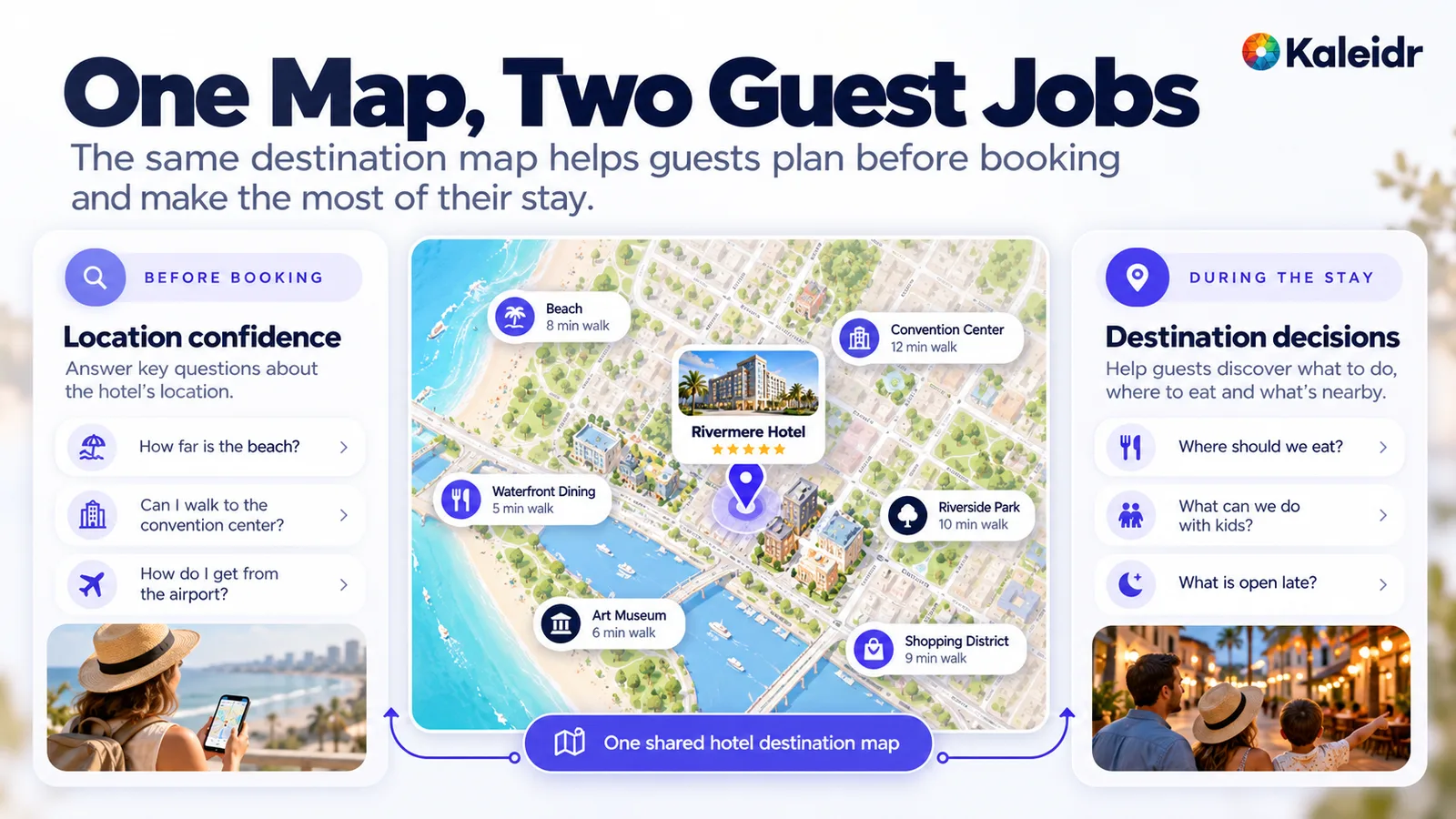
The center of the figure is one shared hotel map, with the property between the beach and the convention center. The left column is the pre-booking job, including distance to the beach, a walk to the venue, and the airport. The right column is the in-stay job, including dinner, children, and what is open late. The walking times on the pins are illustrations, as the figure does not document a measured route.
What Should the First Catalog Include?
More pins do not automatically make a better hotel map. A practical start for an independent property is often a short list the staff would recommend: a handful of restaurants, a few cafés and bars, the major attractions, family activities, practical services, arrival points, and the staff favorites. The count depends on the destination, and 20 to 40 useful places is a planning range, not a platform limit. A directory of several hundred nearby businesses hands the research back to the guest. A smaller catalog is also easier to keep honest when a restaurant closes or a partnership ends.
Directory labels describe businesses, and guest labels describe decisions. Restaurant, bar, attraction, and shop still help a filter, but the categories guests actually use sound like dinner within walking distance, coffee before 8 a.m., with children, rainy day, date night, local favorites, late night, and getting here. Those labels match the questions the front desk already hears. They also match the way a guest types a request, which matters once conversation is added beside the list.
Each place needs a record, not only a coordinate. A strong record has a stable id, a name, a category, a latitude and longitude, a short staff note, a reason to go, a link, and a last-reviewed date. Hours, a temporary closure, an event date, and ticket or table availability are a different class of fact, because they go stale. Durable notes can be reviewed on a schedule. Time-sensitive facts need a current source, or the page should link to the business that owns them. Do not print "open now" from a record the hotel has not refreshed.
Why Should Every Place Be Read From the Hotel?
The property has to be unmistakable, with a distinct marker, the property name, an opening view around the hotel, and routes that start there. The guest's mental model is hotel, then place, then the relationship between them, rather than a city full of scattered pins. "0.8 miles away" is useful, and "a short walk from the lobby" is often better, provided the time comes from a routing service when the page promises a real travel time. A language model should not invent that number. Neighborhood, direction, and what sits between the hotel and dinner are fair editorial context even when a live route is not on the page.
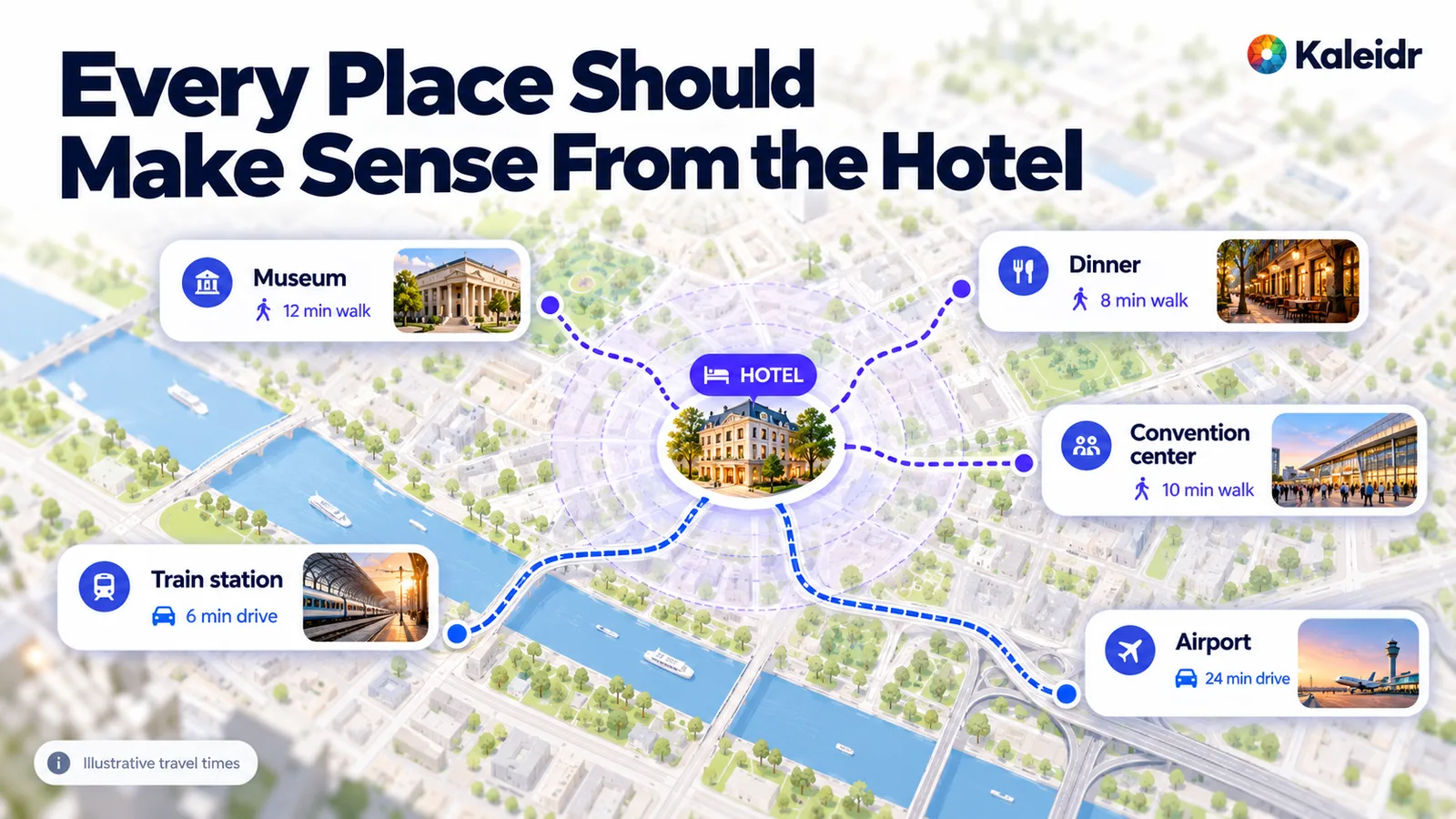
The figure places the hotel at the center, with spokes to a museum, dinner, a convention center, a train station, and an airport. Walking spokes and driving spokes use different labels so the relationship is not only a straight-line distance. A note on the figure marks the travel times as illustrative. Place photos and the hotel portrait are sample artwork, not a specific property's guide.
When Should a Guest Browse, and When Should They Ask?
Conversation should complement the map, not replace basic navigation. A guest who already knows "I need coffee" should filter to coffee, open a place, and request directions, with no chat required. The guide still has to work when AI is unavailable, when the allowance is spent, when the guest prefers a list, or when the question is simple. Assistive technology also needs the list, which is one reason the places cannot live only inside pins.
Conversation earns its place when the request combines several conditions. A quiet drink within ten minutes, a rainy afternoon with children, or one stop before a 7 p.m. dinner is awkward as a stack of filters and natural as a sentence. The answer still depends on trustworthy places and, when a route is promised, on a routing result rather than a guessed time. Browsing covers the known category. Asking covers the compound request.
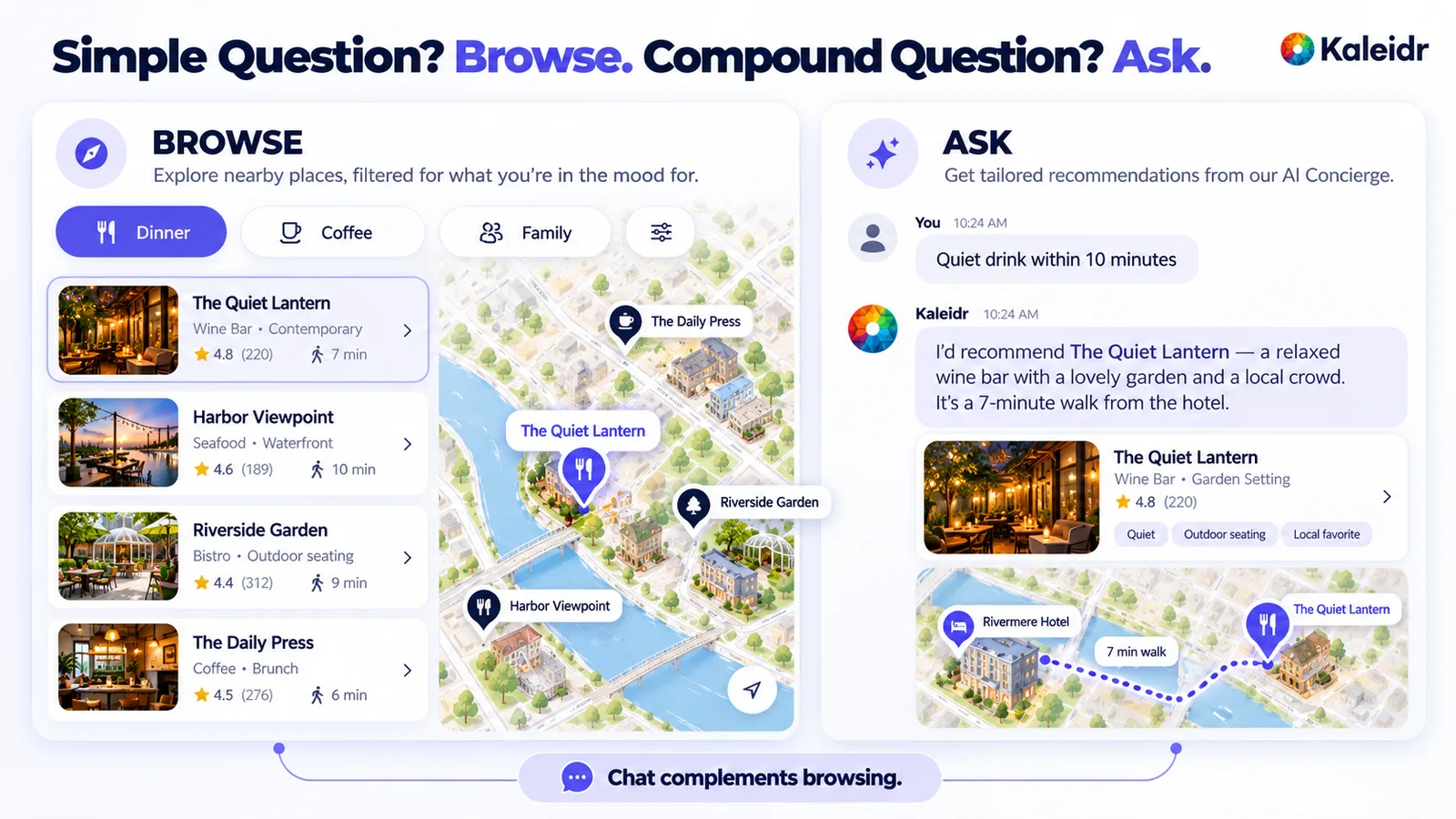
The left panel is browsing, with dinner, coffee, and family filters over a place list and a map selection. The right panel is a question, "Quiet drink within 10 minutes," with one suggested place, a pin, and a route. Star ratings and review counts on the cards are sample labels, not live reviews. The footer states that chat complements browsing.
What Does Visitor AI Chat Actually Answer?
On a published Kaleidr map, the owner can switch on Visitor AI Chat and optionally cap what it may spend each month. The page embeds the map by share id, with no API key, and the map renders in an iframe Kaleidr hosts. Visitor questions draw against that owner cap. The embed is read-only: visitors cannot edit the map, and nothing a visitor does is saved (Kaleidr, 2026). Kaleidr's Chat docs describe the panel more broadly. A question streams into the panel, places in the answer appear as cards and pins, the map can move to those places, and a request for directions draws a route (Kaleidr, 2026).
The public Viewer and Chat docs do not say that every Visitor AI answer is limited to the hotel's approved partner list. If the requirement is "only recommend places this property has approved," treat that as a separate grounding project: the hotel owns the candidate catalog, eligibility runs before the recommendation, and current facts come from the systems that own them. Kaleidr's AI guest concierge guide is the path for hotel policy, property amenities, and reservation questions that need those systems. Public destination chat and that approved-catalog concierge are different products.
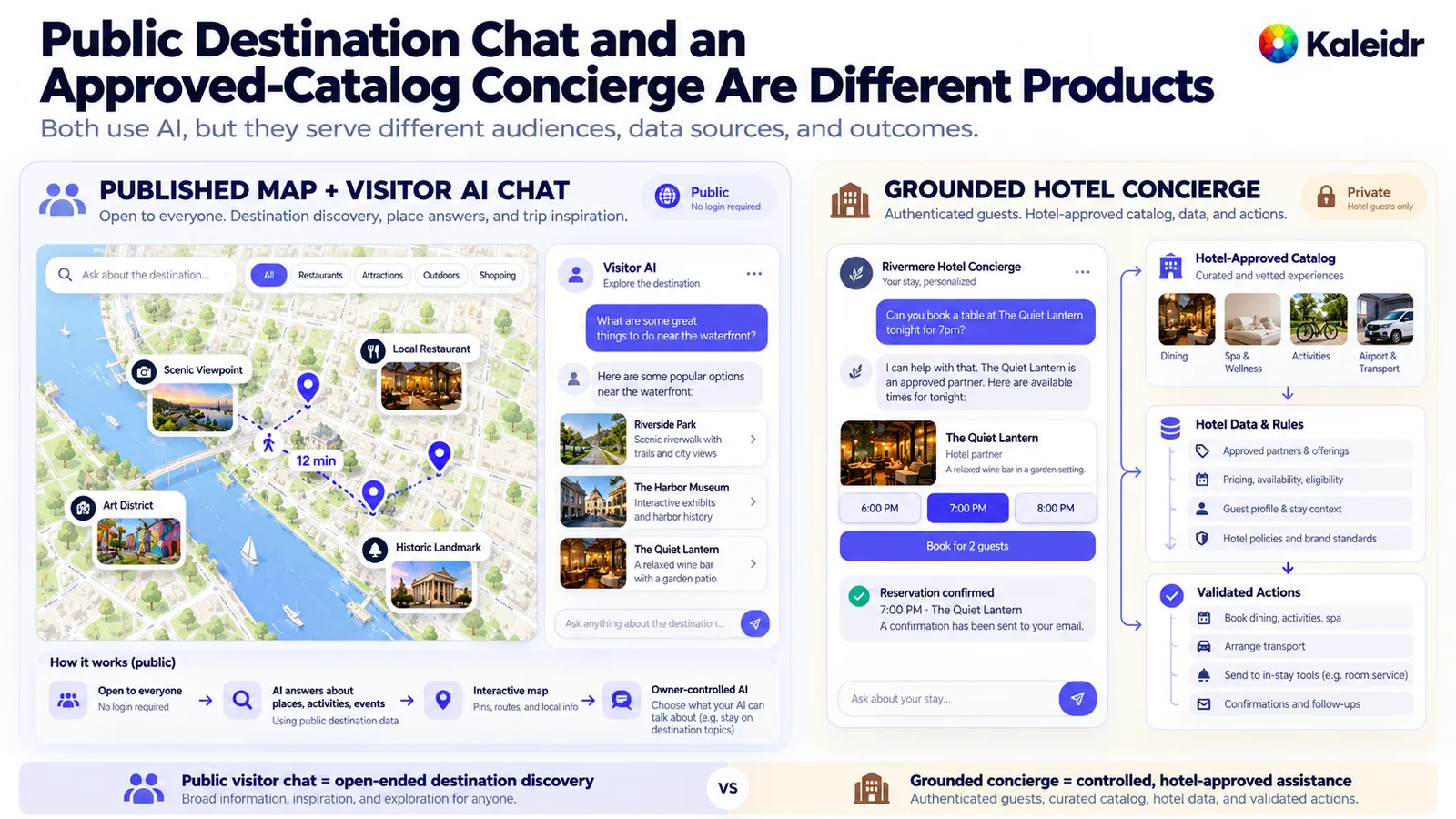
The left side of the figure is a published map with Visitor AI Chat, marked public and open without a sign-in. The right side is a grounded concierge with an approved catalog, hotel data, and a sample reservation confirmation. That confirmation is an illustration of a host system, not a booking Kaleidr completes. The figure's claim that public chat answers from destination data is a product-boundary diagram, and the docs cited above do not promise a hotel-approved-only catalog.
Should the Hotel Keep Its Site or Start From a Template?
An established hotel site should usually keep its brand, booking flow, and CMS, and add the guide as a section. The practical path is staff recommendations, then Kaleidr Studio to create and publish the map, then a Viewer embed on the hotel page (Kaleidr, 2026). Viewer works on every plan, Free included, and the id of the published map is all the embed needs. The Viewer docs cited above show the embed snippet, which uses the share id Studio displays after publish.
<kaleidr-map
  product="viewer"
  share-id="YOUR_MAP_ID"
  style="display: block; height: 480px"
></kaleidr-map>
A new site, a campaign microsite, or a replacement can start from the Kaleidr Hospitality template. The customizer's Edit Map control opens Studio on the map, and a map already published in Studio can be connected by its share snippet or map id. The project downloads as a zip for static hosting. There is no separate hotel-only template. The hotel adapts the travel content to the places it recommends, and any booking form on that site still has to point at the hotel's own engine. Confirm the current template contents in the customizer before treating a specific page block as guaranteed.
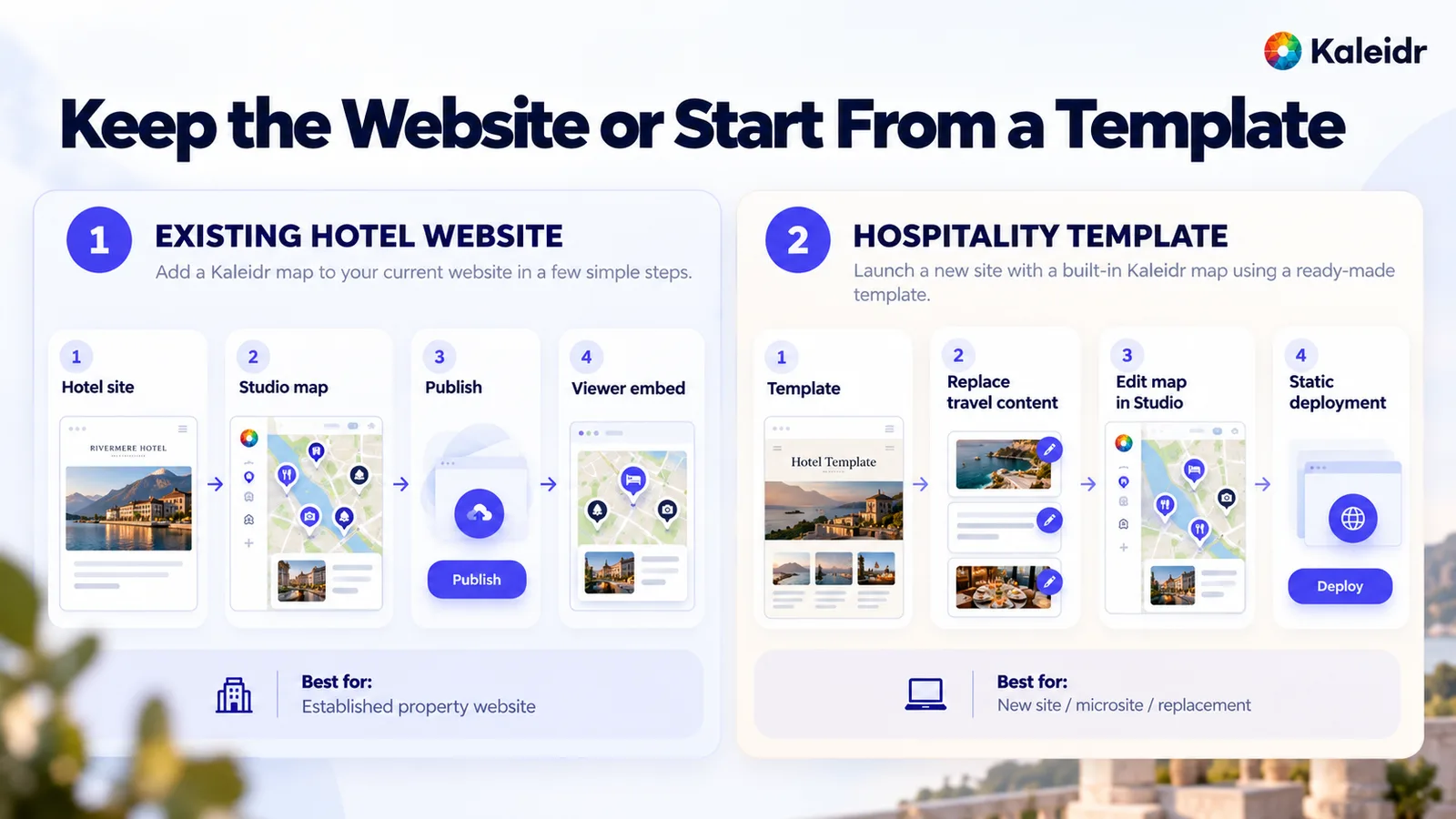
The left route runs from the existing hotel site to a Studio map, publish, and a Viewer embed, and it fits an established property website. The right route starts from the Hospitality template, replaces the travel content, edits the map in Studio, and downloads a static deployment. That route fits a new site, a microsite, or a replacement. Rivermere Hotel on the cards is a sample name.
Where Do Booking and Guest Records Belong?
A destination map is not a property-management system or a booking engine. Kaleidr does not need to own room inventory, room rate, reservation state, payment, a loyalty account, or the guest profile. The guide can hand the guest to those systems: explore the neighborhood, see why the location fits, then follow Book Now into the hotel's booking engine, or open a partner's reservation page. Live rates or live availability inside the map are an integration with the system that owns them, not a template setting. The map guides. The transaction system commits.
A published map is public, so the hotel should publish only data that anyone may read, which the Viewer docs state directly and which was cited above. Hotel location, restaurants, attractions, transit, public venues, and editorial notes can belong on that map. Guest names, room numbers, guest itineraries, reservation details, staff-only entrances, internal notes, and private partner pricing do not. Guest-specific context belongs in an authenticated experience outside the public map.
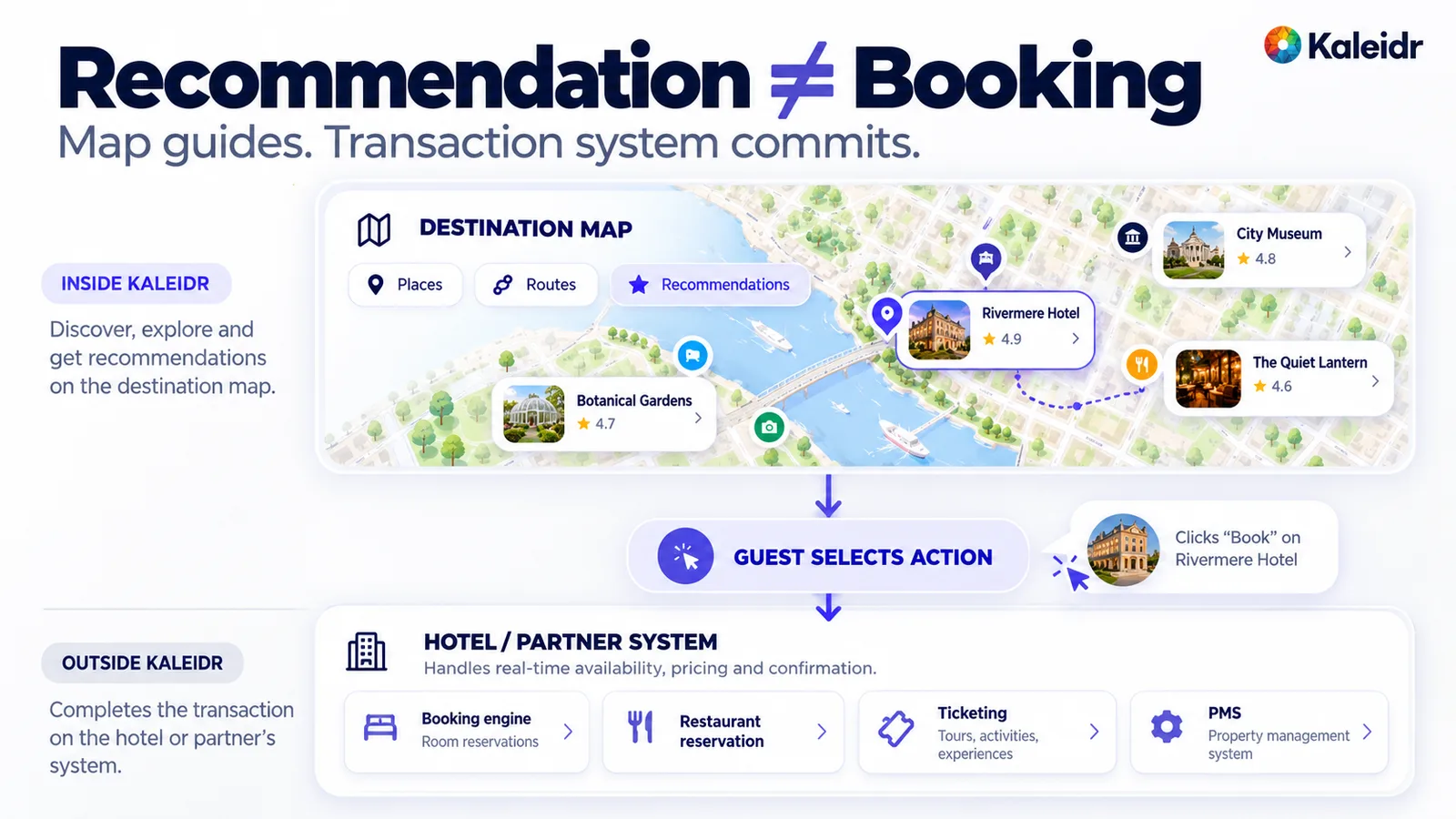
The upper band of the figure is the destination map, labeled inside Kaleidr, with places, routes, and recommendations. The lower band is the hotel or partner system, labeled outside Kaleidr, with a booking engine, restaurant reservation, ticketing, and a PMS. Star ratings on the place cards are sample labels. The arrow between the bands is the guest choosing an action, not Kaleidr completing the transaction.
What Has to Live in the Page, Not Only on the Canvas?
Essential place information should also exist as structured HTML. A heading, a neighborhood overview, a place list with a short reason to visit, direction links, and a few guest questions keep the page useful for keyboard users, screen-reader users, high-zoom users, and anyone whose map fails to load. Kaleidr's embed guide makes the same recommendation: headings, summaries, and location lists outside the canvas serve people and search. Search engines and answer systems cannot read a canvas alone. The page can support queries such as restaurants near the hotel or a hotel near the venue because the prose says so, not because a pin exists.
Do not generate hundreds of thin "near X" pages from the catalog. Write the neighborhood, the staff favorites, the walking-distance set, airport or station access, and family options as real editorial. Many guests will also open the guide while walking, so the phone layout needs a visible hotel anchor, short place cards, a few category chips, one primary action, and an easy return to the property. A beautiful desktop map that collapses under a floating panel fails the in-stay job.
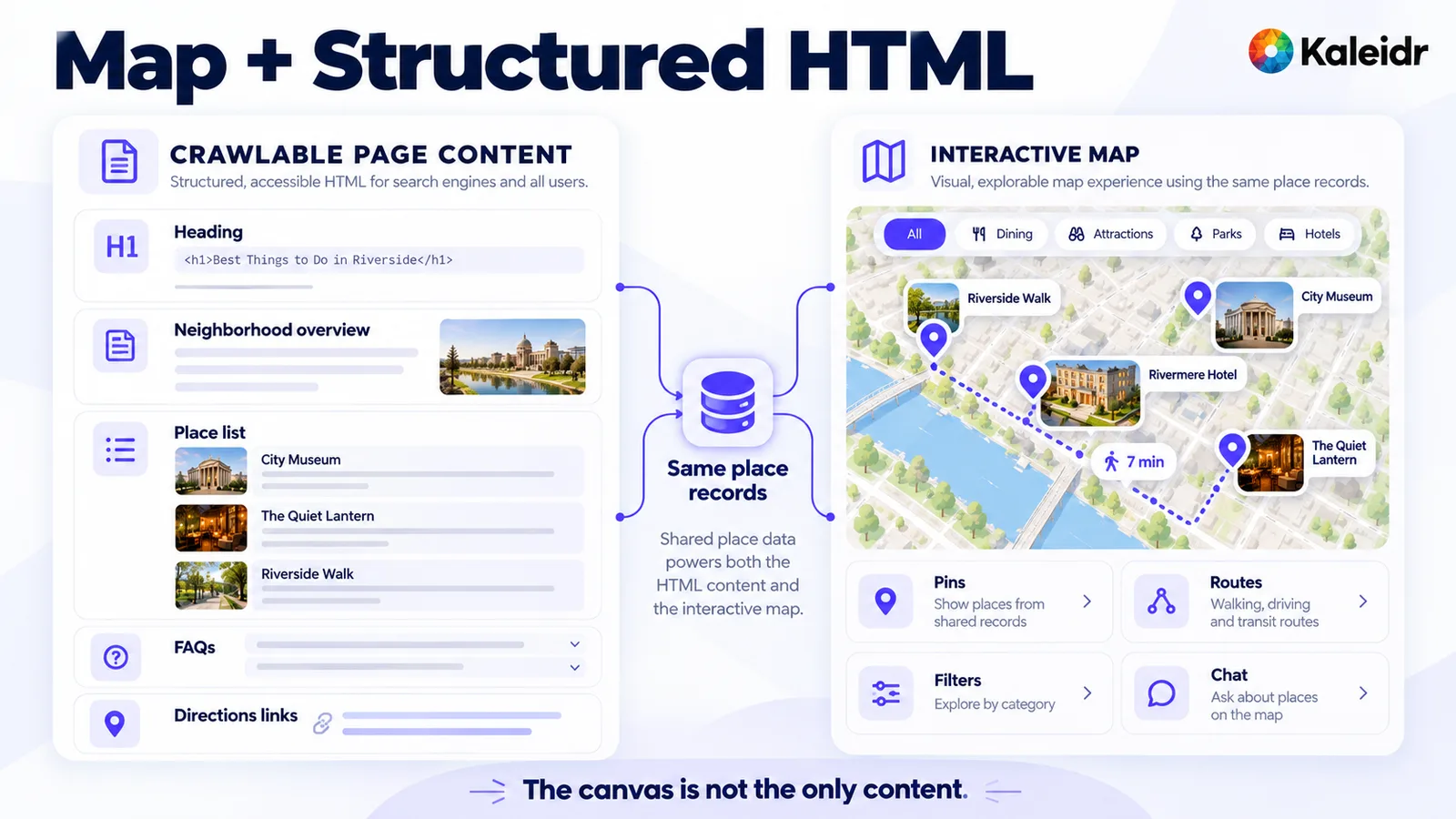
The left column is crawlable page content: a heading, a neighborhood overview, a place list, FAQs, and direction links. The right column is the interactive map: pins, routes, filters, and chat. Both sides are drawn from the same place records. The line under the figure says the canvas is not the only content.
What Should the Hotel Measure Besides a Map Load?
A map load says the experience opened, and a load count does not say the guide helped. Useful events to define are map opened, category selected, place opened, staff pick opened, directions requested, an external reservation link opened, a Visitor AI question, and a booking call to action. Kaleidr Analytics dashboards cover reach, views, and engagement, plus audience location and sessions, views, and interactions per map (Kaleidr, 2026). The Viewer embed does not give the host page the map's click events, so a room booking, a partner reservation, and revenue stay in the hotel or partner system that actually commits them. Do not label a map interaction as revenue unless that system confirms the outcome.
Repeated guest questions are also a content signal. Breakfast before 7, the closest pharmacy, something that works with children, and the airport transfer tell the hotel which categories, notes, and arrival facts are missing. The guide can improve from those questions without treating the chat log as a booking report.
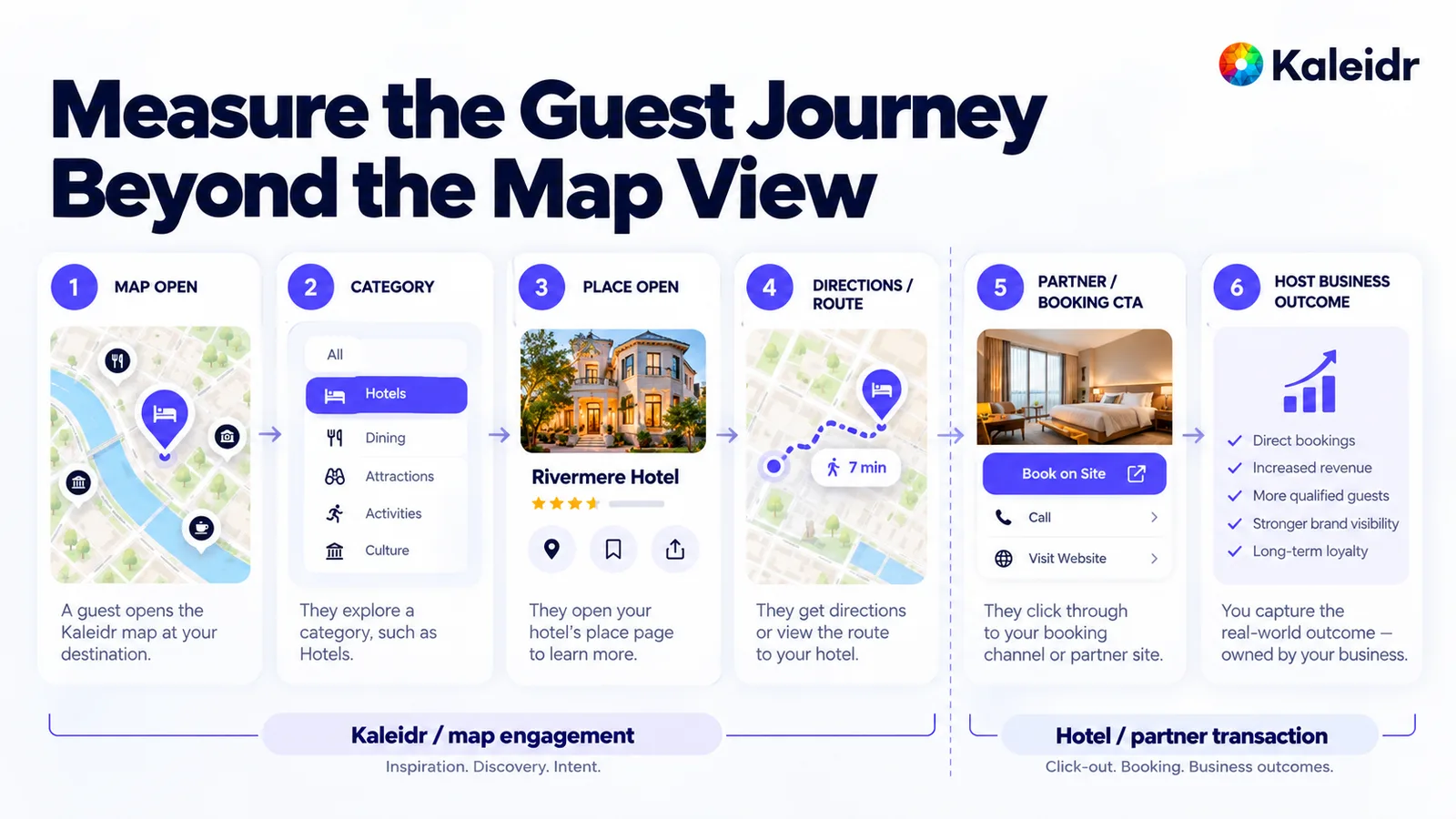
The figure walks from map open to category, place open, directions, a partner or booking call to action, and a host business outcome. A dashed line splits Kaleidr map engagement from the hotel or partner transaction. The outcome column, including direct bookings and revenue, is the host's result to measure, not a Kaleidr metric. The stars on the place card are sample labels.
What Does a Hotel Destination Map Cost on Kaleidr?
Kaleidr's pricing page, checked October 17, 2026, lists Free at $0 a month with Studio and Analytics, 500,000 AI credits a month, and 50,000 map loads a month, about 1 million tile requests. Pro is $29 a month with 5 million AI credits, server API keys, and the fuller API. Every plan includes that same 50,000 map-load allowance. Extra map loads are $2 per 1,000. Add-on packs of AI credits or map loads are a one-time purchase, they are used only after the current cycle's plan allowance, and unused pack units roll over, while plan allowances reset each billing cycle (Kaleidr, 2026).
Viewer itself needs only the published map's share id and works on Free, as the Viewer page cited above already states. A property that stays inside the included map loads can publish and embed without upgrading only to get Viewer. If Visitor AI Chat is on, questions consume the owner's capped allowance. Do not assume a particular number of guest questions fits inside 500,000 credits without measuring real usage. Free also includes browser API keys for AI chat. Pro adds server keys. Enterprise is the conversation when the hotel needs custom usage, a contract, an SLA, dedicated support, or organization-level infrastructure.
What Should a Team Do Next?
Collect 20 to 40 places the staff would recommend, with an id, a category, a staff note, a location, and a link. Build the hotel anchor, the opening view, and the category styles in Studio, publish, and put the Viewer on the neighborhood or local-guide page with the same facts in HTML beside it. Turn on Visitor AI Chat only when compound destination questions earn it, and keep the monthly cap visible. Leave booking, rates, and guest identity in the systems that already own them. Open Kaleidr Studio and start from the recommendations the front desk would actually make.
Note: Kaleidr uses AI-assisted tools for image creation, content refinement, and research throughout its creative and development workflows.
FAQs
What is a hotel destination map?
A hotel destination map is an interactive local guide on a hotel's own website. The property is the anchor, and the pins are places the hotel wants guests to know about, such as restaurants, attractions, transit, and staff recommendations.
Why should a hotel add one before check-in?
Prospective guests are judging the neighborhood, not only the room. A map can show the walk to dinner, the ride from the airport, or the relationship to a venue in a way a single location sentence cannot.
How many places should the map include?
There is no platform quota. For many independent properties, a focused list of roughly 20 to 40 useful recommendations is a stronger start than hundreds of generic nearby businesses.
Can guests ask the map questions?
Yes, when the owner switches on Visitor AI Chat for the published map and, if wanted, caps what it may spend each month. Approved-partner-only answers need a grounded catalog, which public Visitor AI Chat does not promise by itself.
Can the map go on an existing hotel website?
Yes. Viewer embeds the published map by share id, with no API key, on every plan including Free. The page should still carry headings and a place list outside the iframe.
Does Kaleidr handle hotel bookings?
No. Room inventory, rates, payment, and the guest profile stay in the hotel's booking engine and PMS. The map can link the guest to those systems.
Can the map show live room rates?
Only through an integration with the system that owns inventory and price. That is not a template setting and not a field on a static place record.
Is the guide useful for search?
The guide is useful when the page includes crawlable destination content outside the canvas: a neighborhood overview, nearby places, travel relationships, and guest questions. The map alone should not be the only content.
References
- Hotel Tech Report. Hotel Website Design Trends 2026: How to Stand Out and Increase Conversion Rates. Maps as a local travel guide, with filters for points of interest such as landmarks, restaurants, beaches, golf, and transportation centers. Accessed October 17, 2026. https://hoteltechreport.com/news/hotel-web-design-trends
- Kaleidr Developer Docs. Viewer. A keyless iframe embed by share id, on every plan including Free, with optional Visitor AI Chat and a public-data warning. Accessed October 17, 2026. https://docs.kaleidr.com/viewer
- Kaleidr Developer Docs. Chat. A chat panel on a page that already shows a map, with streamed answers, pins, and routes. Accessed October 17, 2026. https://docs.kaleidr.com/chat
- Kaleidr. AI Guest Concierge for Hotels. Hotel questions that need property systems, beside curated maps and a hospitality template. Accessed October 17, 2026. https://kaleidr.com/blog/ai-guest-concierge-hotels
- Kaleidr. AI Map Maker for Branded Interactive Maps. Create, customize, and publish branded interactive maps. Accessed October 17, 2026. https://kaleidr.com/studio
- Kaleidr. Hospitality template. Customizer where Edit Map opens Studio and a published map connects by share snippet or map id. Accessed October 17, 2026. https://template.kaleidr.com/customize/?template=hospitality
- Kaleidr. How to Embed an Interactive Map on a Website. Headings, summaries, and location lists outside the map canvas. Accessed October 17, 2026. https://kaleidr.com/blog/how-to-embed-interactive-map-on-a-website
- Kaleidr. Map Engagement and Location Analytics. Reach, views, engagement, audience location, and sessions per map. Accessed October 17, 2026. https://kaleidr.com/analytics
- Kaleidr. Pricing & Plans. Free and Pro allowances, add-on packs, and the map-load price. Accessed October 17, 2026. https://kaleidr.com/pricing
@misc{hotel_tech_report_website_2026,
  title  = {Hotel Website Design Trends 2026: How to Stand Out and Increase Conversion Rates},
  author = {{Hotel Tech Report}},
  year   = {2026},
  url    = {https://hoteltechreport.com/news/hotel-web-design-trends}
}

@misc{kaleidr_viewer_docs_2026,
  title  = {Viewer},
  author = {{Kaleidr Developer Docs}},
  year   = {2026},
  url    = {https://docs.kaleidr.com/viewer}
}

@misc{kaleidr_chat_docs_2026,
  title  = {Chat},
  author = {{Kaleidr Developer Docs}},
  year   = {2026},
  url    = {https://docs.kaleidr.com/chat}
}

@misc{kaleidr_guest_concierge_2026,
  title  = {AI Guest Concierge for Hotels},
  author = {{Kaleidr}},
  year   = {2026},
  url    = {https://kaleidr.com/blog/ai-guest-concierge-hotels}
}

@misc{kaleidr_studio_2026,
  title  = {AI Map Maker for Branded Interactive Maps},
  author = {{Kaleidr}},
  year   = {2026},
  url    = {https://kaleidr.com/studio}
}

@misc{kaleidr_hospitality_template_2026,
  title  = {Hospitality template},
  author = {{Kaleidr}},
  year   = {2026},
  url    = {https://template.kaleidr.com/customize/?template=hospitality}
}

@misc{kaleidr_embed_guide_2026,
  title  = {How to Embed an Interactive Map on a Website},
  author = {{Kaleidr}},
  year   = {2026},
  url    = {https://kaleidr.com/blog/how-to-embed-interactive-map-on-a-website}
}

@misc{kaleidr_analytics_2026,
  title  = {Map Engagement and Location Analytics},
  author = {{Kaleidr}},
  year   = {2026},
  url    = {https://kaleidr.com/analytics}
}

@misc{kaleidr_pricing_2026,
  title  = {Pricing & Plans},
  author = {{Kaleidr}},
  year   = {2026},
  url    = {https://kaleidr.com/pricing}
}