
An AI map platform is the system that keeps a map useful after the first prompt: trusted data, design, publishing, conversation, measurement, and a path into a product. An AI map maker is the narrower tool that gets a map onto the screen. The opening moments can look the same. The buying question is what still has to be true after launch.
"AI map maker" and "AI map platform" are evaluation terms, not an industry standard. A product can sit between them. The useful split is still the job. A one-off guide and a map that stays embedded, branded, and updated are different purchases.
What is an AI map platform?
An AI map maker turns an idea, a list, or a file into a map. The usual path is prompt, map, share. An AI map platform treats that map as a product that has to be operated. The path continues through data, design, publish, interaction, measurement, and integration.
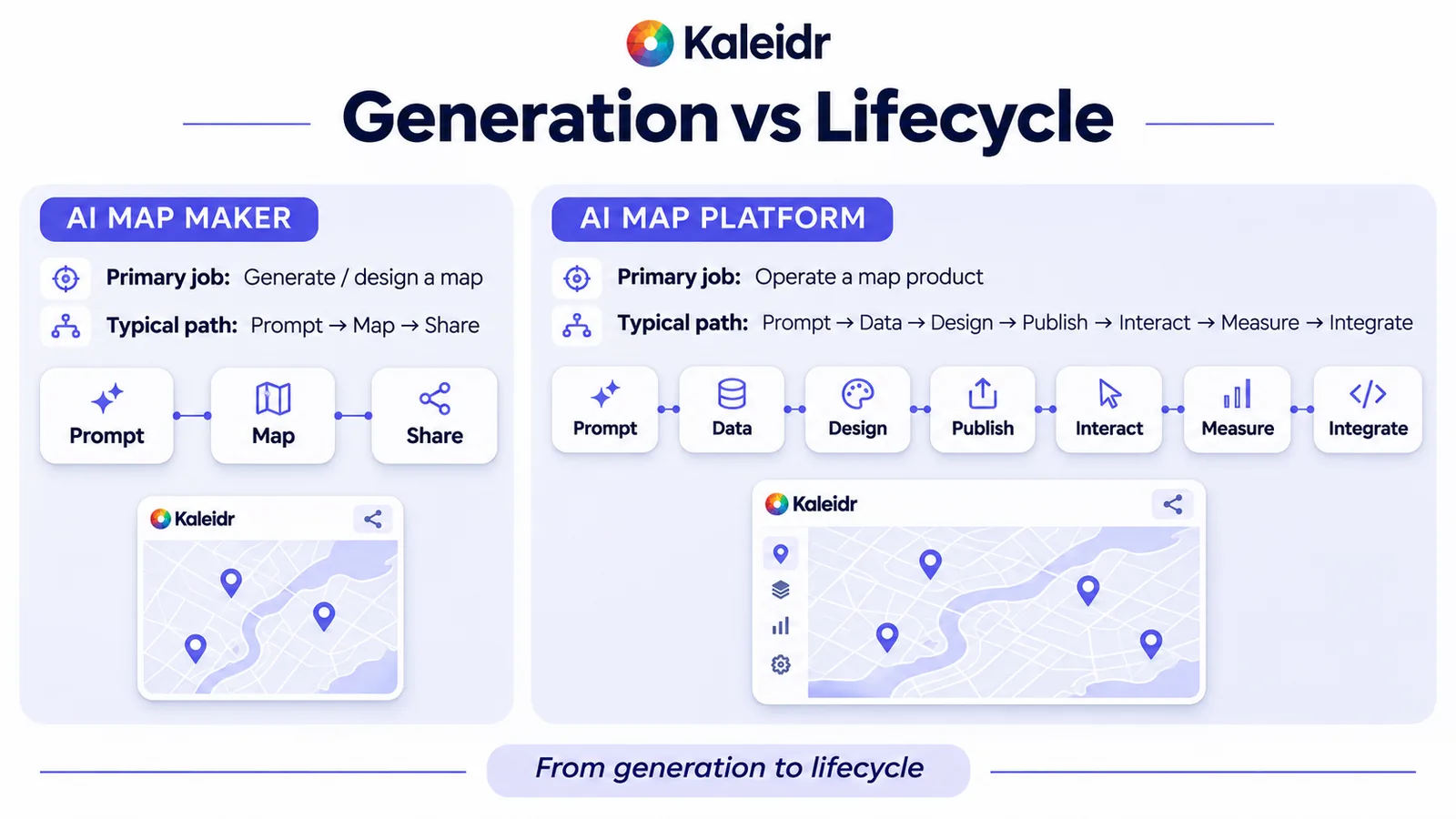
The left path ends when a map can be shared. The right path is the work of keeping that map in a product. The labels are an editorial contrast, not a score of any vendor.
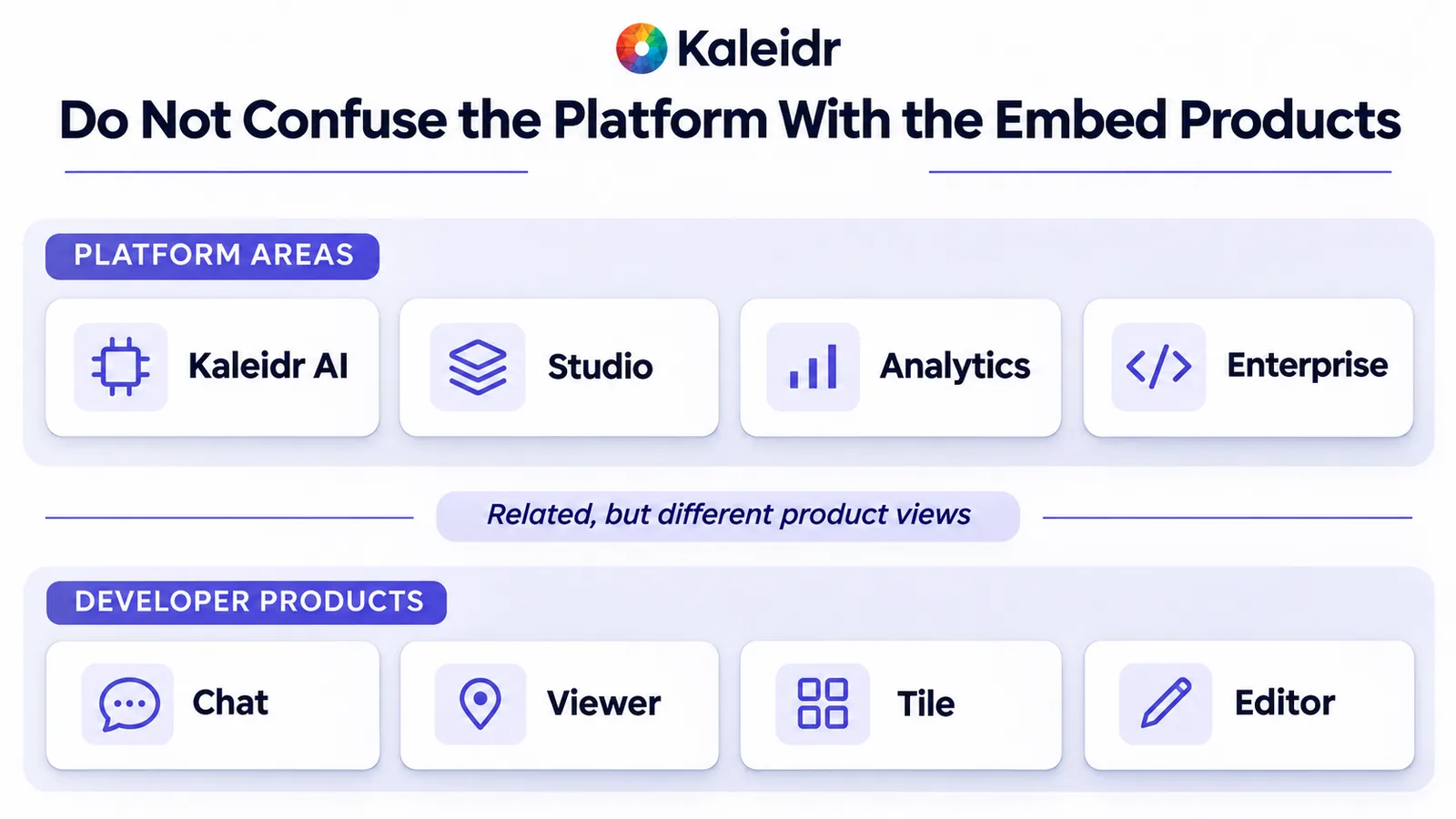
A platform does not earn the name by adding menu items. The parts have to share data, deployment, usage, and a way to change the map later. Kaleidr's public shape is four areas: Kaleidr AI, Kaleidr Studio, Kaleidr Analytics, and Kaleidr Enterprise. What is Kaleidr? separates those areas from the four embed products a page can load.
What happens after the first prompt?
The first prompt removes setup. The author can describe the places, the categories, and a style direction, and a draft can appear before anyone has drawn every pin. A hotel map of restaurants, attractions, and transit still needs a second pass. Someone has to approve the places, the public wording, the brand, and what a guest is allowed to ask.
The stages below are a Kaleidr editorial framework, not a standard. Define the job the map helps someone do. Create the first map. Ground it in data you trust. Design the basemap and the hierarchy. Publish by share, embed, or a deeper integration. Let people interact, including with conversational help. Measure what they actually do. Scale with APIs and organization controls. A map with no job is a pile of layers, and a prompt does not repair that.
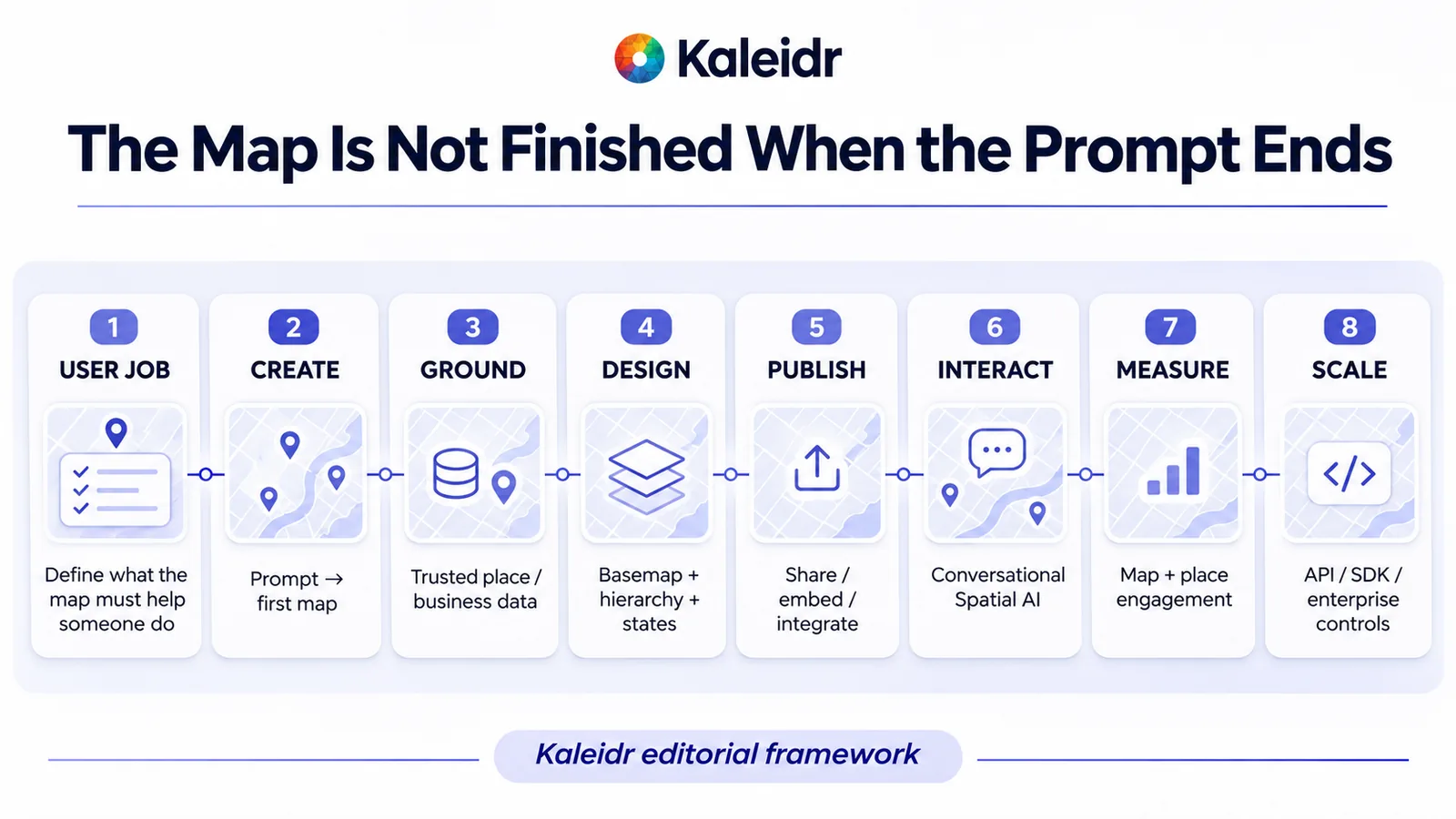
The sequence is an editorial framework for a map that stays in use. Create is the maker step. Ground, design, publish, interact, measure, and scale are the platform steps. The footer marks the drawing as Kaleidr's framework, not an industry standard.
How do Kaleidr's four areas fit one lifecycle?
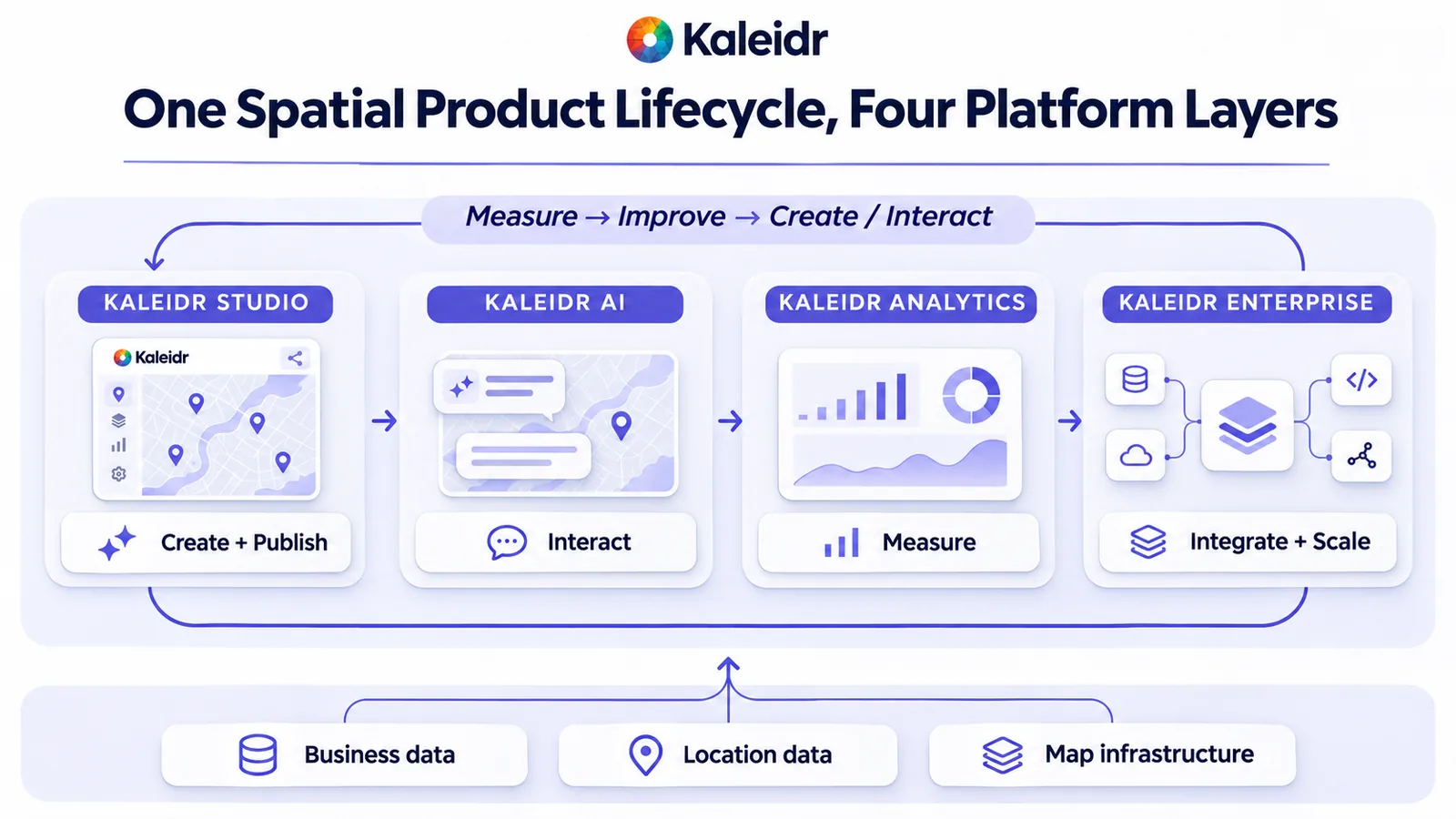
Studio is where the map is created, styled, given data, and published. Kaleidr AI is the conversational layer, in Studio and on a published map. Analytics is the product area for understanding how people use the map. Enterprise is the path for custom usage, contracts, and business data that should ground answers.
The loop is the point of calling it a platform. Measurement should change the data, the design, or the content, and the next publish should carry that change. A generated map that cannot be revised is a poster. A platform map is a release.
Studio creates and publishes. Kaleidr AI handles interaction. Analytics is the measurement layer. Enterprise is integration and scale. The arrow from measure back to create is the loop, and the three blocks underneath are foundations, not extra products.
Are the embed products the same four areas?
No. One browser loader exposes Chat, Viewer, Tile, and Editor. Chat and Editor run in the host page. Viewer and Tile run in a Kaleidr iframe. A publishable key is exchanged for a short-lived session, and a server key calls the API from a backend (Kaleidr, 2026).
Chat on a map the site already runs keeps that map's renderer. Guides exist for Mapbox GL JS, MapLibre GL JS, the Google Maps JavaScript API, and Leaflet (Kaleidr, 2026). Viewer embeds a published Studio map and needs no API key. Tile is a Kaleidr basemap and needs a publishable key. Editor mounts editing tools in the page, and that work stays in the page's memory: nothing is saved, exported, or published from the embed (Kaleidr, 2026). Chat, Viewer, Tile, and Editor run on Free. The Server API starts on Pro (Kaleidr, 2026).
The two rows are related and are not a one-to-one map. Kaleidr AI is not the same name as Chat, and Studio is not the same name as Editor. The middle label says they are different product views.
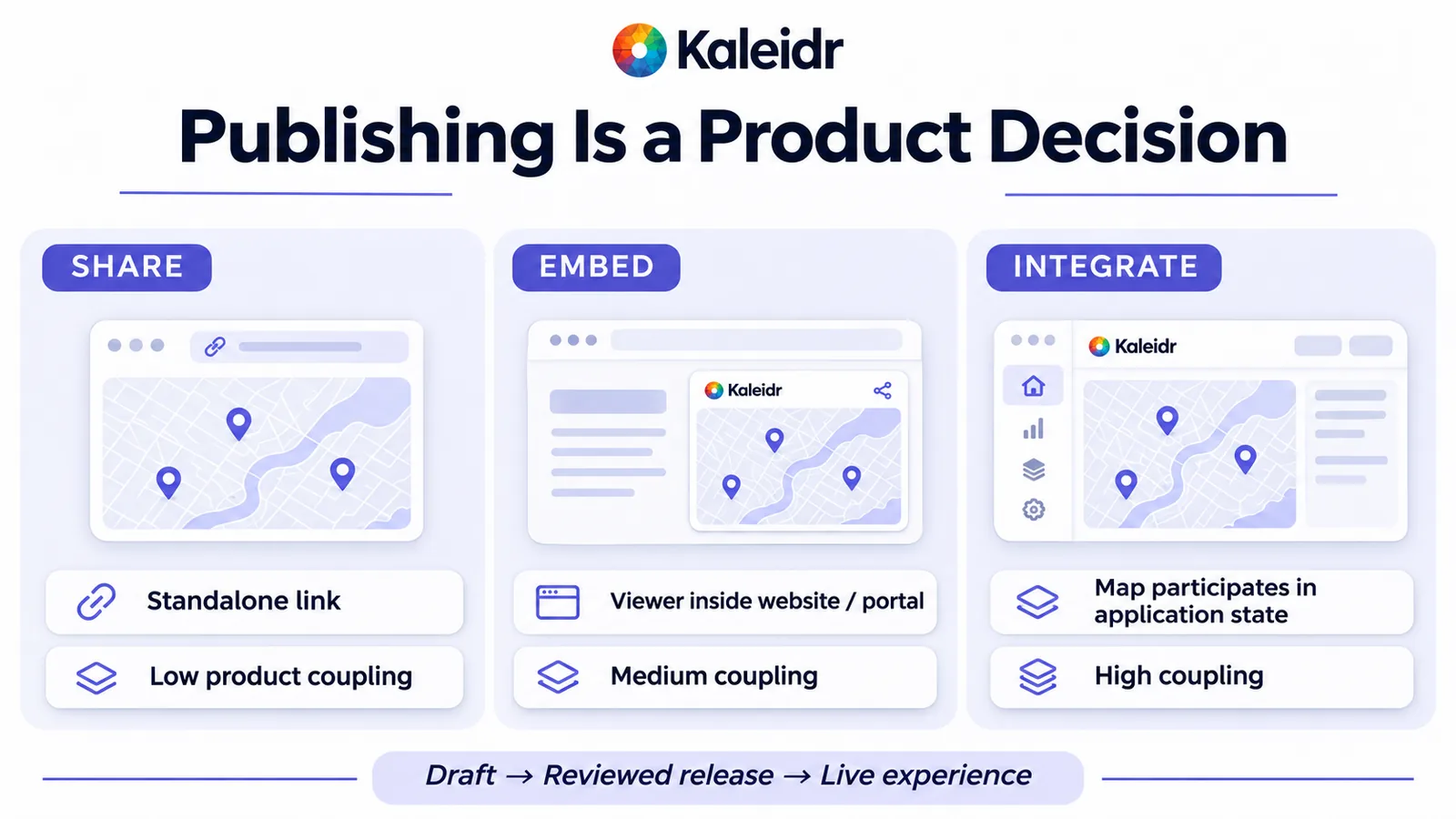
How do share, embed, and integrate differ?
A share link is a standalone map with low coupling to the rest of a product. An embed places Viewer inside a site or a portal, and the page still treats the map mostly as a frame. Integration means the map participates in application state: the host decides what the visitor may see, and the map returns places and routes the host can act on. Publishing is a product decision about that coupling, not only a button that makes a URL.
A dataset on a Studio map is available on Free, Pro, and Enterprise, belongs to that map, and is not read through an API key. Business data that grounds AI answers is a separate Enterprise upload. A published map serves the datasets it draws, whole, with every column, so private notes do not belong in those fields (Kaleidr, 2026). Map publishing and AI map chat on a published map cover the public step in more detail.
Share is a link. Embed puts Viewer in a site. Integrate lets the map take part in application state. The lower path is draft, then a reviewed release, then the live experience.
What should the host application still own?
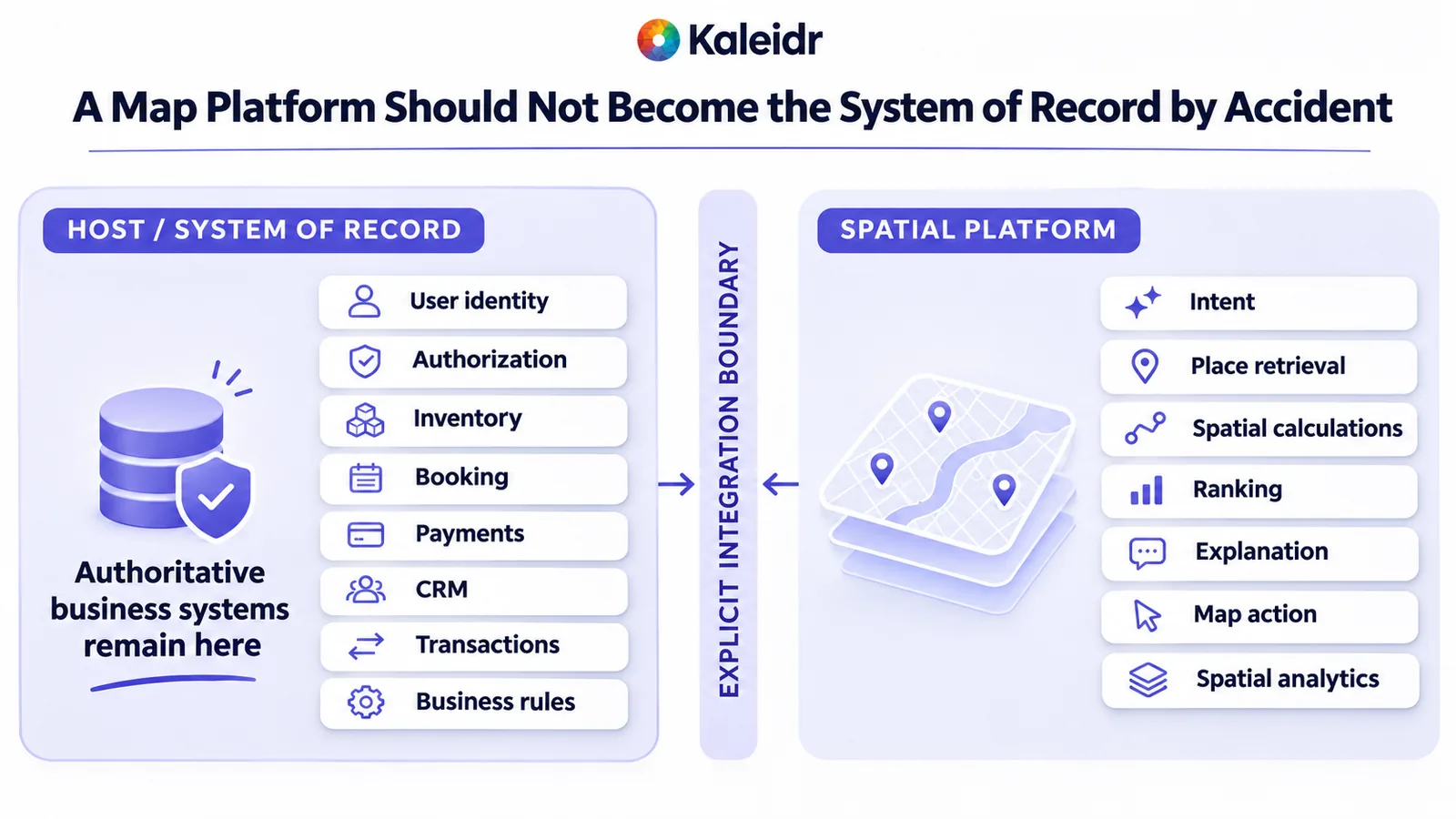
The spatial layer should not become the system of record by accident. Identity, authorization, inventory, booking, payments, CRM, and the business rules stay with the host unless a deliberate integration says otherwise. The chat panel on a host map sends the conversation, a zoom level, and a language tag. The panel does not send the host map's layers, sources, or markers, and Kaleidr does not know who the end user is (Kaleidr, 2026).
Per-user rules belong on the host's backend, with a server key. Kaleidr can retrieve places, rank them, explain them, and draw a route — spatial jobs that are not a substitute for the ledger, the booking system, or the permission check.
The left column is the system of record. The right column is the spatial platform. The center is an explicit boundary, not an automatic merge. Inventory and payments stay on the host side of the drawing.
Why does measurement change the next map?
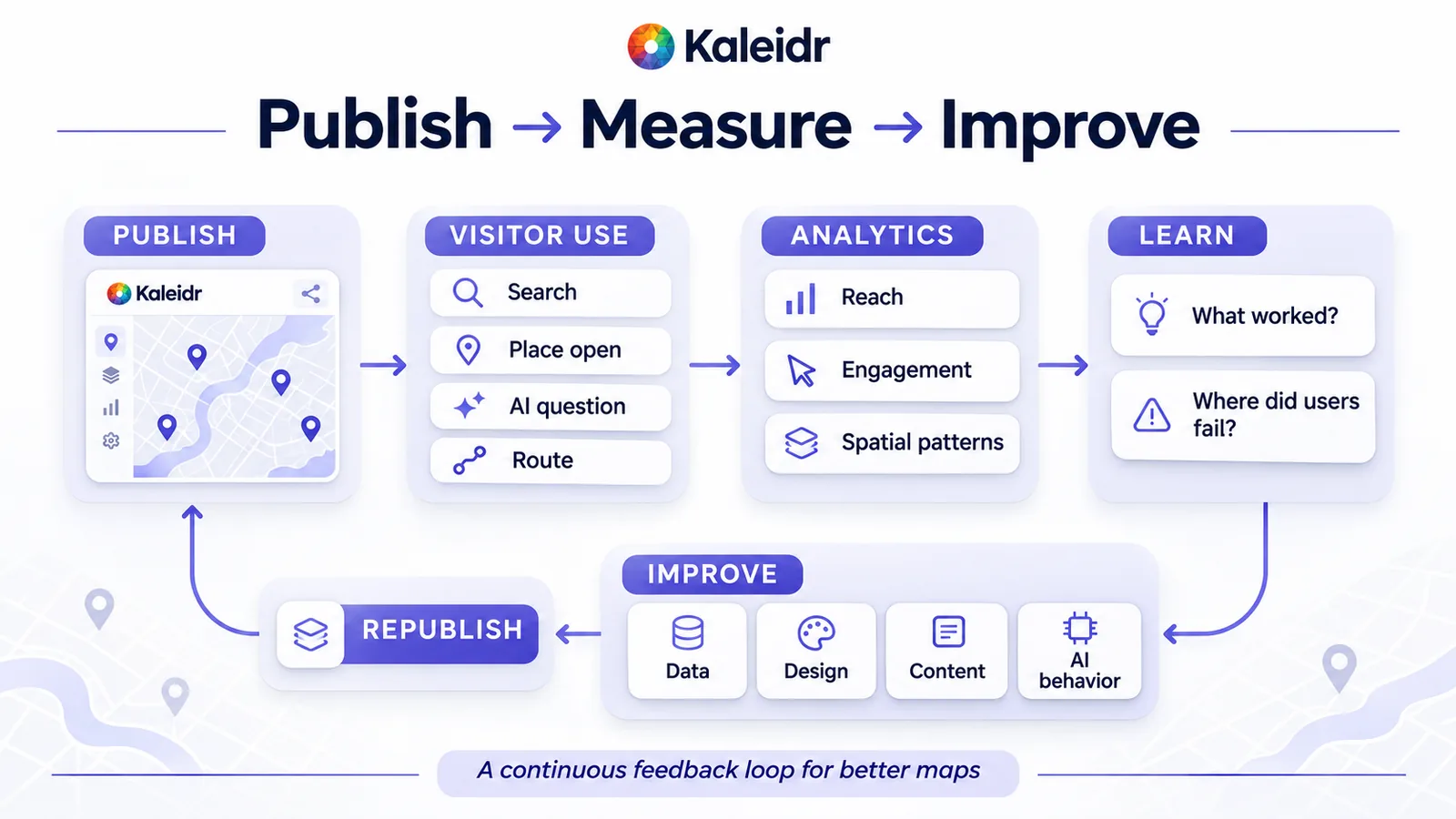
A published map produces behavior: searches, place opens, questions, and routes. Analytics is how a team learns which of those behaviors matched the job, and where people stalled. The next edit might be data, design, or the wording of a place. The following publish should carry that edit. Without the loop, the first prompt remains the last version.
The loop is publish, use, measure, learn, improve, and publish again. Search, place open, AI question, and route are examples of use. Reach, engagement, and spatial patterns are labels on the artwork, not a dashboard export.
Which question should you ask first?
Ask whether the map itself is the final deliverable. If it is, an AI map maker may be enough. If the map must stay live, embedded, or updated, that is a platform signal. Private or first-party data, conversational search, routes, analytics, and APIs are further signals. Tiles under an application you already built are an infrastructure choice, not a reason to buy an authoring suite.
Explore Kaleidr Studio when the map has to be created, published, and kept current. Use a lighter maker when the share link is the whole job. Choose for the lifecycle, not for the first prompt.
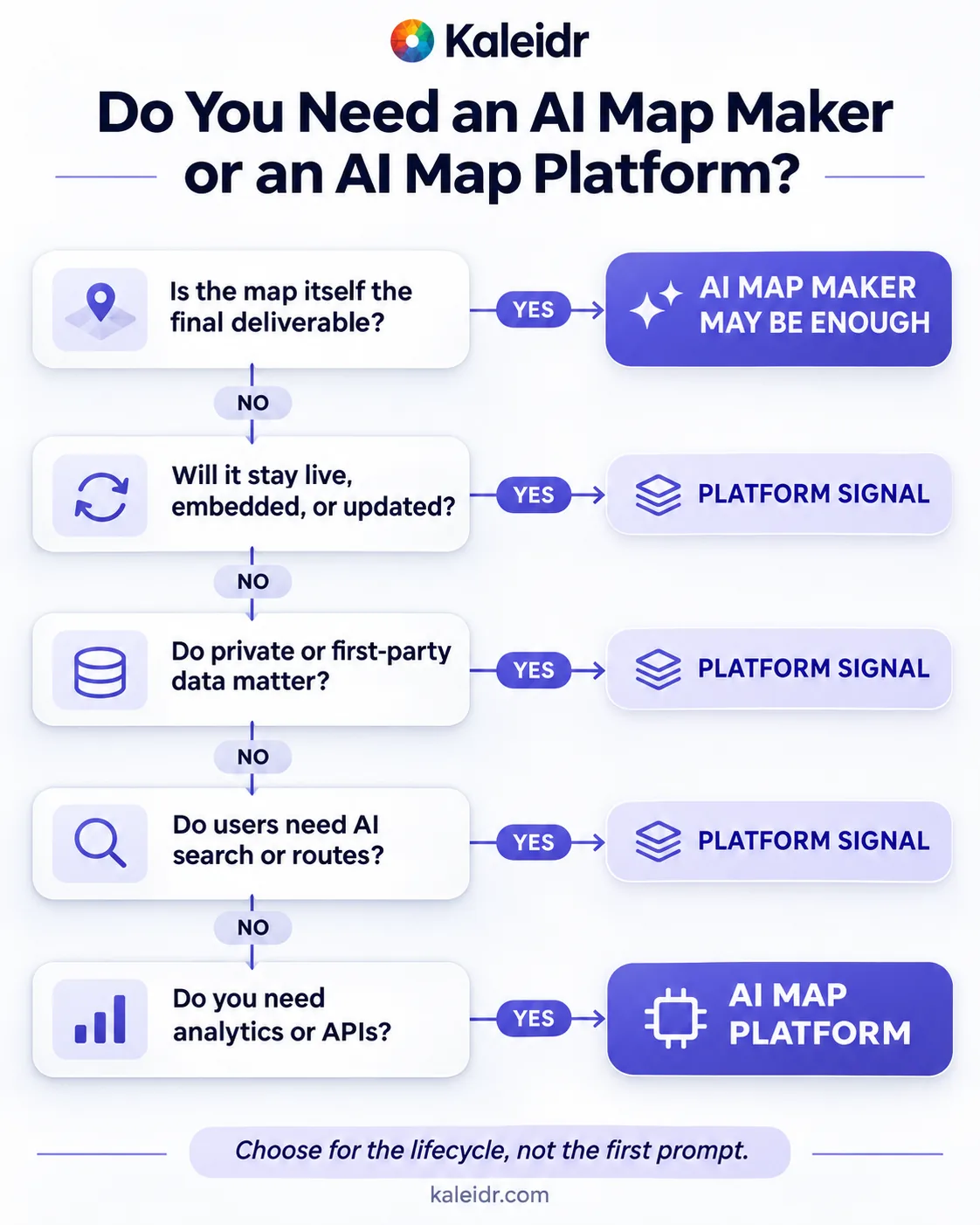
A yes on the first question can stop at a map maker. Later yes answers are platform signals. The last yes names an AI map platform. The footer says to choose for the lifecycle, not the first prompt.
Note: Kaleidr uses AI-assisted tools for image creation, content refinement, and research throughout its creative and development workflows.
FAQs
What is an AI map platform?
An AI map platform supports the life of a map after generation: data, design, publishing, interaction, measurement, and integration. An AI map maker is centered on producing the map.
Is Kaleidr Studio the same as Editor?
No. Studio is where a map is authored and published. Editor mounts editing tools in a host page, and that work stays in the page's memory.
Can Chat attach to a map the site already uses?
Yes. Guides exist for Mapbox GL JS, MapLibre GL JS, the Google Maps JavaScript API, and Leaflet. Chat does not read that map's layers or markers.
Does a published map need an API key?
Viewer does not. The published map's id authorizes the embed. Chat, Tile, and Editor use a publishable key. The Server API uses a server key and starts on Pro.
Are map datasets the same as Enterprise business data?
No. A dataset on a map is available on every plan and is public when the map that draws it is published. Business data that grounds AI answers is a separate Enterprise upload.
When is a map maker enough?
When the map is the deliverable: a guide, a one-off directory, or a design you will share and leave. When it must stay correct inside a product, look at a platform.
References
- Kaleidr Developer Docs. How Kaleidr works. One loader, four products, where each renders, and the difference between a publishable key and a server key. Accessed November 17, 2026. https://docs.kaleidr.com/concepts/how-kaleidr-works
- Kaleidr Developer Docs. Supported maps. Guides for Mapbox GL JS, MapLibre GL JS, the Google Maps JavaScript API, and Leaflet. Accessed November 17, 2026. https://docs.kaleidr.com/chat/supported-maps
- Kaleidr Developer Docs. Editor. In-page edits stay in the page's memory and are not saved, exported, or published. Accessed November 17, 2026. https://docs.kaleidr.com/editor
- Kaleidr Developer Docs. Choose your path. Chat, Viewer, Tile, and Editor on Free. Viewer with no key. The Server API on Pro. Enterprise business data. Accessed November 17, 2026. https://docs.kaleidr.com/concepts/choose-your-path
- Kaleidr Developer Docs. Answers from your own data. Datasets on a map versus Enterprise business data, and the rule that a published map serves its datasets whole. Accessed November 17, 2026. https://docs.kaleidr.com/your-data/overview
- Kaleidr Developer Docs. Security model. What the chat panel sends, including zoom and not the host layers, and that Kaleidr does not know the end user. Accessed November 17, 2026. https://docs.kaleidr.com/security/security-model
- Kaleidr. What Is Kaleidr? Products and Limits. Related guide to the platform areas and the four embed products. Accessed November 17, 2026. https://kaleidr.com/blog/what-is-kaleidr
References in BibTeX
@misc{kaleidr_how_kaleidr_works_2026,
  title  = {How Kaleidr works},
  author = {{Kaleidr}},
  year   = {2026},
  url    = {https://docs.kaleidr.com/concepts/how-kaleidr-works}
}

@misc{kaleidr_supported_maps_2026,
  title  = {Supported maps},
  author = {{Kaleidr}},
  year   = {2026},
  url    = {https://docs.kaleidr.com/chat/supported-maps}
}

@misc{kaleidr_editor_2026,
  title  = {Editor},
  author = {{Kaleidr}},
  year   = {2026},
  url    = {https://docs.kaleidr.com/editor}
}

@misc{kaleidr_choose_your_path_2026,
  title  = {Choose your path},
  author = {{Kaleidr}},
  year   = {2026},
  url    = {https://docs.kaleidr.com/concepts/choose-your-path}
}

@misc{kaleidr_answers_from_your_own_data_2026,
  title  = {Answers from your own data},
  author = {{Kaleidr}},
  year   = {2026},
  url    = {https://docs.kaleidr.com/your-data/overview}
}

@misc{kaleidr_security_model_2026,
  title  = {Security model},
  author = {{Kaleidr}},
  year   = {2026},
  url    = {https://docs.kaleidr.com/security/security-model}
}

@misc{kaleidr_what_is_kaleidr_2026,
  title  = {What Is Kaleidr? Products and Limits},
  author = {{Kaleidr}},
  year   = {2026},
  url    = {https://kaleidr.com/blog/what-is-kaleidr}
}