
An AI map maker for business is chosen by the output it must return: a place answer, a shareable map, a spatial analysis, a dataset from imagery, or a basemap. A one-off guide and a map that stays current, branded, and embedded are different purchases. Imagery extraction and warehouse analysis belong with tools built for those jobs. Kaleidr fits the branded map a team will keep publishing and measuring, and not every mapping job needs every Kaleidr surface.
A tourism team that wants a branded visitor map needs a different product from an analyst ranking sites by drive time. A retailer that wants place questions inside an existing website map needs a different architecture from a traveler building a one-off itinerary. A team extracting buildings from aerial imagery is solving a third problem. The wrong tool can look finished in a screenshot and still miss the job.
AI map maker essentials
- Start with the output: an answer, a published map, an analysis, a dataset, or a basemap.
- Then the lifecycle: a one-off guide and a product surface share a screenshot and not an operating model.
- Then the boundary: where data lives, how fresh it stays, and whether the map publishes, embeds, or integrates.
- Do not score different categories on one feature list. Imagery extraction, GIS analysis, and a branded embed are different purchases.
- Sample numbers on the figures are illustrations. Vendor pages, not the artwork, are the price and product record.
What Should an AI Map Maker for Business Produce?
The first question is what the software must hand back when the prompt ends. Five outputs show up often enough to sort the market, and the figure below names example products under each column. Those names are category labels, not a ranking, and the population counts, distances, and building totals on the artwork are sample labels.
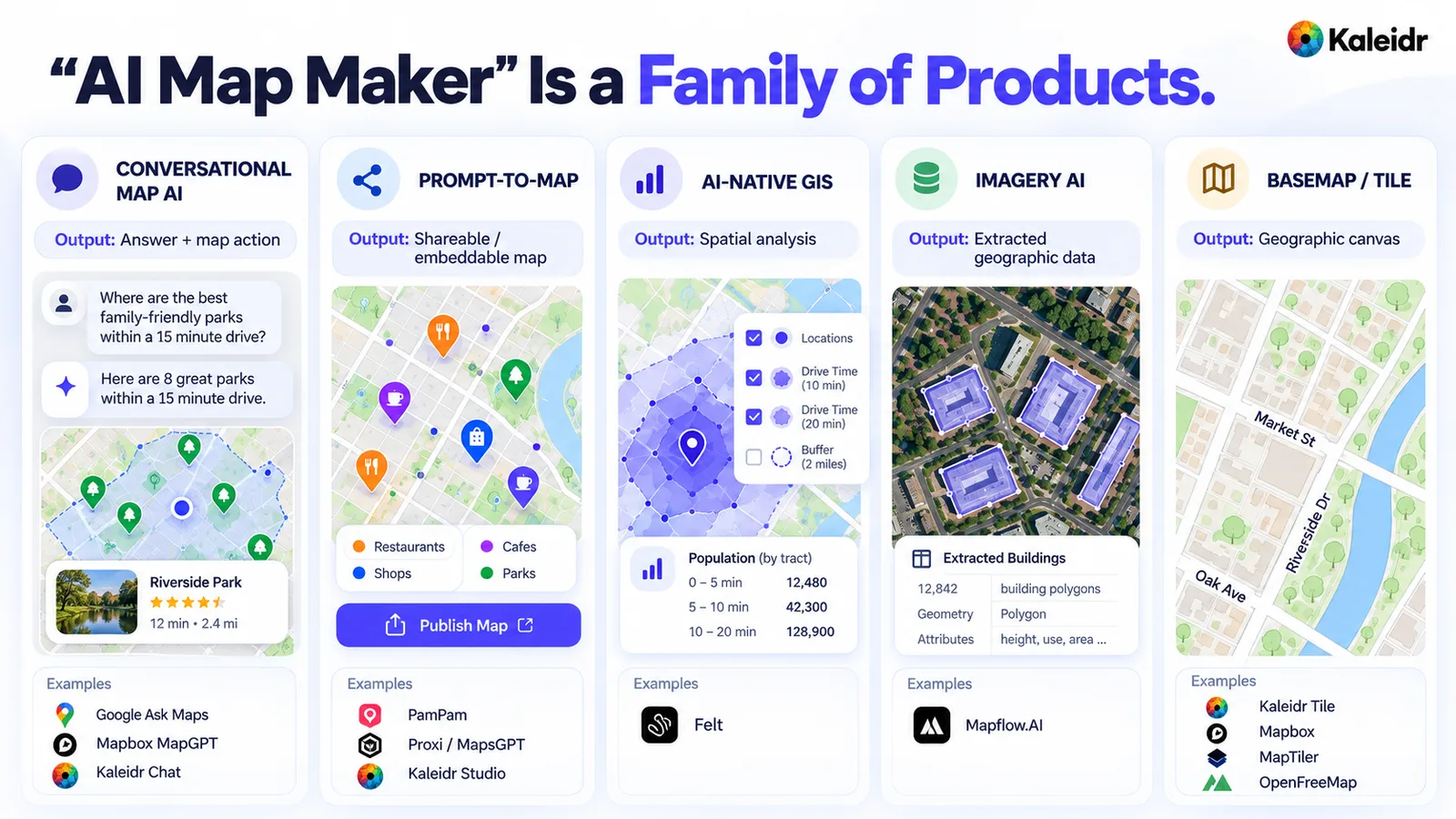
The five columns separate an answer plus a map action, a shareable map, a spatial analysis, extracted geographic data, and a geographic canvas. Example names under the columns include Google Ask Maps, Mapbox MapGPT, Kaleidr Chat, PamPam, Proxi, Kaleidr Studio, Felt, Mapflow.AI, Kaleidr Tile, Mapbox, MapTiler, and OpenFreeMap. Distances, population bands, and the building count on the artwork are sample labels, not vendor results. The figure is a category map, not a score.
| If the primary job is... | Start with this category |
|---|---|
| Ask questions about places and see the answer on a map | Conversational map AI |
| Turn a prompt, list, or spreadsheet into a shareable map | Prompt-to-map creation |
| Run spatial analysis over business or warehouse data | AI-native GIS |
| Extract buildings, roads, or vegetation from imagery | Imagery-analysis AI |
| Serve a styled geographic canvas under an application | Basemap or tile platform |
A conversational answer names a place, explains the choice, and may move the map. Google's Ask Maps, announced on March 12, 2026, answers real-world place questions in conversation, offers personalized recommendations in a U.S. and India rollout on Android and iOS, and can book a restaurant reservation or save a place (Google, 2026). Mapbox MapGPT is a location-intelligent assistant for navigation, infotainment, and trip planning, including restaurant bookings on request, and the product page asks visitors to request access (Mapbox, 2026). Kaleidr Chat is a panel added to a page that already shows a map: the answer streams in the page, places from the answer appear as pins, and a directions request draws a route on that map (Kaleidr, 2026).
A shareable map is a different output. The prompt creates places, categories, and a link or embed, and the map itself is the product of the step. PamPam's AI map maker turns a description or a spreadsheet, including CSV, Google Sheets, and Airtable, into an interactive map that can be embedded or shared as a link (PamPam, 2026). Proxi treats maps as part of a wider community product, with AI-assisted points, directories, events, share links, embeds, and a viewership dashboard, and its pricing page moves accounts above 1,000,000 map viewers a month onto an enterprise plan (Proxi, 2026). Kaleidr Studio is positioned as an AI map maker for branded interactive maps, with prompt and data workflows, editable maps, custom basemaps, 3D visualization, real-time data layers, and publishing (Kaleidr, 2026).
An analysis or a dataset is a third output, and the map is often the review surface rather than the deliverable. Felt AI turns a plain-language request into a working map, runs buffers, joins, and SQL, and builds dashboards and custom tools while showing each step for review (Felt, 2026). Mapflow's web app detects buildings with type classification, forests with height classes, roads, and construction sites, and it documents a GeoJSON download of the result (Mapflow, 2026). A basemap job is narrower still: tile delivery, styling, attribution, licensing, and traffic pricing. That purchase should not be scored as if it were an authoring platform, and the map-load pricing comparison is the right table when the bill is map display.
Is the Map a One-Off or a Business Product?
A one-off map and a business product can share a first screenshot and still demand different systems. A campaign, a travel guide, an editorial feature, or a temporary event may need a prompt, a modest place list, light styling, and a share link. A production map may also need repeatable import, stable place IDs, authentication, live updates, an SDK, analytics, and a support path. The figure contrasts those operating models. The file names, warehouse icons, and workflow chips on the right are a checklist, not a claim that any one vendor ships every box.
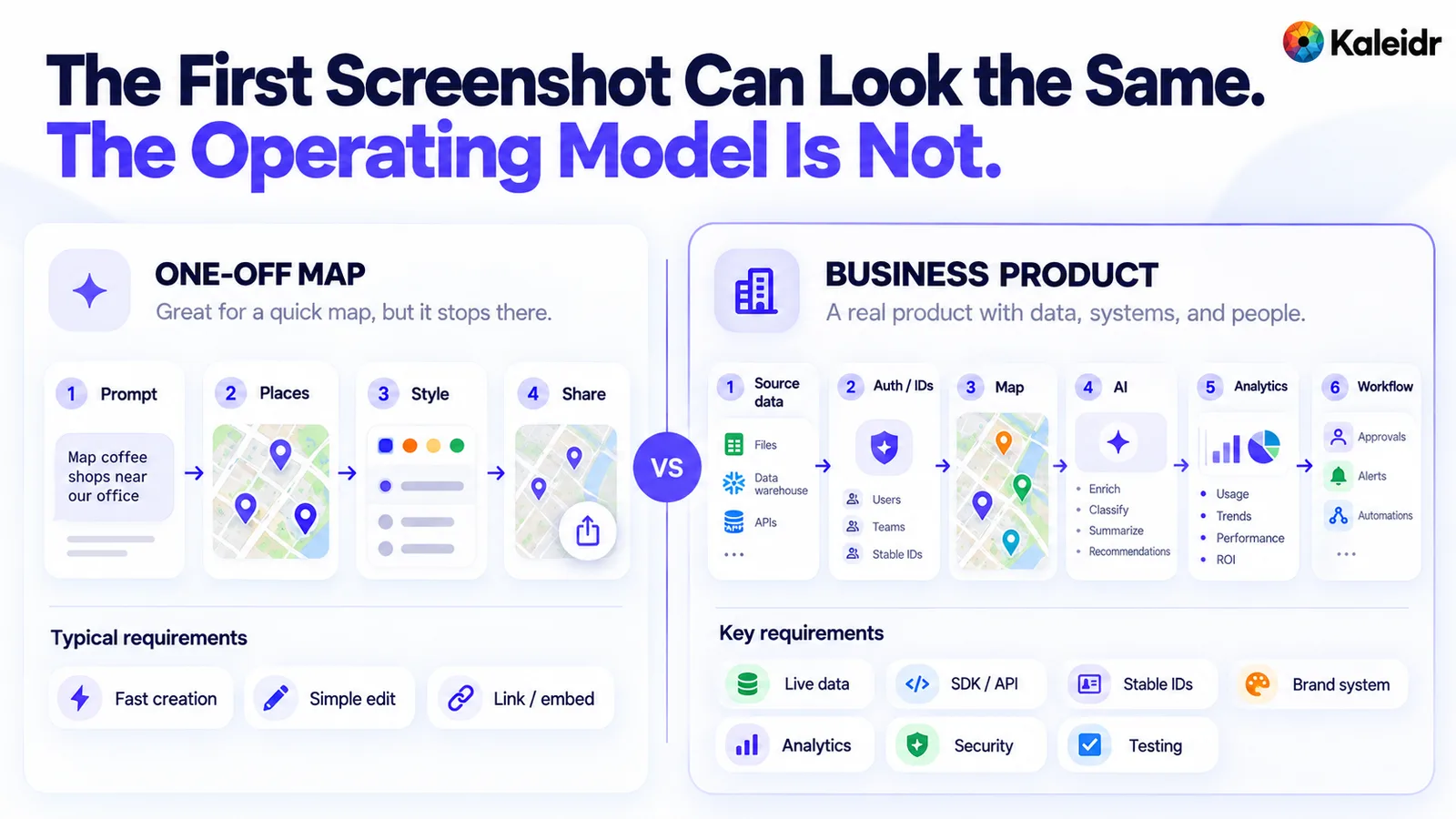
The left path is a one-off map: a prompt, places, style, and a share link, with fast creation and a simple embed. The right path is a business product: source data, authentication and stable IDs, the map, AI, analytics, and a workflow. Requirement chips on the right include live data, an SDK or API, a brand system, security, and testing. The chips are a buying checklist, and the artwork does not assert that one product includes every chip.
PamPam's current site is built around travel maps, directories, spreadsheet import, embedding, and share links, which matches a creator workflow. Proxi also creates maps quickly and then extends into directories, events, crowdsourcing, and audience programs. Kaleidr's developer docs separate Chat, Editor, Tile, and Viewer as four products with different contracts, rather than one generic embed (Kaleidr, 2026). Felt's site describes an AI-native GIS platform with JavaScript, Python, a REST API, and webhooks for teams that want the map to behave like software (Felt, 2026). If the map will live for years, choose for the tenth update, not only the first generation.
Where Does the Location Data Come From?
An AI map is only as useful as the records it is allowed to use. Public place search can answer “find bakeries in this neighborhood.” Approved distributors, current inventory, eligibility, and account status do not live in that public index, and the model should not invent them. A business map has to keep the authoritative system in place and pass the map only the fields the experience needs.
Warehouse and GIS connections are a different starting point. Felt's AI page describes queries against Snowflake, BigQuery, Databricks, Postgres, or Redshift, with the data staying in place, plus joins and new layers styled from the result. Imagery is another starting point. Mapflow processes satellite, aerial, or drone imagery into vector features, and the useful question is whether the model extracts the needed features at the area, accuracy, and cost the project requires. A branded publishing tool and an imagery extractor should not be shortlisted against each other for that job.
Does the Map Need to Stay Current?
A prompt can create a map once. A business system has to keep the map correct after that. Store catalogs change slowly, hours and editorial guides change on a schedule, inventory and vehicle positions change continuously, and customer eligibility is often known only at request time. A travel guide can survive a manual edit. A locator that promises “in stock now” cannot.
Ask whether imported rows stay linked to the source, whether refresh is automatic, and whether a live layer can update without rebuilding the basemap. Ask what the map shows when the source is unavailable. The more operational the map becomes, the more the freshness rule matters. A polished map that is wrong the next morning is not an operational map.
How Much Brand Control Does the Map Need?
Many tools can recolor a marker, swap a logo, or apply a basic theme. A branded product surface may also need the roads, land, buildings, labels, and type of the basemap itself, plus dark and light variants. Recoloring a pin is a content-layer change. Designing the geographic canvas is a basemap change, and the two purchases should stay separate in the evaluation.
Kaleidr Studio's current page describes custom basemaps, 3D visualization, real-time data layers, and flexible styling beside the prompt workflow. Kaleidr Tile then shows a chosen designed basemap in an iframe Kaleidr hosts, on every plan including Free, when the key has the maps scope (Kaleidr, 2026). If the map is a flagship surface, evaluate the canvas and the pins. If the map is a campaign, a lighter theme may be enough.
Should the Map Publish, Embed, or Integrate?
Publishing, embedding, and integrating are three different commitments, and the figure separates them. A published map is a hosted URL. An embed places that map inside a website. An integration lets the application control state, data, and callbacks. A vendor can support the first two and still be the wrong choice for a product team that needs user-specific data, live inventory, or authenticated workflows. The code block and the sample host on the figure are illustrations of that difference, not a Kaleidr SDK snippet and not a live map URL.
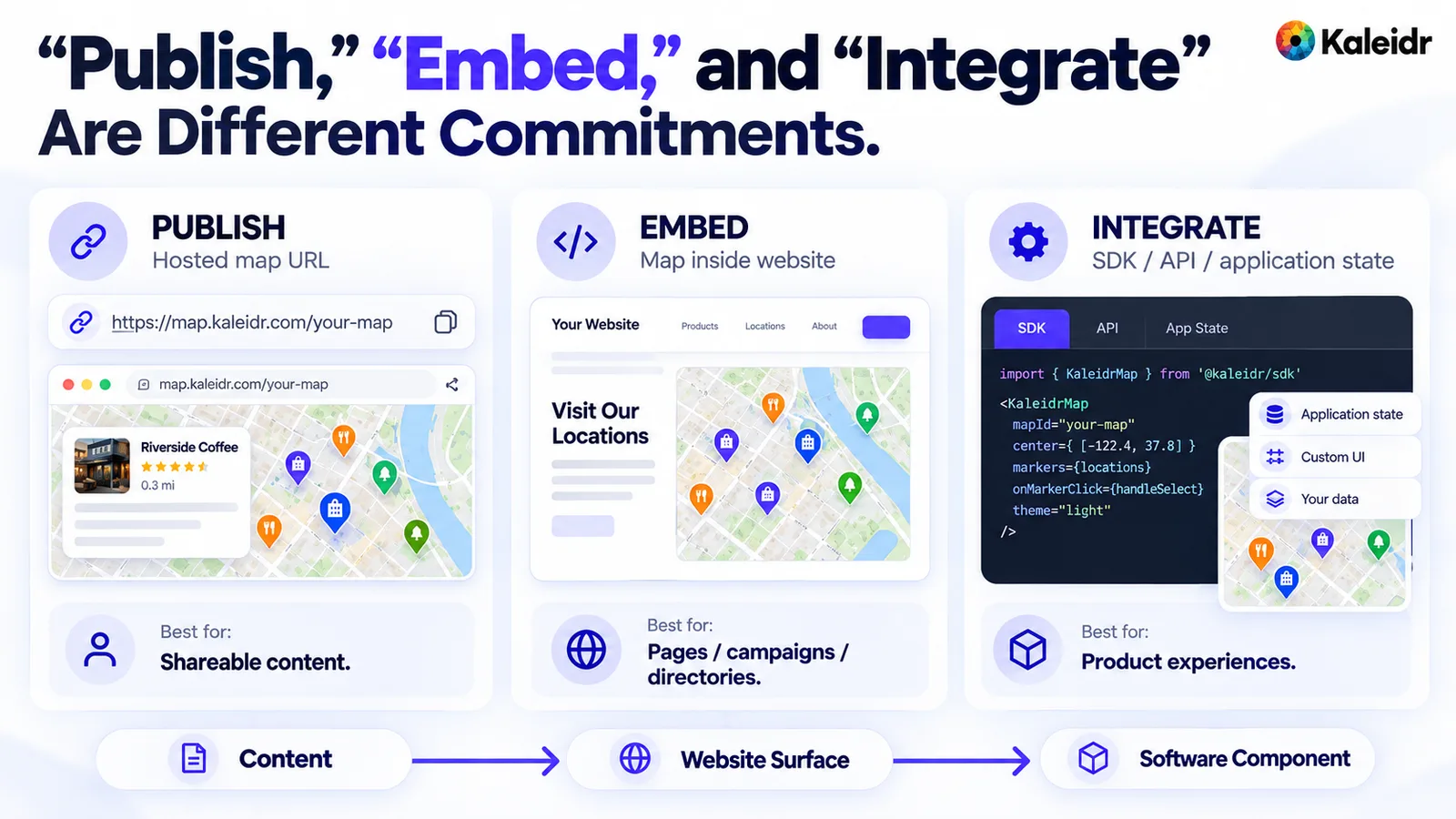
The left panel is a hosted map URL for shareable content. The center panel is an embed inside a site page for campaigns, directories, and similar surfaces. The right panel is an integration, with application state, custom UI, and the product's own data. The code and the sample address on the right are illustrations of that commitment, not a Kaleidr API and not a production URL.
PamPam's site emphasizes link sharing and website embeds. Proxi adds share links, embed code, and QR codes beside directories and community workflows. Kaleidr Viewer embeds a published map by share id, and the docs state that there is no key for that embed, so origin controls belong on the map rather than on a key (Kaleidr, 2026). Kaleidr Chat, already cited, attaches to Mapbox, MapLibre, Google Maps, and Leaflet, which is the path when a team already runs a renderer. Felt adds a JavaScript SDK, a REST API, Python, and webhooks when the map itself is the application. The right level depends on whether the map is content or software.
Should the AI Act on the Live Map?
Prompt-to-map creation and conversational map AI answer different sentences. “Create a food map from this list” produces a persistent map. “Which of these places is open latest and closest to the hotel?” needs the current map, the candidate places, the constraints, and an action such as a route or a selection. The figure sets those jobs side by side. Place names, ratings, hours, and travel times on it are sample labels, not a recorded Kaleidr or Google result.
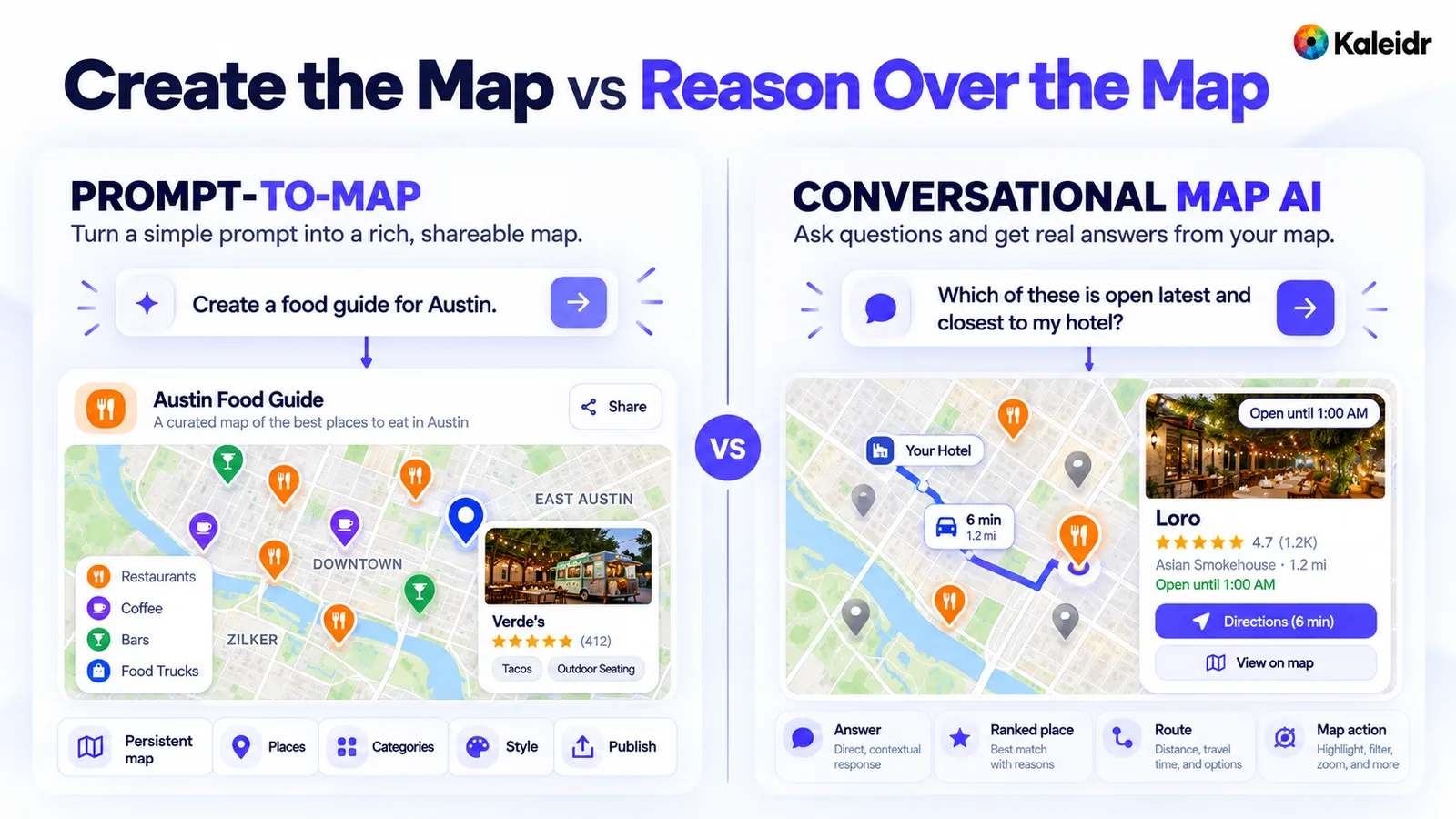
The left panel turns a prompt into a persistent map with places, categories, style, and a publish action. The right panel answers a question about the places already on the map and shows a route and a map action. Ratings, hours, distances, and place names on both panels are sample labels. The split is the buying question: a new map, or intelligence on the map the team already runs.
Google Ask Maps is a consumer example inside Google Maps. Mapbox MapGPT is aimed at navigation, infotainment, and trip planning, and the page lets a team define the assistant's knowledge, actions, voice, and appearance. Kaleidr Chat stays on the host map rather than replacing the renderer. The buying question is whether the team is purchasing a new map or adding intelligence to the map it already operates.
What Should Map Analytics Measure?
Map creation is the start of the business question, not the end. A production team may need to know which places were opened, which filters were used, which route was started, and whether attention differs across places. Page views alone do not answer those questions. Kaleidr Analytics describes dashboards for reach, views, and engagement, audience location across maps, and sessions, views, and interactions per map (Kaleidr, 2026).
A host application should still own checkout, reservation, and CRM outcomes unless a specific integration writes those events back. Map analytics explain interaction with the map. Business systems explain the commercial result. Ask which events exist, whether place identifiers are included, and whether the events can be exported or joined to a host conversion. Ask that question about the plan being purchased, not about a higher tier on a slide.
What Should Stay Exportable?
Faster creation makes it easier to skip the ownership question, so split portability by layer: data as CSV or GeoJSON, map content with its places, categories, descriptions, and styles, a basemap as a standard tile format or a hostable style, and analytics as an export rather than only a dashboard. Felt's platform, cited above, lists GIS exports as GeoPackage, Shapefile, GeoJSON, or CSV. Mapflow's web app, cited above, documents a GeoJSON download, and the free plan of 250 credits with a 25 km² limit marks that download as unavailable (Mapflow, 2026).
Managed infrastructure is still valuable, because the vendor operates part of the stack. The buyer should know which layer stays portable and which layer is the reason to stay. If leaving means rebuilding the places, the style, and the event history, that cost belongs in the decision before the first prompt.
How Should AI Map Maker Pricing Scale?
Monthly subscription price is a weak comparison, because the categories meter different units. Seats, map viewers, map loads, tile requests, AI credits, and square kilometers of imagery are not interchangeable, and the figure says so directly. A low subscription can be the wrong bargain when traffic is the real driver. A higher subscription can be economical when it replaces several tools. The map-load comparison linked above shows how one of those units, map display, is published for Kaleidr, MapTiler, Mapbox, and Google. Search, routing, and AI credits sit outside that table.
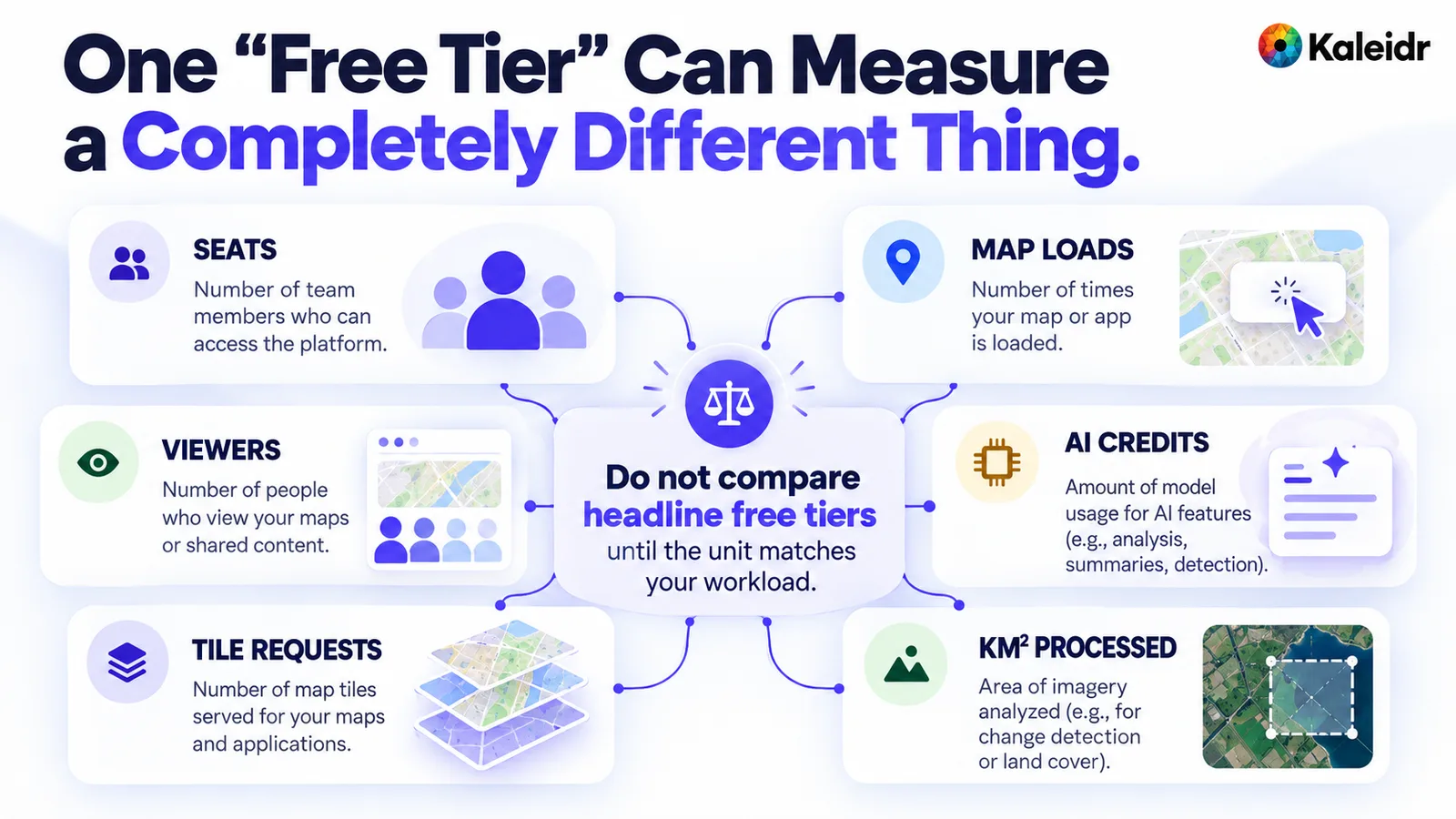
The six cards name seats, map loads, viewers, AI credits, tile requests, and square kilometers of imagery as different meters. The center tells a buyer not to compare headline free tiers until the unit matches the workload. No vendor price is printed on the figure. The point is the unit, not a discount.
Felt published new pricing on October 13, 2026. Paid plans can add seats, every plan includes a monthly map-view allowance, and extra processing, map views, or Felt AI credits can be added as usage (Felt, 2026). Mapflow's free allowance is the 250 credits and 25 km² already noted, with paid credit and subscription options beside the plan that marks downloads unavailable. Proxi's ceiling of 1,000,000 map viewers a month is a viewer meter, not a map-load meter. Estimate the real workflow, then compare the unit that workflow actually spends.
Which Category Fits the Job?
Common jobs point at different categories, and the weights in any scorecard should be set before a demo. Output fit, data fit, freshness, brand, integration, conversational use, analytics, portability, governance, and cost can all matter. A GIS team will raise data and analysis. A publisher will raise design and embedding. A product team will raise integration and security. The percentages a team assigns are a planning aid, not a Kaleidr benchmark.
Tourism and destination sites usually start with prompt-to-map and publishing tools, then test branding, embed, updates, and analytics. Retail discovery usually starts with a map platform plus Spatial AI, because inventory and routes have to stay attached to the store record. Site selection over warehouse data usually starts with an AI-native GIS such as Felt. Building footprints and road networks usually start with imagery analysis such as Mapflow, and that shortlist should not include an itinerary creator. A team that already runs Mapbox, MapLibre, Google Maps, or Leaflet can start by attaching a conversational layer instead of replacing the renderer.
The decision tree in the next figure asks the same questions in order: analysis or a published experience, one-off or ongoing, private data or not, conversational questions or not, and an existing map or not. Follow the branch that matches the job. Do not average the branches into one winner.
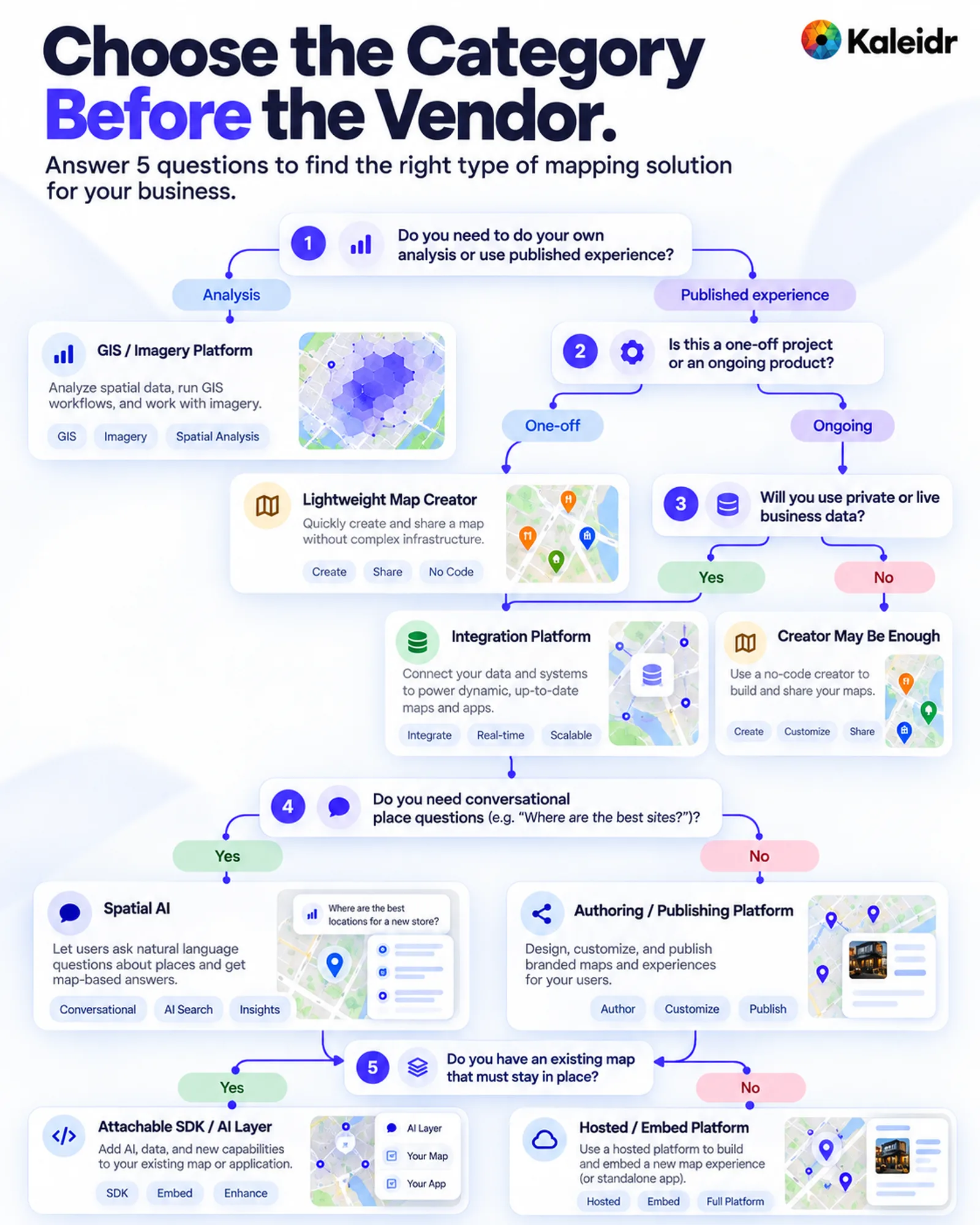
The tree starts by separating GIS or imagery analysis from a published experience. Later questions separate a one-off creator from an ongoing product, private or live data from public content, conversational questions from authoring, and an existing map from a hosted embed. The labels are a buying sequence. The tree does not rank vendors.
Where Does Kaleidr Fit?
Kaleidr spans more than one part of this landscape, and that breadth is not a reason to use every surface. Studio aligns with prompt-driven creation and branded publishing, Chat with conversational Spatial AI on a map the product already runs, and Tile with a designed basemap in a hosted iframe. Viewer embeds a published map by share id without a platform key, Analytics covers reach, views, engagement, and place attention, and Enterprise is the path when those surfaces sit beside users, data, and workflows the organization already operates. The visit count and the percent change on the analytics card are sample labels, not a Kaleidr result.
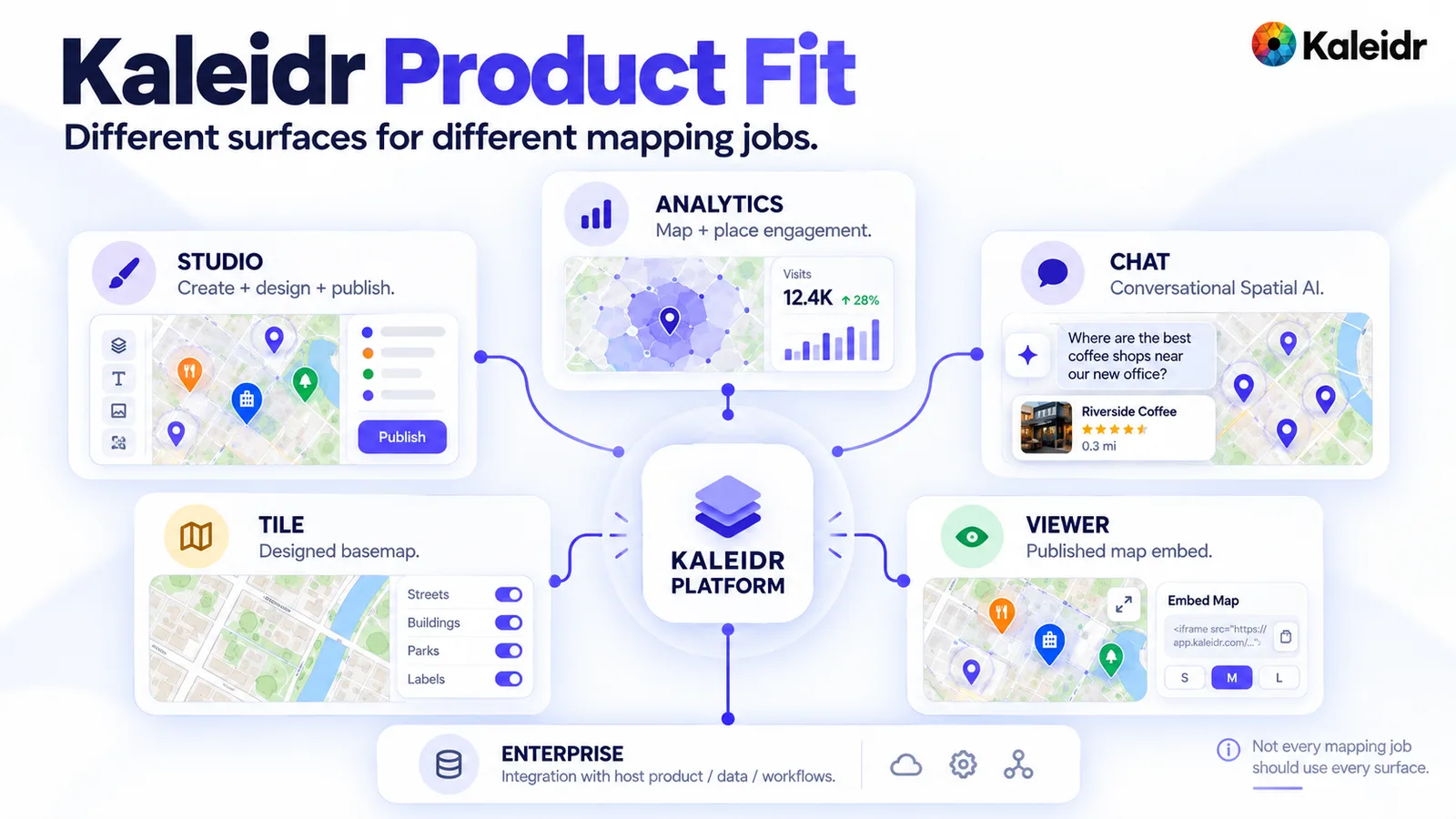
Studio is labeled for creating and publishing a map, Chat for conversational Spatial AI, Tile for a designed basemap, and Viewer for an embedded published map. Analytics is labeled for map and place engagement, and the visit count and percent on that card are sample labels, not Kaleidr results. Enterprise is labeled as integration with a host product, data, and workflows. The note on the figure says not every mapping job should use every surface.
Imagery extraction still belongs with a tool built for imagery. Spatial SQL over a cloud warehouse still belongs with an AI-native GIS evaluation. A simple travel guide for this week may still be faster in a lightweight creator. Kaleidr's closer fit is the map that has to become a branded, interactive, measurable surface, with conversational help when the product needs it.
What Should a Team Do Next?
Define the output, the data source, the freshness rule, and the deployment level before booking demos. Then read the current vendor page for the category that survived those questions, because pricing and packaging move, as Felt's October 13, 2026, pricing note shows. See Kaleidr Studio when the job is a branded map the team will keep editing and publishing, and use the developer docs when the job is a chat panel, a tile, or a keyless embed on a map that already exists.
Note: Kaleidr uses AI-assisted tools for image creation, content refinement, and research throughout its creative and development workflows.
FAQs
What is an AI map maker?
An AI map maker is software that uses natural language or machine learning to create, search, analyze, or extract geographic information. The phrase covers prompt-to-map creation, conversational place search, AI-native GIS, imagery analysis, and basemap delivery. Those are different products.
What is the best AI map maker for business?
There is no single best tool. The fit depends on whether the team needs a shareable map, an embedded product surface, conversational place search, GIS analysis, imagery-derived data, or a designed basemap. Choose the output and the operating model before comparing feature lists.
Can AI create a map from a spreadsheet?
Yes. PamPam currently imports CSV, Google Sheets, and Airtable into an interactive map. Kaleidr Studio also supports data-driven map creation beside its prompt workflow. The follow-up question is whether those rows stay linked to the source after the first import.
What is the difference between an AI map maker and GIS?
An AI map maker often emphasizes creation, discovery, or publishing. GIS emphasizes spatial data management and analysis. Felt and similar AI-native GIS products narrow that gap by running buffers, joins, and SQL from plain language, with the steps available for review.
Can a team add AI to an existing Mapbox or Google map?
Yes, on Kaleidr's current Chat path. The docs describe attaching the panel to a host Mapbox, MapLibre, Google Maps, or Leaflet map so the places and routes draw on that map. Replacing the renderer is a separate decision.
How should AI map maker pricing be compared?
Normalize the unit first. A seat, a map load, a map viewer, an AI credit, a tile request, and a square kilometer of imagery are not interchangeable. Estimate the workflow the team will actually run, then compare the meter that workflow spends.
Is Kaleidr an AI map maker?
Kaleidr covers more than one category. Studio is the prompt-driven creation and design product, Chat is conversational Spatial AI on a live host map, Tile serves designed basemaps, Viewer embeds a published map by share id, and Analytics measures map and place engagement. Not every job needs every surface.
References
- Google. Ask Maps and Immersive Navigation: New AI features in Google Maps. Ask Maps answers real-world place questions in conversation, with personalized recommendations and actions such as reservations and saved places. March 12, 2026. Accessed October 15, 2026. https://blog.google/products-and-platforms/products/maps/ask-maps-immersive-navigation/
- Mapbox. MapGPT. A location-intelligent assistant for navigation, infotainment, and trip planning, with access by request. Accessed October 15, 2026. https://www.mapbox.com/mapgpt
- Kaleidr Developer Docs. Chat. A chat panel on a page that already shows a map, with pins and routes drawn on that map. Accessed October 15, 2026. https://docs.kaleidr.com/chat
- PamPam. AI Map Maker. Prompts and spreadsheet import, including CSV, Google Sheets, and Airtable, plus embed and share. Accessed October 15, 2026. https://www.pampam.city/ai-map-maker
- Proxi. Plans & Pricing. Community maps, AI-assisted points, directories, embeds, viewership analytics, and a move to enterprise above 1,000,000 map viewers a month. Accessed October 15, 2026. https://proxi.co/pricing
- Kaleidr. AI Map Maker for Branded Interactive Maps. Prompt and data creation, custom basemaps, 3D visualization, real-time layers, and publishing. Accessed October 15, 2026. https://kaleidr.com/studio
- Felt. Felt AI. Plain-language spatial analysis that runs buffers, joins, and SQL, and shows each step. Accessed October 15, 2026. https://felt.com/platform/felt-ai
- Mapflow. Mapflow Web App. Building detection with type classification, forests with height classes, roads, construction sites, and a GeoJSON download. Accessed October 15, 2026. https://mapflow.ai/web-app
- Kaleidr. Map Load Pricing Compared: 2026 List Prices. Published basemap list prices and the difference between map loads and other meters. Accessed October 15, 2026. https://kaleidr.com/blog/map-load-pricing-compared
- Kaleidr Developer Docs. Introduction. Chat, Editor, Tile, and Viewer as four products, including a keyless Viewer embed. Accessed October 15, 2026. https://docs.kaleidr.com/
- Felt. The map your business runs on. AI-native GIS with JavaScript, Python, a REST API, webhooks, and GIS exports to GeoPackage, Shapefile, GeoJSON, or CSV. Accessed October 15, 2026. https://felt.com/
- Kaleidr Developer Docs. Tile. A designed basemap in a hosted iframe, on every plan including Free, with the maps scope. Accessed October 15, 2026. https://docs.kaleidr.com/tile
- Kaleidr Developer Docs. Viewer. Embed a published map by share id, with no key on the embed. Accessed October 15, 2026. https://docs.kaleidr.com/viewer
- Kaleidr. Map Engagement and Location Analytics. Reach, views, engagement, audience location, and sessions per map. Accessed October 15, 2026. https://kaleidr.com/analytics
- Mapflow. Pricing. A free plan of 250 credits and a 25 km² area limit, with download marked unavailable on that plan. Accessed October 15, 2026. https://mapflow.ai/pricing
- Felt. Felt's new pricing: start with what you need, grow at your own pace. October 13, 2026. Seats, included map views, and optional Felt AI credits. Accessed October 15, 2026. https://felt.com/blog/felts-new-pricing
@misc{google_ask_maps_2026,
  title  = {Ask Maps and Immersive Navigation: New AI features in Google Maps},
  author = {{Google}},
  year   = {2026},
  url    = {https://blog.google/products-and-platforms/products/maps/ask-maps-immersive-navigation/}
}

@misc{mapbox_mapgpt_2026,
  title  = {MapGPT},
  author = {{Mapbox}},
  year   = {2026},
  url    = {https://www.mapbox.com/mapgpt}
}

@misc{kaleidr_chat_docs_2026,
  title  = {Chat},
  author = {{Kaleidr Developer Docs}},
  year   = {2026},
  url    = {https://docs.kaleidr.com/chat}
}

@misc{pampam_ai_map_maker_2026,
  title  = {AI Map Maker},
  author = {{PamPam}},
  year   = {2026},
  url    = {https://www.pampam.city/ai-map-maker}
}

@misc{proxi_pricing_2026,
  title  = {Plans \& Pricing},
  author = {{Proxi}},
  year   = {2026},
  url    = {https://proxi.co/pricing}
}

@misc{kaleidr_studio_2026,
  title  = {AI Map Maker for Branded Interactive Maps},
  author = {{Kaleidr}},
  year   = {2026},
  url    = {https://kaleidr.com/studio}
}

@misc{felt_ai_2026,
  title  = {Felt AI},
  author = {{Felt}},
  year   = {2026},
  url    = {https://felt.com/platform/felt-ai}
}

@misc{mapflow_web_app_2026,
  title  = {Mapflow Web App},
  author = {{Mapflow}},
  year   = {2026},
  url    = {https://mapflow.ai/web-app}
}

@misc{kaleidr_map_load_pricing_2026,
  title  = {Map Load Pricing Compared: 2026 List Prices},
  author = {{Kaleidr}},
  year   = {2026},
  url    = {https://kaleidr.com/blog/map-load-pricing-compared}
}

@misc{kaleidr_docs_home_2026,
  title  = {Introduction},
  author = {{Kaleidr Developer Docs}},
  year   = {2026},
  url    = {https://docs.kaleidr.com/}
}

@misc{felt_platform_2026,
  title  = {The map your business runs on},
  author = {{Felt}},
  year   = {2026},
  url    = {https://felt.com/}
}

@misc{kaleidr_tile_docs_2026,
  title  = {Tile},
  author = {{Kaleidr Developer Docs}},
  year   = {2026},
  url    = {https://docs.kaleidr.com/tile}
}

@misc{kaleidr_viewer_docs_2026,
  title  = {Viewer},
  author = {{Kaleidr Developer Docs}},
  year   = {2026},
  url    = {https://docs.kaleidr.com/viewer}
}

@misc{kaleidr_analytics_2026,
  title  = {Map Engagement and Location Analytics},
  author = {{Kaleidr}},
  year   = {2026},
  url    = {https://kaleidr.com/analytics}
}

@misc{mapflow_pricing_2026,
  title  = {Pricing},
  author = {{Mapflow}},
  year   = {2026},
  url    = {https://mapflow.ai/pricing}
}

@misc{felt_pricing_2026,
  title  = {Felt's new pricing: start with what you need, grow at your own pace},
  author = {{Felt}},
  year   = {2026},
  url    = {https://felt.com/blog/felts-new-pricing}
}