
A store locator template is a branded retail store finder a shopper can use before the trip. The map, the list, and the next action should agree on the same stores. Hours, services, and directions can live in that experience. Live inventory, pickup eligibility, and checkout stay in the retailer's own systems. Kaleidr Studio publishes the map, Viewer embeds it, and the Kaleidr Retail template is one way to start.
Shopify's 2026 omnichannel guide describes a shopper who browses online, checks store availability, buys in a mobile app, picks up in a store, and returns through another channel (Shopify, 2026). A pin and an address answer where the store is. A finder has to help with the next question, which is whether this store is the one worth the trip. The contrast below uses sample store names, hours, and distances, and the "higher store visits" label is artwork rather than a measured Kaleidr result.
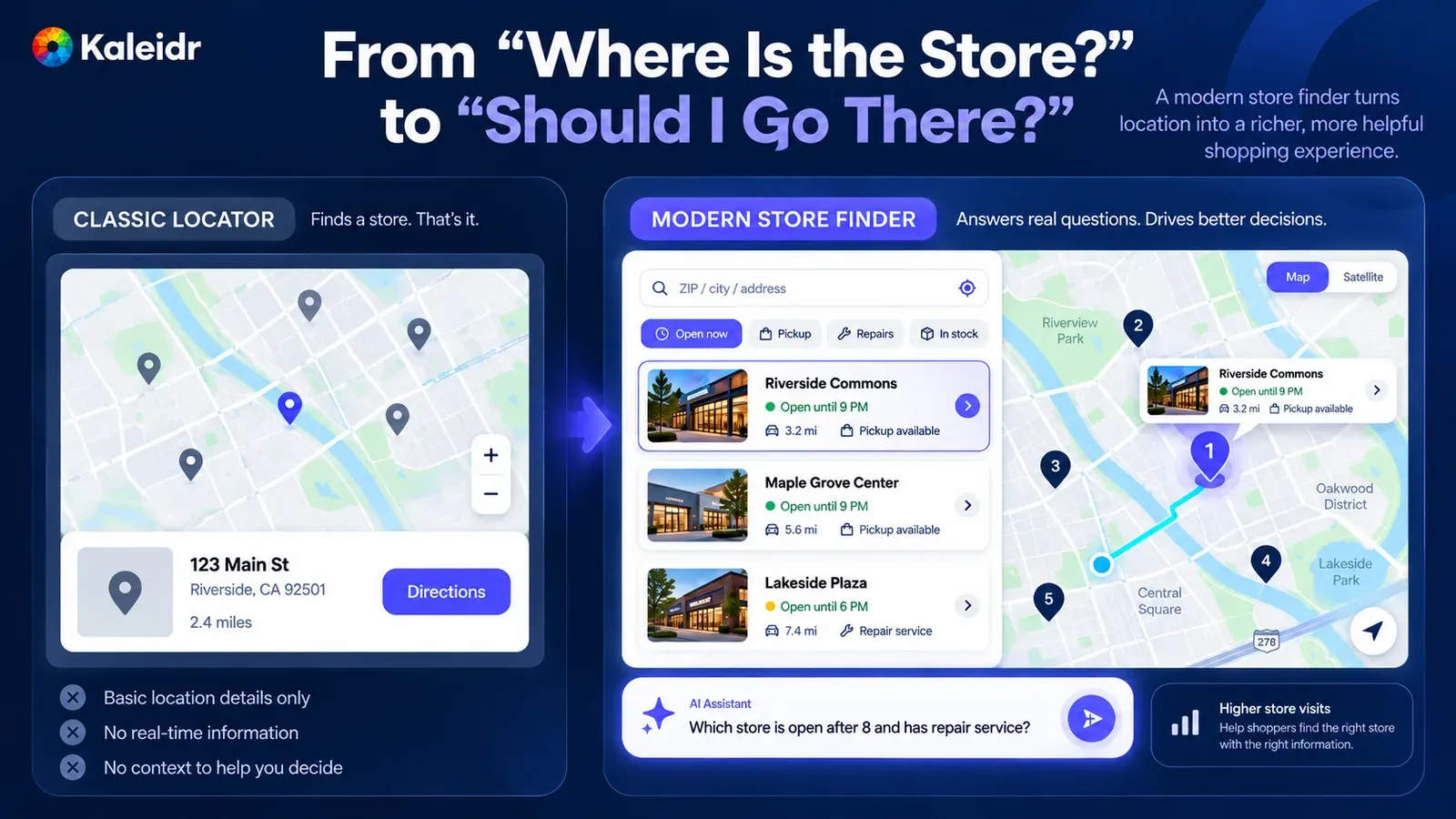
The left panel is a classic locator: a map, one address, a distance, and a directions button. The right panel adds open-now, pickup, and repair filters, store cards, a selected pin, a route, and a sample question. Store names such as Riverside Commons, the miles, and the closing times are sample labels. The visits claim on the right is a figure label, not a reported outcome.
What Is a Store Locator Template?
A store locator template is a ready-made retail page for finding a physical location, not a copy of the commerce platform. The shopper should see the stores that match the search, a reason to prefer one, and a next step such as directions, a call, or the store's own page. Kaleidr's part of that page is the published map and, for a new microsite, the Kaleidr Retail starting point. Inventory counts, pickup promises, and payment stay in the systems that already own them.
The useful record is stable even when the stock count is not. Each location needs an id that will not change when a mall rebrands the store, plus a name, an address, coordinates, and the services a shopper can filter without a live lookup. Hours can sit beside that record only when someone owns the refresh. A stale "open now" badge is worse than no badge, because the shopper made a trip on it.
What Job Is the Locator Doing?
The locator earns its place when it moves a shopper from a place query to a next action. Find is the search, by ZIP, city, or address. Compare is hours, services, and the travel cost of getting there. Choose is one eligible store, and act is directions, a call, pickup, or the store page. A page that stops at a cloud of pins has finished the easy half of the job.
Those jobs do not all need the same data freshness, which is why a locator is better built in layers than as one feed. A static list can carry the stores and the services. Decision context adds hours and a travel label the retailer can stand behind. Conversation helps when the shopper stacks several conditions into one sentence. Commerce, including a live stock check and checkout, stays in the retailer's systems even when the figure shows an add-to-cart control as the last layer.
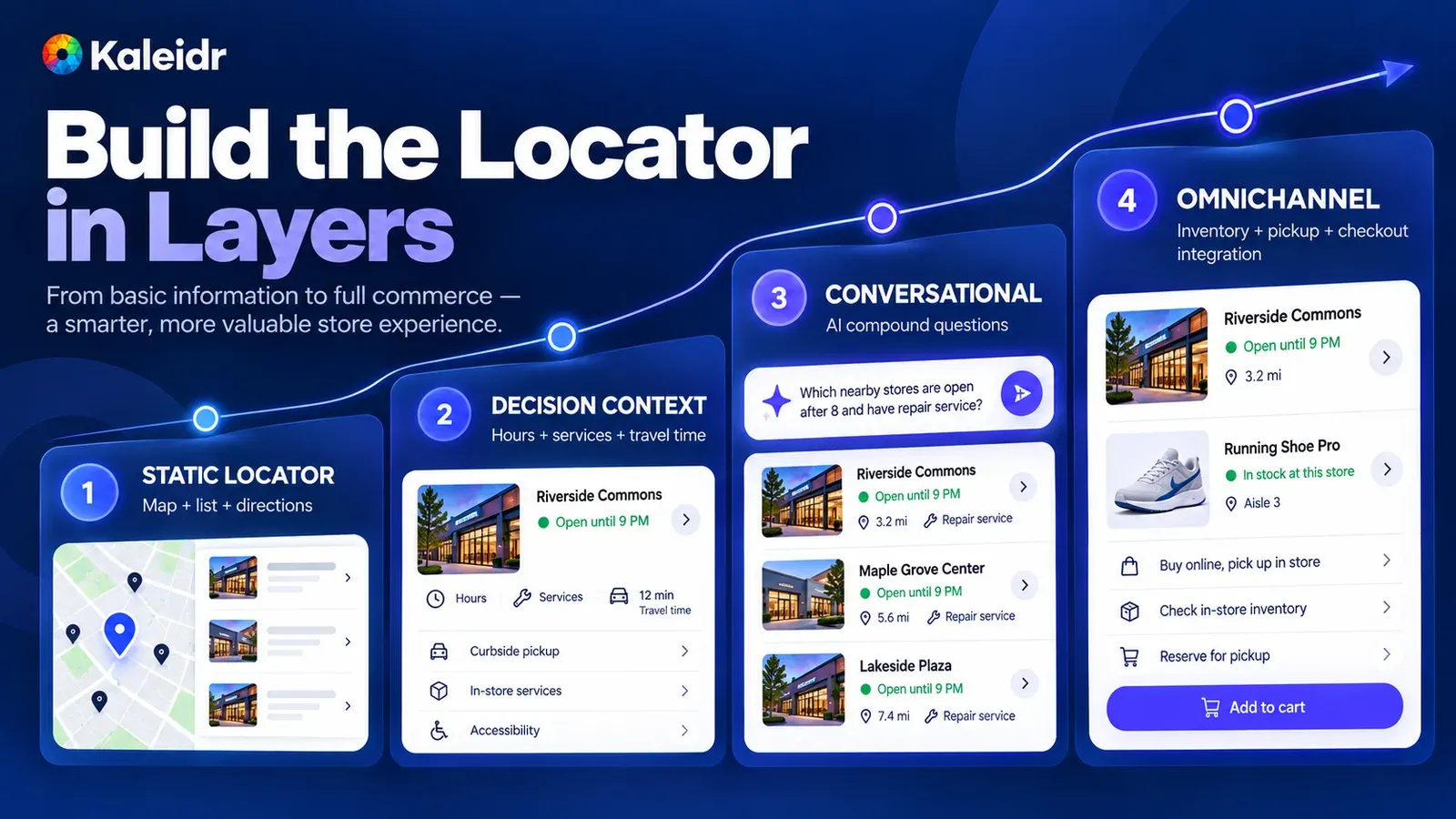
The figure climbs from a static map and list, to hours and services, to a sample question about stores open after 8 with repairs, to an illustrated product card. The "in stock" line, the aisle number, and the add-to-cart button are sample commerce labels. Kaleidr does not process that checkout. Travel times on the cards are sample labels too.
Why Must the List and the Map Share One Result?
A shopper who selects a store in the list should see that same store selected on the map, and a tap on the pin should open the same card. Search text, filters, the result set, and the selection are one state. Two widgets that only happen to sit on the same page will drift the first time a filter changes one of them. The id that joins the pin, the card, the store page, and a later inventory lookup should be the retailer's own store id, not a pin number that changes with the zoom.
The shared-state figure uses a sample search for Reston and a sample selection of Tysons. The distances, closing times, and ids on the diagram are labels for the layout, including store_id 2 and result_set_id rs_7f3a. Those labels are not a live query against a real chain. What the diagram gets right is the rule: one query, one result set, one selected store, in the list and on the map together.
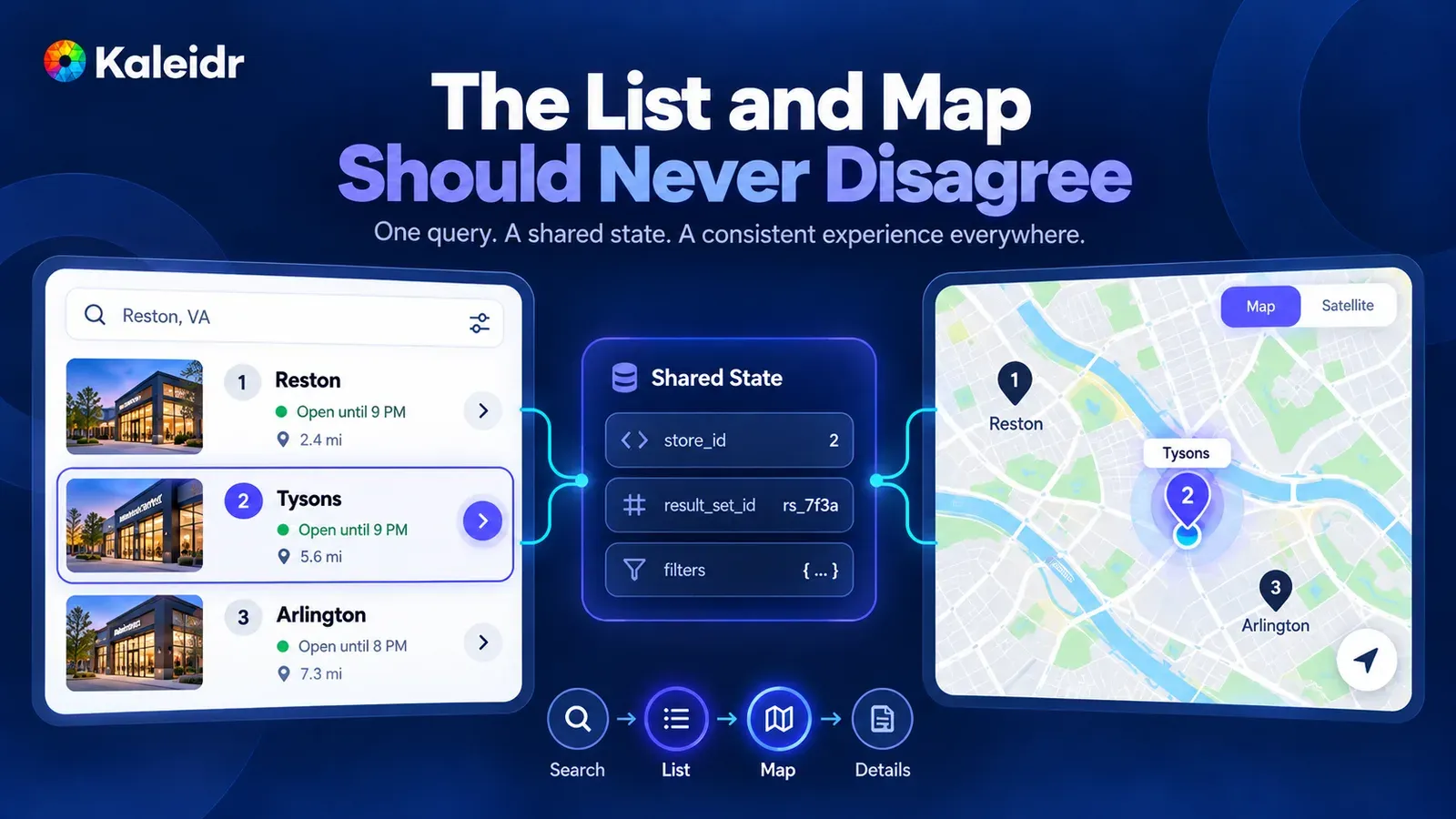
The list shows three sample stores, and both the list and the map have Tysons selected. The center block names the shared fields: a store id, a result-set id, and the filters. Reston, Tysons, and Arlington, along with the miles and the closing times, are sample labels. The ids are diagram labels, not a production key format.
What Does Nearest Actually Rank?
Straight-line distance, walking time, drive time, and the extra time off a route can crown four different stores. A shopper leaving a downtown hotel on foot and a shopper driving home from work are not asking the same question, even when both type the same city. The locator should sort by the metric that matches the trip, and the card should say which metric produced the number. A language model should not invent a drive time on a page that promises a real route.
"Nearest" without a unit is how a store with a long walk and a short crow-flies distance wins the wrong job. If the retailer does not have a routing source for that session, the honest label is distance, not minutes. Open-now belongs in the same family of exact tests. Compute it from a current hours source and the shopper's local time, and leave the badge off when the hours are missing. Unknown hours are not the same fact as closed.
Which Store Fields Belong in the Template?
Name, address, coordinates, general services, and the short editorial note change slowly enough for a template to hold them. Inventory, a holiday closure, pickup eligibility, store capacity, and appointment availability move on an operations clock. Pasting yesterday's stock count into the page and calling it current fails the moment a sale lands. The split is the whole point of the figure: the template layer and the operational layer follow different update patterns, and they do not sync themselves.
Treat services as structured fields when a filter must be exact. "Repairs" as a free-text sentence will not match a repairs filter, and "usually" will not match open-now. A shopper who stacks open-now, pickup, and repairs deserves a result that applied each condition, or an honest empty state. The empty state should say that no store matched, not that the chain has no stores.
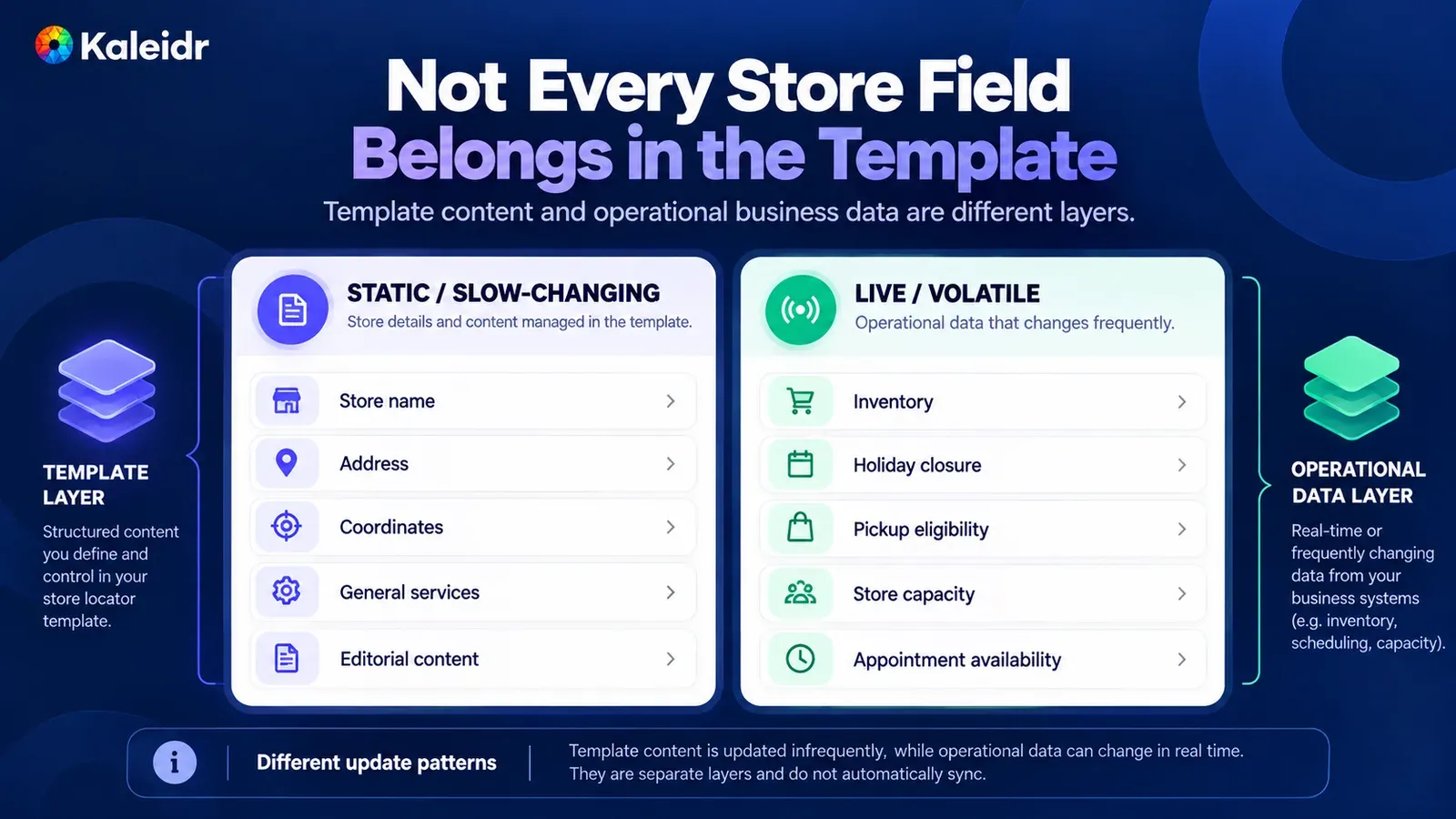
The left column is the template layer: name, address, coordinates, general services, and editorial content. The right column is the operational layer: inventory, a holiday closure, pickup eligibility, capacity, and appointments. The footer says the two layers update on different clocks and do not sync automatically. None of the rows is a live feed from a named retailer.
When Does a Store Finder Become a Product Finder?
A store finder starts from the shopper and returns nearby stores. A product finder starts from a product, gathers candidate stores, checks current inventory, and only then offers pickup or directions. Retail apps already bundle those jobs. Nearby, on the Shopify App Store, describes live inventory per location, click and collect, drive times, and directions (Nearby, 2026). SAAS Integrator's listing describes click and collect, stock by store, a store finder with a map and live hours, and per-product availability (SAAS Integrator, 2026). Those are commerce products with their own catalogs, and none of that behavior ships inside the Kaleidr template.
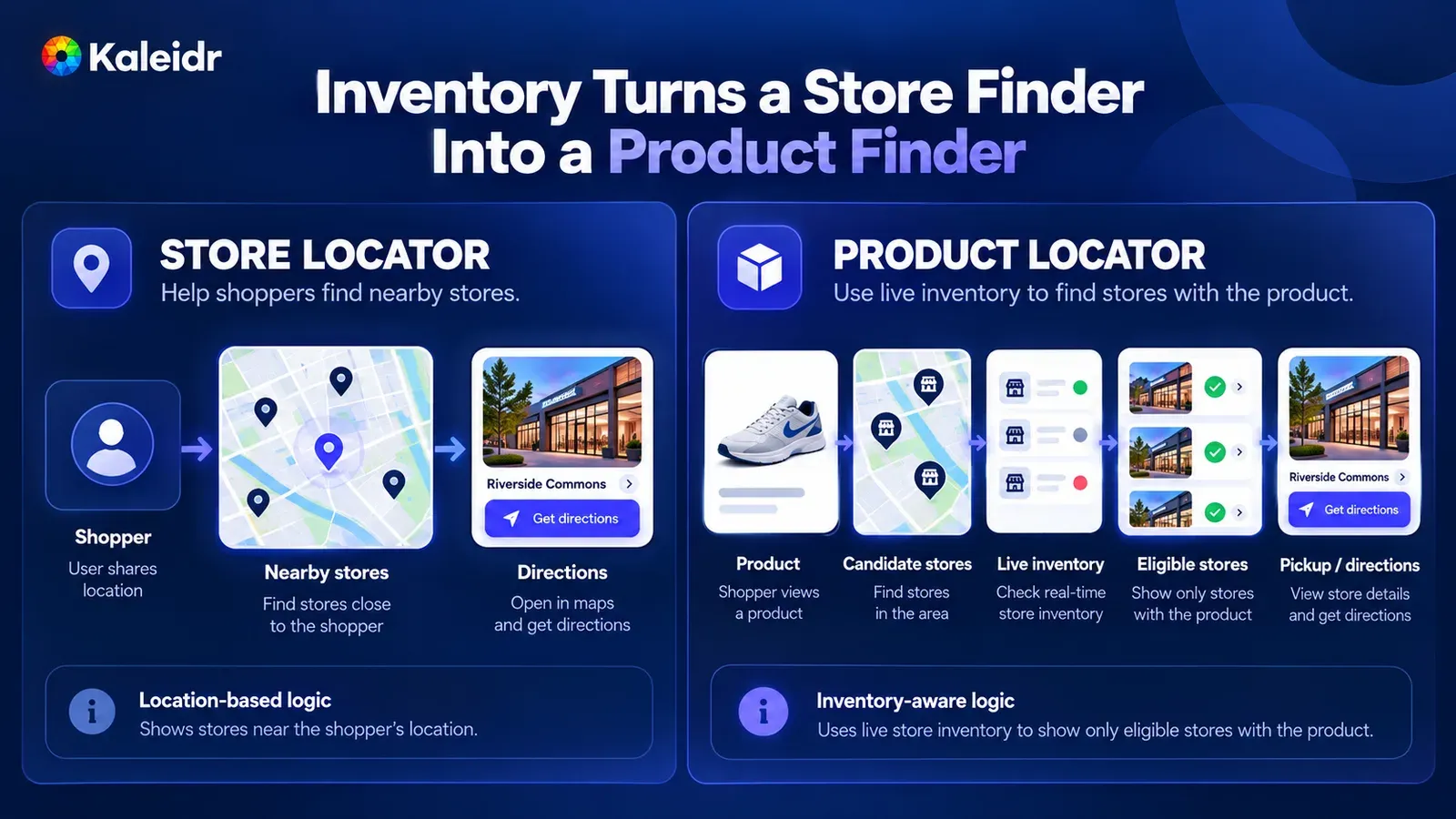
The left path is shopper, nearby stores, and directions. The right path is product, candidate stores, a live inventory check, eligible stores, and pickup or directions. The shoe, the stock dots, and the store names are sample artwork. The right-hand path is the retailer's inventory logic, not a Kaleidr stock feed.
Google's local inventory help draws the same line with four labels. In stock means high confidence that the item is available, limited stock means low confidence, and out of stock means high confidence that the item is unavailable. Unknown availability is the label when the scan pattern is too thin to support a status (Google, 2026). A lookup that fails, times out, or comes back stale belongs with unknown. The store can stay on the map. The page should not tell the shopper the product is gone.
How Should Pickup Be Revalidated?
Shopify defines buy online, pickup in store as an order-fulfillment method: the shopper buys online and collects the order at a physical store (Shopify, 2026). A pickup badge on a map is a hint the shopper can use to choose a store. The commerce system still has to recheck inventory, store eligibility, and the cutoff before checkout, because the badge can go stale between the map and the cart. Kaleidr does not take the payment, hold the unit, or replace the point of sale.
The handoff is easier to trust when both sides use the same store id. The locator can pass that id to the retailer's pickup flow. The retailer's system decides whether the id is still eligible. If the recheck fails, the shopper should see a new choice, not a confirmation the map cannot keep. Directions remain useful either way, because a shopper who will not buy ahead still needs the store.
What Does Ask Kaleidr Answer on a Published Map?
A published Kaleidr map can carry the Ask Kaleidr panel. The page has no API key, the published map authorizes the session, and the map's owner pays for the questions. The panel works on every plan, including Free. Reading the map's own places, including rows of an uploaded dataset, is switched on by Kaleidr for the platform and is off by default. While that behavior is off, the panel answers from general knowledge and does not read the map's markers, layers, or datasets, and there is no switch for it in Studio or in the embed code (Kaleidr, 2026).
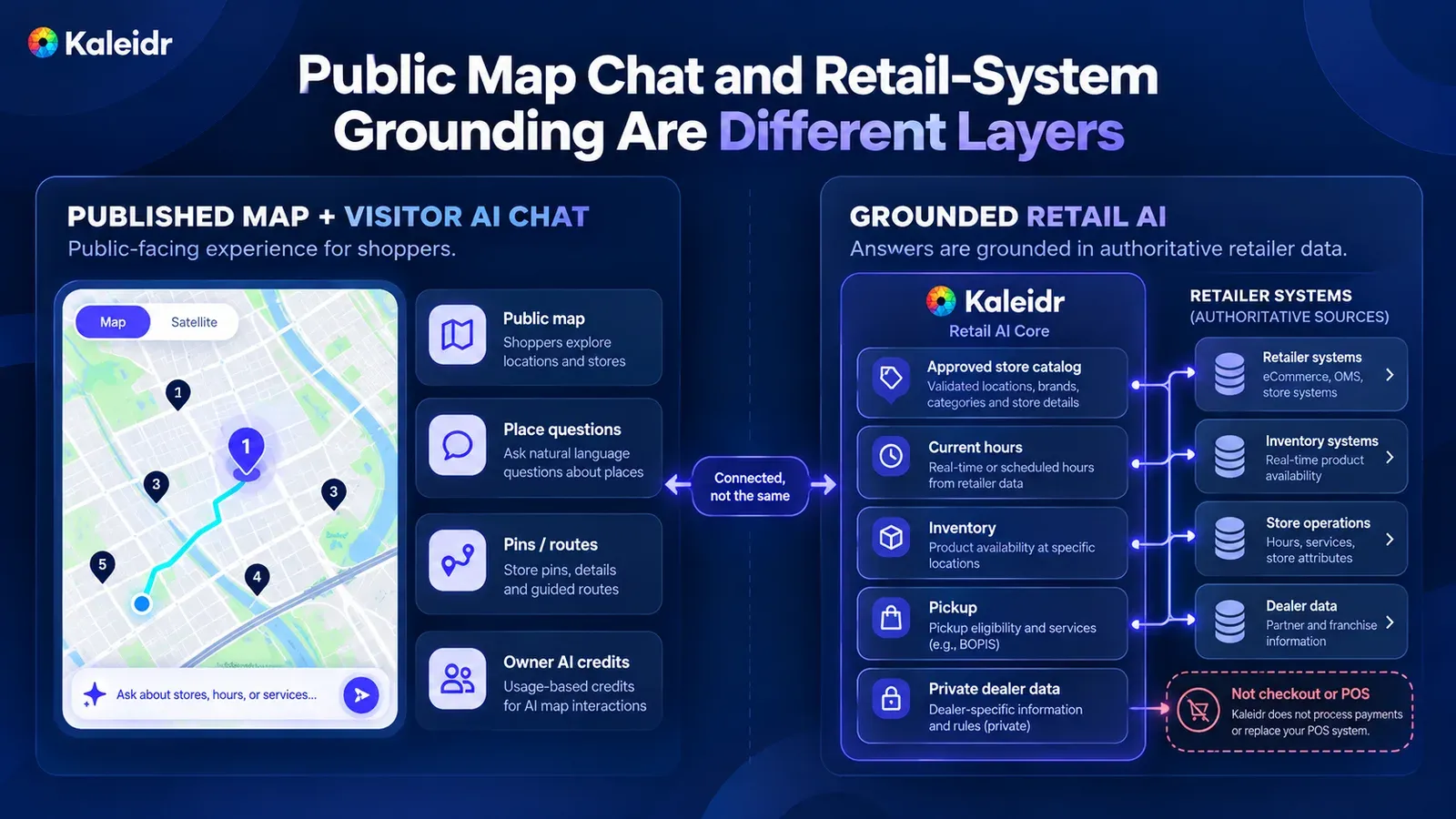
The left side is a published map with place questions, pins and routes, and usage that the owner pays for. The right side is a separate grounded layer fed by retailer systems. A note on the figure says Kaleidr is not checkout and does not replace the point of sale. The connection is labeled as connected, not the same system.
By default, the public panel does not answer only from the retailer's store list. Place reading is off, so the default answers come from general knowledge. A retailer that needs exact answers about inventory, services, hours, pickup, or private dealer data needs the business-data path, where the approved system stays authoritative. Kaleidr's choose-your-path docs class answers from the customer's own uploaded business data as Enterprise (Kaleidr, 2026). Public map chat and that grounded path are different layers.
When Should Filters Carry the Question?
Open now, pickup, repairs, and a distance cap are exact conditions, and a filter should apply them the same way on every search. A sentence such as "which store is open after 8, has repairs, and is near my route home" stacks those facts with a route. Natural language is a comfortable way to collect the stack. Each hard condition should still resolve against structured fields or the system that owns the fact, not against a guess. Filters remain the path for a shopper who will not type, for a session after the AI allowance is spent, and for assistive technology that is reading the list.
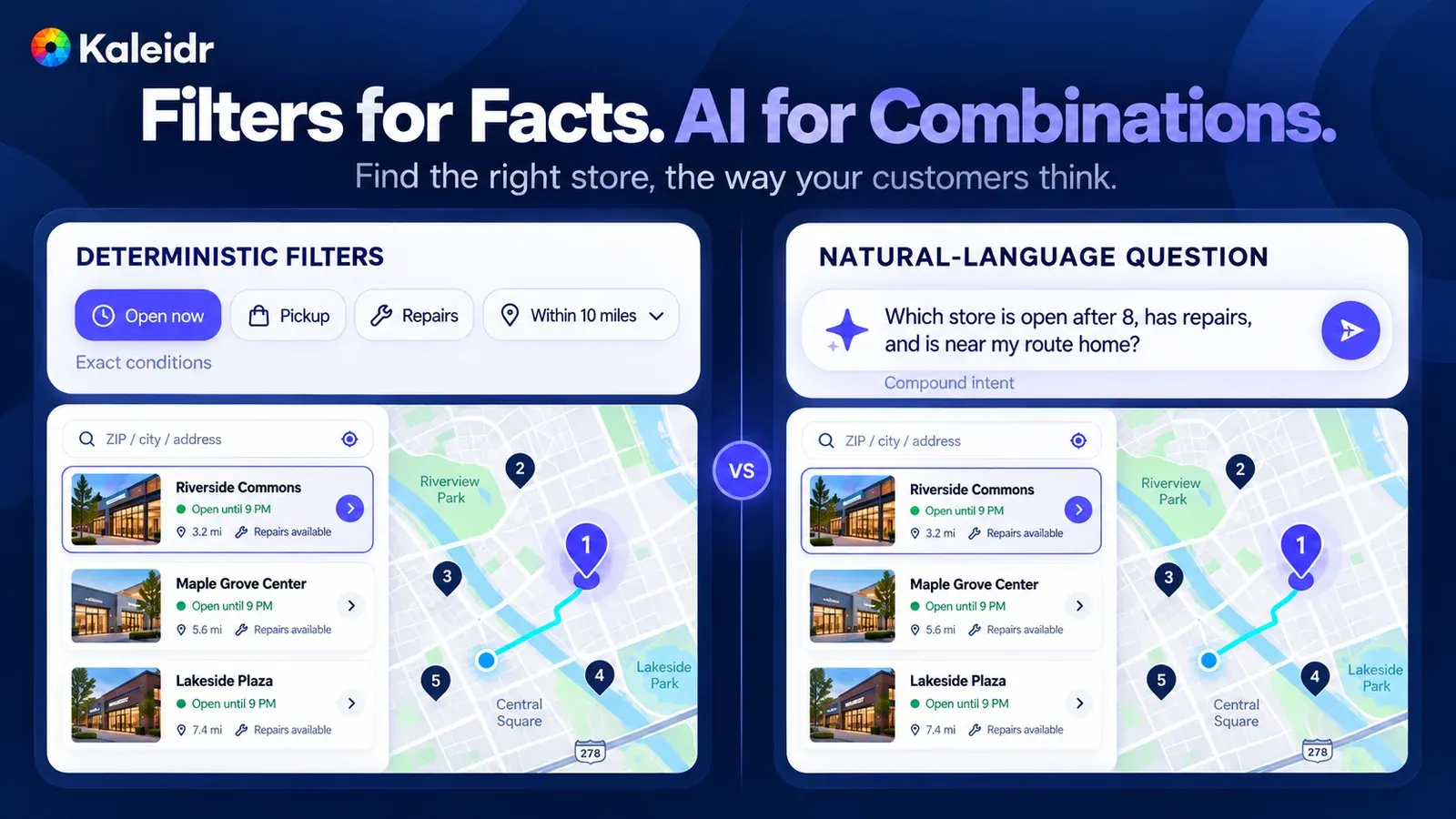
The left side marks open now, pickup, repairs, and a ten-mile cap as exact conditions. The right side asks which store is open after 8, has repairs, and is near the route home. Both sides show the same sample stores, miles, and hours. The question is a sample prompt on the figure, not a transcript from a live panel.
Where Does the Kaleidr Retail Template Start?
The public template index describes Kaleidr Retail as a neighborhood store network: a locator for the closest shop, today's opening hours, and which stores are open latest (Kaleidr, 2026). The retail customizer includes Edit Map, a field for a Studio map embed or map id, appearance colors, and a site download (Kaleidr, 2026). Studio is where the retailer creates, customizes, and publishes the branded map (Kaleidr, 2026). Use the template route for a new locator site or a microsite, and replace the sample stores before anyone treats the page as the chain's real list. An existing ecommerce site should keep its product pages and add the published map, rather than rebuilding the catalog inside the template.
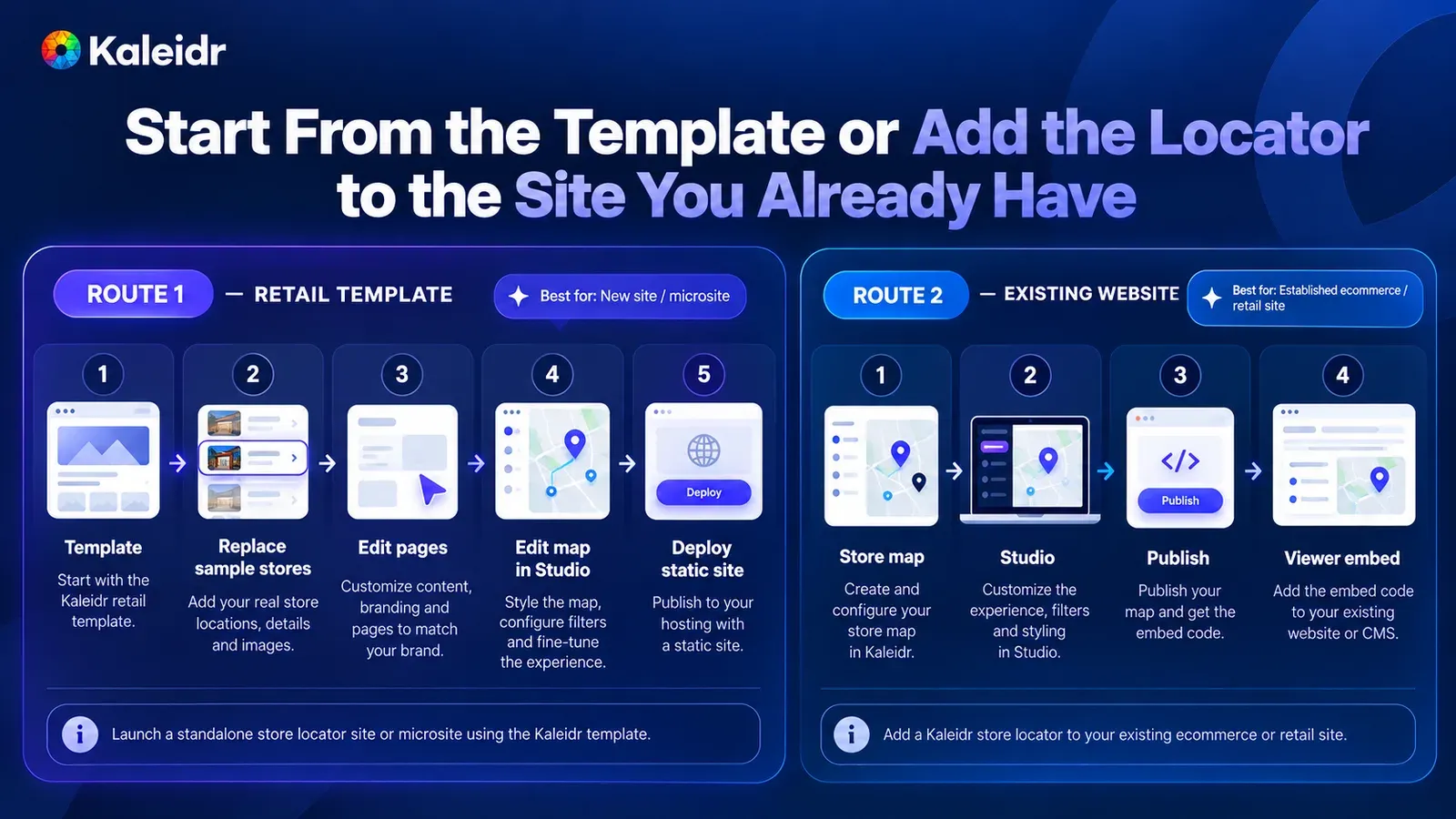
Route one starts from the retail template, replaces sample stores, edits the pages, edits the map in Studio, and deploys a static site. Route two builds the store map, customizes it in Studio, publishes, and embeds Viewer on an existing site. The step labels describe those two paths. Sample stores in the artwork are not a retailer's live directory.
How Do You Add the Locator to a Site You Already Have?
Viewer embeds the published map by share id, with no API key on the page, on every plan including Free, and the map renders in an iframe Kaleidr hosts (Kaleidr, 2026). Store names, hours, and addresses should also exist as HTML outside the canvas, which is the pattern in Kaleidr's embed guide. The sample uses YOUR_MAP_ID for the share id Studio shows after publish, and the page still needs the loader described in the Viewer docs. A site that needs live product-page inventory, a private dealer list, or checkout should treat the embed as the map, not as the whole commerce stack.
<kaleidr-map
  product="viewer"
  share-id="YOUR_MAP_ID"
  style="display: block; height: 480px"
></kaleidr-map>
Hundreds of store markers should not each become a stop in the tab order. The HTML list is the accessible path through the same result set, with the same store ids the map uses. Publish only the store facts the retailer is willing for any visitor to read, because a published map is the map the embed shows. Keyboard users, and anyone who cannot use the canvas, still need the name, the address, and the next action in that list.
What Should the Phone Version Do First?
Many store-finder sessions are likely to happen while the shopper is already moving, so the phone layout is the primary test rather than a shrunk desktop. Search, open now, pickup, the selected store, and directions need targets a thumb can hit, and the list has to stay readable without a tour of the pins. Ask for precise location only after a deliberate action, and keep ZIP or city search working when the shopper declines. A bottom sheet of store cards is a practical way to keep the map and the list on one screen.
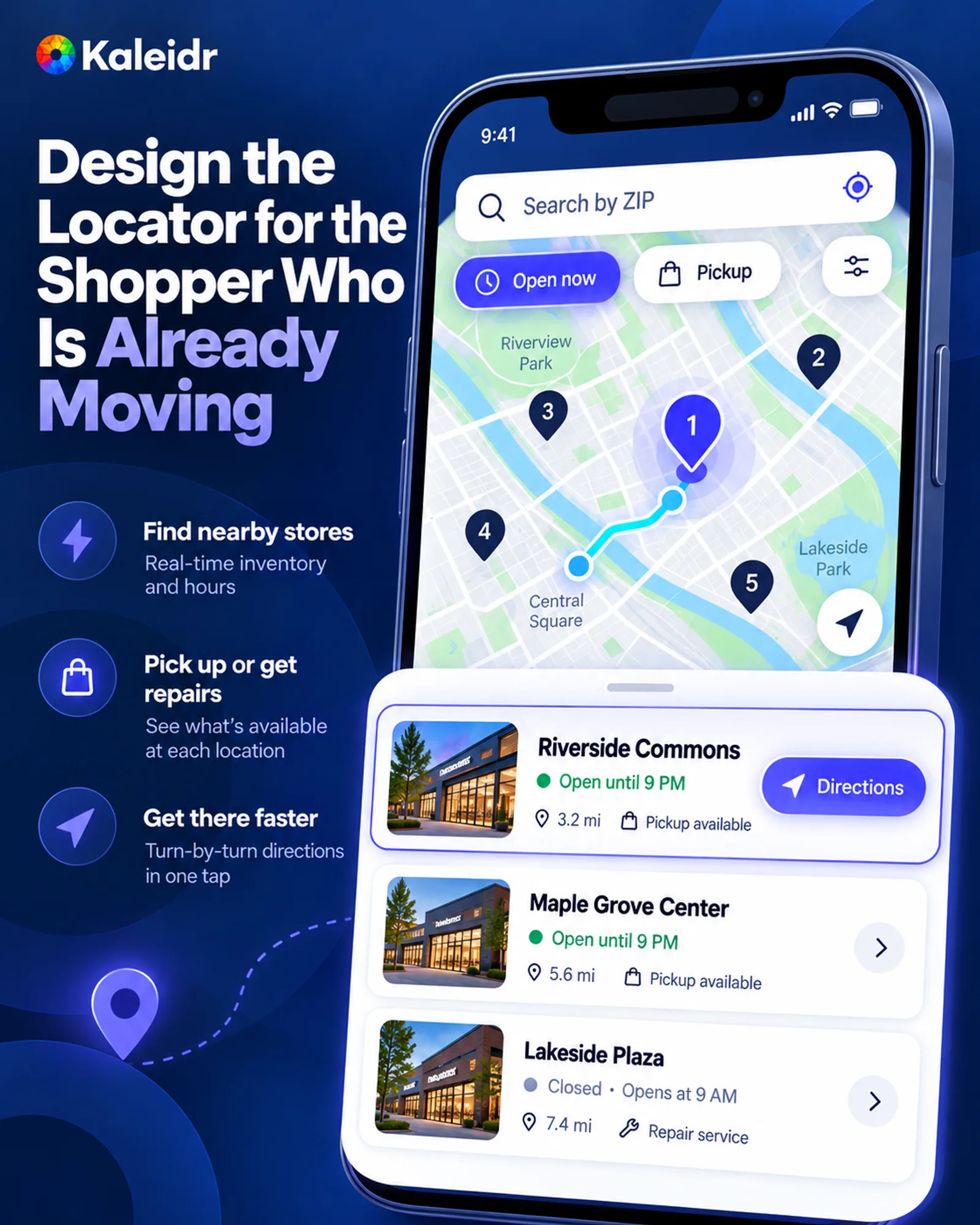
The phone shows a ZIP search, open-now and pickup chips, five numbered pins, a route, and three store cards. Riverside Commons is selected, with a directions action. The miles, the hours, and the "real-time inventory" line beside the phone are sample labels. That line on the artwork does not mean the template syncs stock.
Which Outcomes Are Worth Counting?
Kaleidr Analytics dashboards show reach, views, and engagement, with audience location and activity across maps (Kaleidr, 2026). A map load says the experience opened. Store visits, pickup completions, and revenue belong in the retailer's own reports. Join those outcomes to the map with the same store id if the team wants one location to mean one location in both systems. A visits badge drawn on a marketing figure is not that report.
The questions worth instrumenting follow the job. Did the shopper search, filter, select a store, and take a next action? Which filter produced an empty set? Which stores are selected often and never followed by a direction request? Those are product questions about the finder. They become commerce questions only after the retailer's system records the visit, the pickup, or the sale.
What Does This Locator Cost on Kaleidr?
Kaleidr's pricing page states that Free includes 500K AI credits and 50K map loads a month, and that Pro is $29 a month with 5M AI credits. Extra map loads cost $2 per 1,000. Add-on packs of extra AI credits or map loads are one-time purchases, used only after the current cycle's plan allowance, and unused pack units roll over. Plan allowances reset each billing cycle (Kaleidr, 2026). Enterprise is the conversation when answers must come from the retailer's own business data, or when the deployment needs a contract and organization-level terms.
Visitor questions on a published map draw on the owner's AI credits, on every plan including Free, as the published-map chat docs cited above describe. A credit pack extends that pool after the month's allowance is spent. Map loads are a separate meter from those credits. Neither meter is a stock feed, a pickup reservation, or a point of sale.
What Should a Retailer Do Next?
Start from the decision the shopper is trying to finish, then choose the data layer that can stay honest. A small chain with stable locations can launch from the Kaleidr Retail template and publish the store map in Studio. A retailer with a live catalog should keep inventory and pickup in the commerce system, and let the map show only what that system has confirmed. Replace every sample store before the page is public.
A first version is ready when the list and the map share one result, every store has a stable id, and the page says which travel metric it sorted by. Hours and services are either current or absent. The retailer's system rechecks pickup and stock before anyone is told the item is waiting. The HTML list repeats the core facts. The team can name the report that will count a real visit.
Note: Kaleidr uses AI-assisted tools for image creation, content refinement, and research throughout its creative and development workflows.
FAQs
What is a store locator template?
A store locator template is a ready-made retail map experience for finding a physical store and choosing a next step. The Kaleidr Retail template is one such starting point, described publicly as a neighborhood store network with today's hours. The template is not the retailer's inventory system.
What should a store locator show?
Show the stores that match the search, the hours and services the retailer can keep current, and a next action such as directions, a call, or the store page. Say which travel metric produced a "nearest" ranking. Leave unknown stock and unknown hours unlabeled rather than converting them into a confident no.
Does the Kaleidr Retail template include live inventory?
The template holds the slower store facts and the published map. Live inventory, pickup eligibility, and checkout stay in the retailer's systems. Shopify apps such as Nearby and SAAS Integrator advertise those live retail jobs, and those capabilities belong to the apps, not to the Kaleidr template.
Does Ask Kaleidr answer only from the store list?
Place reading on a published map is off by default. While place reading is off, the panel answers from general knowledge and does not read the map's markers, layers, or datasets. Exact answers about inventory, hours, pickup, or private dealer data belong on the Enterprise business-data path, where the approved system stays in charge.
Can the locator go on an existing website?
Yes. Publish the map in Studio and embed it with Viewer, using the share id and no API key on the page. Viewer works on every plan, including Free. Keep the store list in HTML as well, so the page is useful outside the canvas.
Does the template sync with Shopify or a point of sale?
The Kaleidr Retail template does not sync a Shopify catalog, a point of sale, or a live stock file by itself. A copied stock count on a static page is already aging. Revalidate pickup and inventory in the commerce system at checkout.
Can a store locator support pickup?
A locator can show a pickup hint and pass a stable store id into the retailer's flow. Shopify describes buy online, pickup in store as fulfillment that ends with collection at the store, which is a commerce workflow. The map badge is not the reservation, and Kaleidr does not take payment.
How is a product locator different?
A store locator starts from the shopper and finds nearby stores. A product locator starts from a product, removes stores that cannot fill it, and only then offers pickup or directions. The second job needs a current inventory source. Unknown availability is not the same status as out of stock.
References
- Shopify. Omnichannel Retail Strategy: How to Build One (2026). A shopper may check store availability, buy in an app, pick up in a store, and return through another channel. Accessed October 20, 2026. https://www.shopify.com/enterprise/blog/omni-channel-retail-strategy
- Nearby. In-stock store finder for product pages, with pickup and buy. Live inventory per location, click and collect, drive times, and directions. Shopify App Store. Accessed October 20, 2026. https://apps.shopify.com/nearby-1
- SAAS Integrator. SAAS: Pickup + Store Finder. Click and collect, stock by store, a store finder with a map and live hours, and per-product availability. Shopify App Store. Accessed October 20, 2026. https://apps.shopify.com/saas-integrator-cnc
- Google. Understand how stock status works. In stock, limited stock, out of stock, and unknown availability. Accessed October 20, 2026. https://support.google.com/business/answer/13738543
- Shopify. What is BOPIS: Buy Online, Pickup In-Store Guide (2026). Pickup defined as buying online and collecting the order at a physical store. Accessed October 20, 2026. https://www.shopify.com/blog/bopis
- Kaleidr Developer Docs. Kaleidr AI on a published map. No API key on the page, the owner pays, Free included, and place reading off by default. Accessed October 20, 2026. https://docs.kaleidr.com/chat/published-map-chat
- Kaleidr Developer Docs. Choose your path. Answers from a customer's own uploaded business data are an Enterprise path. Accessed October 20, 2026. https://docs.kaleidr.com/concepts/choose-your-path
- Kaleidr. Map website templates. Kaleidr Retail described as a neighborhood store network with today's opening hours. Accessed October 20, 2026. https://template.kaleidr.com/
- Kaleidr. Retail template customizer. Edit Map, a Studio map embed or map id, and a site download. Accessed October 20, 2026. https://template.kaleidr.com/customize/?template=retail
- Kaleidr. AI Map Maker for Branded Interactive Maps. Create, customize, and publish branded interactive maps. Accessed October 20, 2026. https://kaleidr.com/studio
- Kaleidr Developer Docs. Viewer. A keyless embed by share id, on every plan including Free, rendered in an iframe Kaleidr hosts. Accessed October 20, 2026. https://docs.kaleidr.com/viewer
- Kaleidr. How to Embed an Interactive Map on a Website. Headings, summaries, and location lists outside the map canvas. Accessed October 20, 2026. https://kaleidr.com/blog/how-to-embed-interactive-map-on-a-website
- Kaleidr. Map Engagement and Location Analytics. Reach, views, engagement, and audience location. Accessed October 20, 2026. https://kaleidr.com/analytics
- Kaleidr. Pricing & Plans. Free and Pro allowances, add-on packs, and the map-load price. Accessed October 20, 2026. https://kaleidr.com/pricing
@misc{shopify_omnichannel_2026,
  title  = {Omnichannel Retail Strategy: How to Build One (2026)},
  author = {{Shopify}},
  year   = {2026},
  url    = {https://www.shopify.com/enterprise/blog/omni-channel-retail-strategy}
}

@misc{nearby_store_finder_2026,
  title  = {In-stock store finder for product pages, with pickup and buy},
  author = {{Nearby}},
  year   = {2026},
  url    = {https://apps.shopify.com/nearby-1}
}

@misc{saas_integrator_pickup_2026,
  title  = {SAAS: Pickup + Store Finder},
  author = {{SAAS Integrator}},
  year   = {2026},
  url    = {https://apps.shopify.com/saas-integrator-cnc}
}

@misc{google_stock_status_2026,
  title  = {Understand how stock status works},
  author = {{Google}},
  year   = {2026},
  url    = {https://support.google.com/business/answer/13738543}
}

@misc{shopify_bopis_2026,
  title  = {What is BOPIS: Buy Online, Pickup In-Store Guide (2026)},
  author = {{Shopify}},
  year   = {2026},
  url    = {https://www.shopify.com/blog/bopis}
}

@misc{kaleidr_published_map_chat_2026,
  title  = {Kaleidr AI on a published map},
  author = {{Kaleidr Developer Docs}},
  year   = {2026},
  url    = {https://docs.kaleidr.com/chat/published-map-chat}
}

@misc{kaleidr_choose_path_2026,
  title  = {Choose your path},
  author = {{Kaleidr Developer Docs}},
  year   = {2026},
  url    = {https://docs.kaleidr.com/concepts/choose-your-path}
}

@misc{kaleidr_templates_2026,
  title  = {Map website templates},
  author = {{Kaleidr}},
  year   = {2026},
  url    = {https://template.kaleidr.com/}
}

@misc{kaleidr_retail_customizer_2026,
  title  = {Retail template customizer},
  author = {{Kaleidr}},
  year   = {2026},
  url    = {https://template.kaleidr.com/customize/?template=retail}
}

@misc{kaleidr_studio_2026,
  title  = {AI Map Maker for Branded Interactive Maps},
  author = {{Kaleidr}},
  year   = {2026},
  url    = {https://kaleidr.com/studio}
}

@misc{kaleidr_viewer_docs_2026,
  title  = {Viewer},
  author = {{Kaleidr Developer Docs}},
  year   = {2026},
  url    = {https://docs.kaleidr.com/viewer}
}

@misc{kaleidr_embed_guide_2026,
  title  = {How to Embed an Interactive Map on a Website},
  author = {{Kaleidr}},
  year   = {2026},
  url    = {https://kaleidr.com/blog/how-to-embed-interactive-map-on-a-website}
}

@misc{kaleidr_analytics_2026,
  title  = {Map Engagement and Location Analytics},
  author = {{Kaleidr}},
  year   = {2026},
  url    = {https://kaleidr.com/analytics}
}

@misc{kaleidr_pricing_2026,
  title  = {Pricing & Plans},
  author = {{Kaleidr}},
  year   = {2026},
  url    = {https://kaleidr.com/pricing}
}