
AI店舗検索は、信頼できる店舗ディレクトリ、地理検索、ライブマップ、複数条件の地域ニーズを扱う対話レイヤーを組み合わせた仕組みです。距離、営業時間、サービス、アクセシビリティ、受け取りには決定論的なフィルターを使い、顧客が複数の条件を自然言語で組み合わせる場面でAIを活用します。モデルは意図を解釈し、店舗システムは事実を検証し、ホストアプリケーションはポリシーを適用し、地図は承認済みの結果を表示します。
以下では、アーキテクチャ、共有検索状態、Kaleidr Chatの接続、ランキング、計測、避けるべき誤りを解説します。レンダラー別の接続手順は地図にAIチャットを追加する方法を参照してください。関連する観光地向けワークフローはAI搭載観光マップの構築方法を参照してください。
AI店舗検索の基本
- 事実は店舗システムが管理する: 営業時間、サービス、休業、在庫対象可否をモデルに推測させません。
- フィルターを見える状態にする: チャットで解釈した条件を、顧客が確認・編集できるチップに変換します。
- 検索状態を一元化する: リスト、地図、チャットで同じ検索起点、フィルター、選択店舗IDを共有します。
- ライブマップにチャットを接続する: Kaleidr ChatはMapbox、Google Maps、MapLibre、Leafletに接続し、レンダラー自体はホストが管理します。
- 行動を計測する: 成功指標にはチャットの起動回数より、経路案内、電話、予約、受け取りを使います。
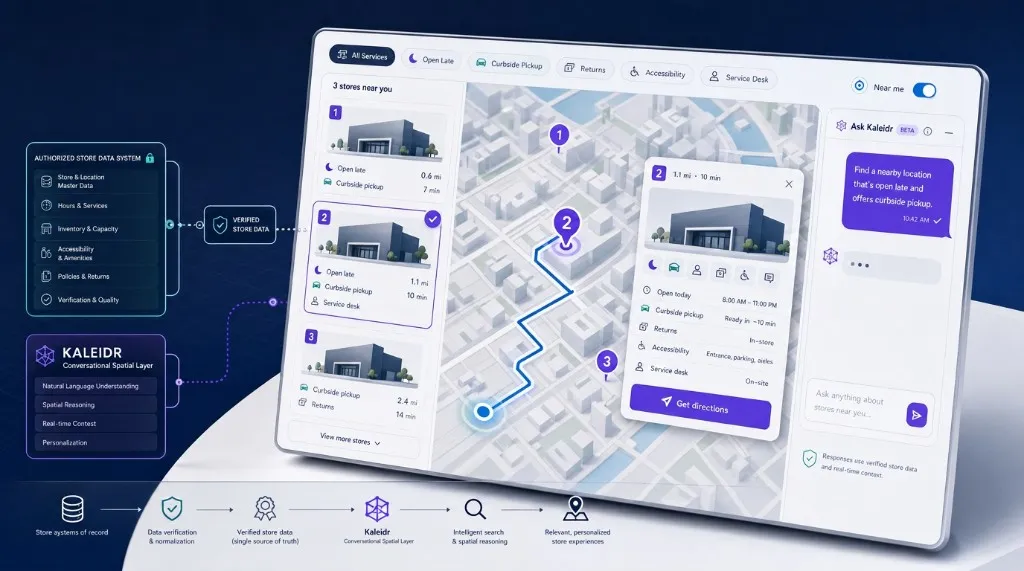
マップチャット対応AI店舗検索を構築するには?
完成形には、住所または任意の端末位置による検索、距離・営業時間・サービス・操作を示す店舗リスト、選択・絞り込み済みマーカーを表示するインタラクティブマップ、自然言語で検索を調整するAIチャットパネルという4つの同期された領域があります。有用な回答は、依頼を明示的な条件に変換し、認可された店舗システムから対象レコードを取得し、残った店舗を順位付けし、選択店舗を地図上で強調し、一致理由を説明したうえで、経路案内、電話、予約、詳細表示などの操作を提示します。AIレイヤーが営業時間、サービス、在庫、対象可否を作り出してはいけません。これらの属性は最新の業務システムから取得します。
AI店舗検索と「近くの店舗」検索の違いは?
名称は似ていますが、製品要件は異なります。店舗ロケーターは店舗がどこにあるかを示し、店舗ファインダーはどの店舗が要件に合うかを示します。「近くの店舗」検索には、許可された位置情報または入力された検索起点が必要です。AI店舗検索は、自然言語の解釈を認可済み店舗データに結び付け、変化する複数条件を満たす近隣店舗を特定します。従来型ロケーターが基盤であることは変わりません。AIは、リスト、フィルター、店舗レコードを置き換えるのではなく、複雑な意図の入力を容易にします。
| 体験 | 主な質問 | 必要な機能 |
|---|---|---|
| 店舗ロケーター | 店舗はどこにありますか? | 検索可能な店舗一覧と地図 |
| 店舗ファインダー | どの店舗が要件に合いますか? | フィルター、サービス、利用可否、ランキング |
| 近隣検索 | 近くに何がありますか? | 位置情報または入力された検索起点 |
| AI店舗検索 | 複数条件を満たす近隣店舗はどこですか? | 認可済み店舗データに対する自然言語検索 |
郵便番号、半径、営業中、店舗種別、受け取り方法、アクセシビリティ、商品対象可否には標準コントロールを使います。「仕事帰りにも営業していてカーブサイド受け取りに対応」「返品と駐車場の両方が必要」「会場近くで当日受け取り」といった条件の組み合わせにはAIを使います。解釈後は適用条件を表示し、顧客が確認・修正できるようにします。
アーキテクチャで事実と会話を分離するには?
本番向けAI店舗検索では、対話、描画、推論、業務上の事実を分離します。ホストアプリケーションはUI、セッション、ロケール、同意、ワークフロー、コンバージョン操作を管理します。店舗システムは店舗ID、住所、座標、営業時間、サービス、営業状態、在庫対象可否、更新日時を管理します。ホストのバックエンドは認可、取得、絞り込み、ランキング方針、キャッシュ、監査ログを担当します。地図レンダラーは表示、マーカー、クラスタリング、カメラ、ルートプレビューを担い、空間サービスはジオコーディング、距離、移動時間、経路案内を提供します。Kaleidrはホストがすでに描画している地図に会話型の空間レイヤーを追加し、分析機能は検索品質、選択、経路案内、電話、コンバージョンを記録します。
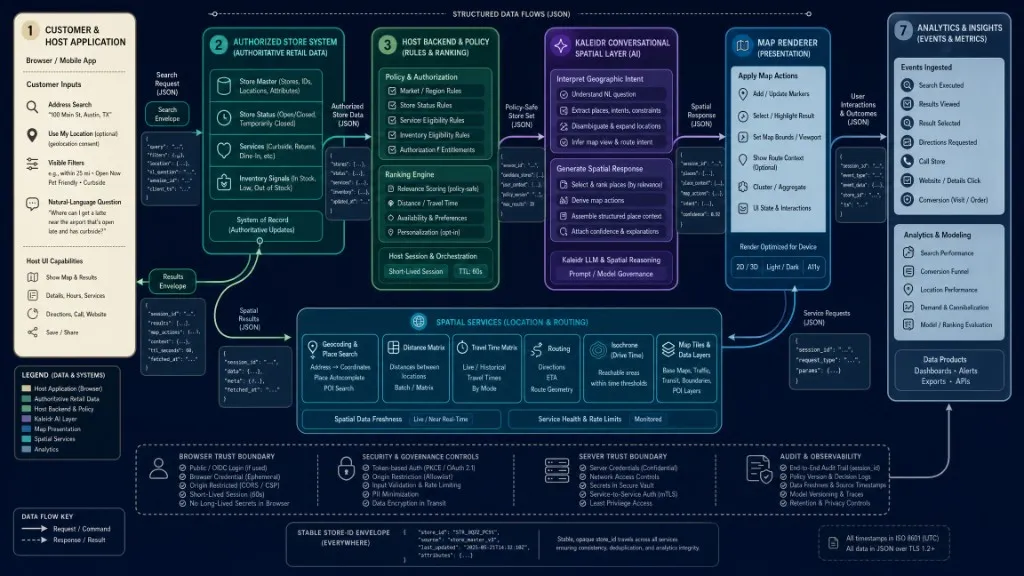
現在のKaleidrドキュメントでは、Chatはライブマップインスタンスに接続するAIレイヤーとして説明されています。Mapbox、Google Maps、MapLibre、Leafletに接続し、解決した場所を描画し、結果に合わせてカメラを調整しますが、地図の描画責任は既存レンダラーに残ります(Chat — 地図にAIを接続)。リスト、地図、分析、詳細ページで同じ安定した店舗IDを使います。座標と表示住所を分け、業務属性には更新日時を付け、営業時間は店舗の現地時間帯で表現し、アクセシビリティやサービスを推論だけで判断しないでください。
共有状態、検索起点、チャットをどう連携させる?
地図とリストは同じ検索条件を表す必要があります。ホストは、検索起点、半径、範囲、表示フィルター、AI提案条件、並び順、選択店舗ID、結果を含む単一の検索状態を管理します。Kaleidr Chatは絞り込みを提案できますが、チャット履歴に埋め込まず、確認可能なアプリケーション条件に変換します。顧客が住所や場所を入力したら、地図を移動し、その起点から再順位付けします。サービスフィルターを適用したら、対象外のマーカーとカードを同時に非表示にします。カードまたはマーカーを選択したら、両方で同じ店舗を強調します。カメラが動くたびに全件を更新せず、「このエリアを検索」またはデバウンスしたidleイベントを使います。
検索起点はホスト側の責任であり、通常は顧客が入力した住所、郵便番号、場所です。Kaleidr Chatにブラウザーの位置情報は必須ではありません。Chatはライブマップに接続し、ホストがすでに取得した信頼できる店舗結果を使います。
https://cdn.kaleidr.com/embed/v1/kaleidr.jsからバージョン指定されたKaleidrローダーを読み込み、埋め込みを有効にして、aiスコープを含む公開可能キーでChatをライブマップに接続します。
const chat = Kaleidr.mount("#store-chat", {
  product: "chat",
  publishableKey: "kld_pk_live_REPLACE_ME",
  map: storeMap,
  enabled: true
});

window.addEventListener("pagehide", () => {
  chat.destroy();
});
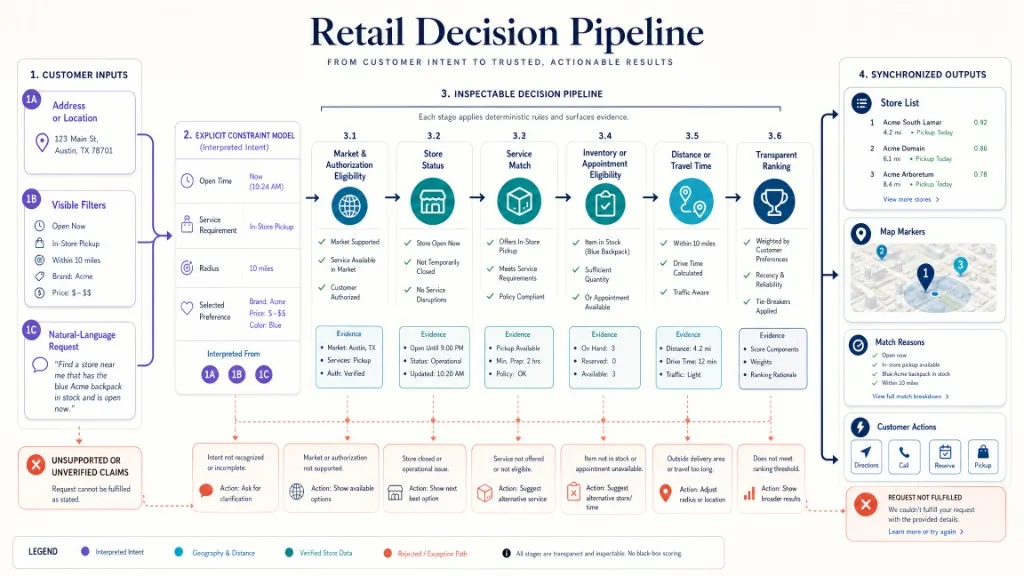
この例は、現在のChat接続リファレンスとkaleidr.jsローダーに従っています。公開可能キーは承認済みオリジンに制限し(CORSと許可オリジン)、サーバーキーと小売システムの認証情報はバックエンドに保持します(認証とスコープ)。ランキング前に、市場での認可、店舗の営業状態、サービス適合、在庫・予約ルール、距離・移動時間を決定論的に判定するのはモデルではなくホストです。裏付けのない主張は推測せず拒否します。ローカルSEOでは、LocalBusiness構造化データを店舗ページに表示される事実と一致させます。構造化データは有用なページ本文の代わりにはなりません。
ランキング、計測、典型的な失敗の回避方法は?
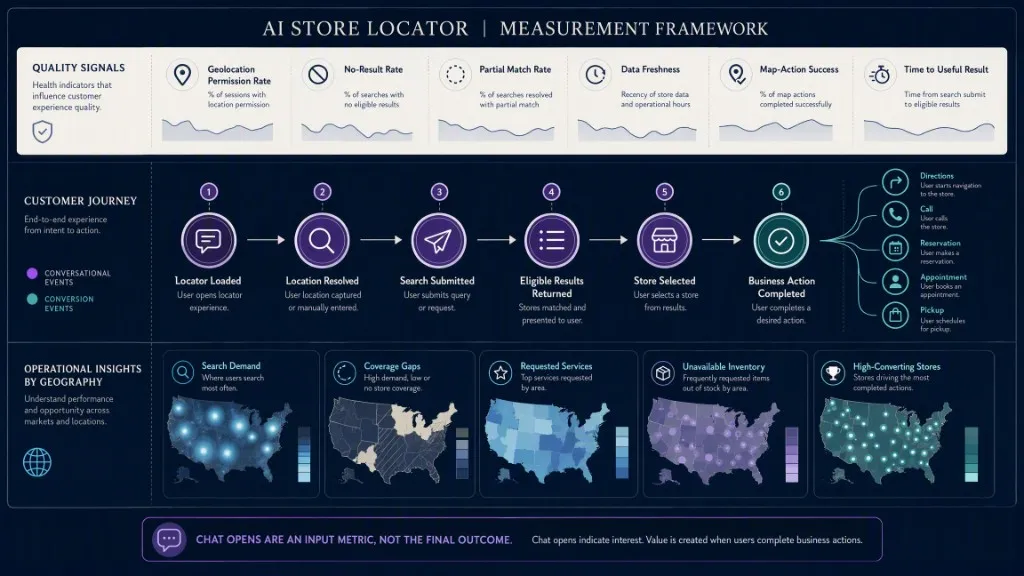
最初に必須の対象条件を適用し、その後、距離、移動時間、顧客の希望など、承認済みシグナルで対象店舗を順位付けします。結果の横に一致理由を表示します。アクセシビリティのため、地図とリスト領域に名前を付け、フィルターや操作をキーボードで移動できるようにし、フォーカストラップを避け、ターゲットサイズの指針を満たし、WCAG 2.2が適用される場合はドラッグ以外の操作を提供します。ロケーターの読み込み、場所の解決、検索送信、対象結果、店舗選択、経路案内、電話、予約、来店予約、受け取りを追跡します。Chatの起動は入力指標であり、成果ではありません。結果なし率、部分一致、データ鮮度、地図操作の成功、役立つ結果までの時間を監視し、地域別の需要と対応範囲も確認します。
| 誤り | 起きること | 推奨される対策 |
|---|---|---|
| モデルに営業時間や在庫を作らせる | 顧客が休業中または在庫のない店舗に到着する | すべての情報を認可済みシステムに基づかせる |
| AIの条件をチャット内だけに隠す | ユーザーが検索条件を確認・編集できない | 条件を見えるフィルターとして表示する |
| リストと地図の状態が異なる | 画面間の矛盾で信頼が失われる | 単一の共有検索状態を使う |
| ライブマップなしでChatを接続する | 店舗をロケーターの地図に描画できない | 既存の店舗マップインスタンスをKaleidr Chatに渡す |
| Chat起動を成功とみなす | 関心とタスク完了を混同する | 経路案内、電話、予約、受け取りを計測する |
| サーバーまたは小売認証情報をブラウザーに公開する | 非公開システムが露出する | オリジン制限付き公開可能キーのみを使う |
結論
AI店舗検索は、基盤となる店舗検索の信頼性を損なわずに、複雑な地域条件を表現しやすくする必要があります。ホストアプリケーションはワークフロー、検索状態、コンバージョン操作を管理し、業務用店舗システムは営業時間、サービス、休業、対象可否の正しい情報源であり続けます。地図レンダラーは引き続き地理情報を表示し、Kaleidrは製品がすでに使用している地図に会話型の位置操作を追加します。最も堅牢な実装は、決定論的フィルター、明確な検索起点、同期したリストと地図、信頼できるデータに基づくAI支援、透明な一致理由、明確な次の操作を組み合わせます。
店舗検索にマップチャットを追加する
バージョン指定されたJavaScriptローダーと、許可オリジンに制限した公開可能キーを使って、Kaleidr Chatを対応するライブ店舗マップに接続します。Mapbox、Google Maps、MapLibre、Leafletへの接続方法は**Chat接続ガイドを参照してください。非公開の小売データ、ランキング、デプロイ要件については、EnterpriseとAnalytics**を確認してください。
よくある質問
AI店舗検索とは?
AI店舗検索は、店舗ディレクトリとインタラクティブマップに自然言語検索を組み合わせます。AIが複数条件の意図を解釈し、店舗システムが場所、営業時間、サービス、営業状態を検証します。
AI店舗検索は通常のフィルターに置き換わりますか?
いいえ。距離、営業状態、店舗種別、既知のサービスには、明示的なフィルターが最も分かりやすい操作方法です。AIは、ユーザーが複数条件を会話形式で組み合わせる場合に役立ちます。
Kaleidrは既存の店舗マップに接続できますか?
はい。現在のChat SDKは対応するライブマップインスタンスを受け取り、Mapbox、Google Maps、MapLibre、Leafletへの接続方法を提供しています。
Kaleidr Chatにはブラウザーの位置情報が必要ですか?
いいえ。Chatはホストマップに接続し、認可済み店舗結果に基づいて地理的意図を解釈します。住所、郵便番号、その他ホストが提供する地点などの検索起点は、アプリケーションが管理します。
最も重要な指標は何ですか?
検索成功、結果なし率、選択店舗、経路案内、電話、予約、受け取り、役立つ結果までの時間、データ品質エラーを追跡します。Chatの起動回数だけでは価値を証明できません。
参考文献
- Google. Local Business Structured Data. Google Search Central. Accessed 4 August 2026. https://developers.google.com/search/docs/appearance/structured-data/local-business
- Kaleidr. Auth & Scopes. Kaleidr Developer Docs. Accessed 4 August 2026. https://docs.kaleidr.com/platform-api/auth-and-scopes
- Kaleidr. Chat — Attach AI to Your Map. Kaleidr Developer Docs. Accessed 4 August 2026. https://docs.kaleidr.com/sdk/chat-attach
- Kaleidr. CORS & Allowed Origins. Kaleidr Developer Docs. Accessed 4 August 2026. https://docs.kaleidr.com/platform-api/cors-and-allowed-origins
- Kaleidr. kaleidr.js — the Loader. Kaleidr Developer Docs. Accessed 4 August 2026. https://docs.kaleidr.com/sdk/kaleidr-js
- Kaleidr. Pricing & Plans. kaleidr.com. Accessed 4 August 2026. https://kaleidr.com/pricing
- World Wide Web Consortium. Web Content Accessibility Guidelines (WCAG) 2.2. Accessed 4 August 2026. https://www.w3.org/TR/WCAG22/
@misc{kaleidr_chat_attach,
  title  = {Chat -- Attach AI to Your Map},
  author = {{Kaleidr}},
  note   = {Kaleidr Developer Docs; accessed 4 August 2026},
  url    = {https://docs.kaleidr.com/sdk/chat-attach}
}

@misc{kaleidr_loader,
  title  = {kaleidr.js -- the Loader},
  author = {{Kaleidr}},
  note   = {Kaleidr Developer Docs; accessed 4 August 2026},
  url    = {https://docs.kaleidr.com/sdk/kaleidr-js}
}

@misc{kaleidr_auth_scopes,
  title  = {Auth and Scopes},
  author = {{Kaleidr}},
  note   = {Kaleidr Developer Docs; accessed 4 August 2026},
  url    = {https://docs.kaleidr.com/platform-api/auth-and-scopes}
}

@misc{google_localbusiness,
  title  = {Local Business Structured Data},
  author = {{Google}},
  note   = {Google Search Central; accessed 4 August 2026},
  url    = {https://developers.google.com/search/docs/appearance/structured-data/local-business}
}

@misc{wcag22,
  title  = {Web Content Accessibility Guidelines 2.2},
  author = {{World Wide Web Consortium}},
  note   = {Accessed 4 August 2026},
  url    = {https://www.w3.org/TR/WCAG22/}
}